


Let's get one thing straight right out of the gate: you cannot just delete a bad Yelp review that someone leaves on your business page. That power rests solely with the person who wrote it, or, in very specific situations, with Yelp's own content moderators. This is by design, and frankly, it’s what gives the platform its credibility as a source of real customer feedback.
The Reality of Removing a Yelp Review

Many business owners I've worked with initially believe they can just scrub any criticism they don't like. It’s a huge misconception. The reality is that Yelp’s entire system is built to give control to just two parties: the reviewer and Yelp itself.
Once you accept this, your whole approach to reputation management changes. You stop chasing the impossible goal of hitting a "delete" button and start focusing on something far more practical: learning how to work within Yelp’s system.
Who Has Control Over a Yelp Review?
So, who really holds the cards when it comes to a review on your profile? It's not as simple as it seems, but breaking it down helps clarify your role in the process.
Here's a quick breakdown of who holds the power to remove a review from your business profile.
| Who Can Take Action | What They Can Do | Key Takeaway |
|---|---|---|
| The Reviewer | Delete or edit their own review at any time. They can also close their account, which removes all their reviews. | They have total control over their own content. Sometimes, a thoughtful response from you can prompt them to make a change. |
| Yelp's Moderators | Remove a review if it's successfully flagged and found to violate Yelp’s Content Guidelines. | Your job is to build a solid case for them. They are the ultimate arbiters for policy violations. |
| Yelp's Software | Automatically filter a review into the "not recommended" section, where it doesn't affect your star rating. | This is an automated process that looks for spammy, biased, or unhelpful content. You have no direct control over it. |
| You (The Business) | Flag reviews that violate policy, respond publicly or privately, and gather evidence to support a removal request. | You can't delete anything, but you can initiate the process and provide the necessary proof for Yelp to act. |
This table makes it clear: your power isn't in deleting but in influencing. You’re the one who can spot a violation and bring it to Yelp’s attention with a well-documented report.
Your Path Forward
This all means your strategy has to be built around understanding Yelp’s rules, not trying to find a way around them. They are strict, but they are also your best tool.
Key Takeaway: You can't delete a review yourself, but you can influence its fate. Your role is to identify legitimate violations of Yelp's policies and present a clear, evidence-based case to their moderators for removal.
The real skill is learning what constitutes a violation and how to present your case effectively. For example, knowing how businesses successfully remove fake reviews gives you a massive advantage. Mastering this process is where your true power lies.
Getting to Grips with Yelp's Content Guidelines
If you want to get a negative review taken down, you need to stop thinking like a frustrated business owner and start thinking like a Yelp moderator. That means looking at the review not through the lens of whether it's "fair," but whether it specifically breaks one of Yelp's Content Guidelines.
A review can feel completely unjust, but that alone won't get it removed. It has to violate a concrete rule.
And it's not always the most dramatic violations that get a review pulled. Sure, obvious stuff like hate speech or threats are easy to spot and report. But your best bet for removal often lies in the more subtle, but equally important, policy breaches.
Look Beyond the Obvious Violations
You've got to dig into the less obvious rules that can get a review disqualified. These are often the most powerful arguments you can make when you flag something.
Here are a few of the big ones to keep an eye out for:
- Conflict of Interest: This is a huge one. Is the review from a disgruntled ex-employee? A current staff member? Maybe even a direct competitor? Their feedback isn't based on a genuine customer experience, and that's a clear violation.
- Not Relevant: A review is supposed to be about a firsthand consumer experience with your business. Someone ranting about your political signs, the lack of street parking, or something they "heard from a friend" isn't a valid review. It’s just noise.
- Promotional Content: Sometimes, a review isn't a review at all. It might be spam or a thinly veiled ad for another company disguised as feedback.
This screenshot from Yelp’s official guidelines page lays out the main categories they police.
What’s telling is how "Relevance" and "Conflict of Interest" sit right alongside more serious violations like "Threats." This shows that Yelp's moderators are trained to take these non-dramatic breaches just as seriously.
When you can build your case around a specific, non-emotional violation like a conflict of interest, you give the moderator a clean, fact-based reason to act. This dramatically improves your chances.
Finding Your Opening
You have to put on your detective hat here. For example, does a review use very specific industry jargon or mention internal company info that a regular customer wouldn't know? That could be a clue it's from a competitor or a former employee. Or maybe a review complains your prices are too high compared to "ABC Services down the street"—that could be flagged as promotional content for a rival.
Don't forget, Yelp has a massive moderation machine running 24/7. Their automated software is constantly filtering reviews it flags as suspicious or fake. In fact, a recent report revealed Yelp removed over 47,900 inappropriate reviews and shut down more than 551,200 user accounts for violations worldwide. That's a massive scale. You can dig into the specifics in Yelp’s 2024 Trust & Safety Report.
Your mission is to find the violation, gather any evidence you have, and present a simple, clear case. This changes the entire conversation from "This review is unfair" to "This review breaks rule X," putting you in a much stronger position to get it removed.
How to Effectively Report a Yelp Review
So, you've found a review that clearly crosses the line and violates Yelp’s policies. What's next? It's time to take action, but the way you report it is everything. Firing off a quick, angry report is a surefire way to get it dismissed by a moderator. A calm, factual, and well-documented report? That's much harder to ignore.
The whole process starts inside your Yelp for Business account. Just head to the "Reviews" section, find the review in question, and click the little three-dot icon to select the "Report Review" option. This is the only official path to get a human moderator to look at your case.
Building a Case Moderators Can't Ignore
Just clicking "Report" and hoping for the best won't get you very far. You need to clearly explain why the review violates a specific policy. Think of it as connecting the dots for the moderator, who is likely sifting through hundreds of reports on any given day. Make their job easy.
- Be Specific: Don't just say, "This is fake." Instead, try something like, "This review violates the Conflict of Interest policy. The user mentions internal staff scheduling, which is information a real customer wouldn't have."
- Stick to the Facts: Ditch emotional language. Phrases like "This person is a liar" or "This review is destroying my business" will only hurt your case. Stick to objective points that support your claim.
- Cite the Rules: Directly reference the guideline you believe has been broken. For example, "This content is not relevant to a consumer experience, as it only complains about the availability of public parking on the street."
The diagram below shows some of the most common—and most easily proven—violations that often lead to a review being taken down.
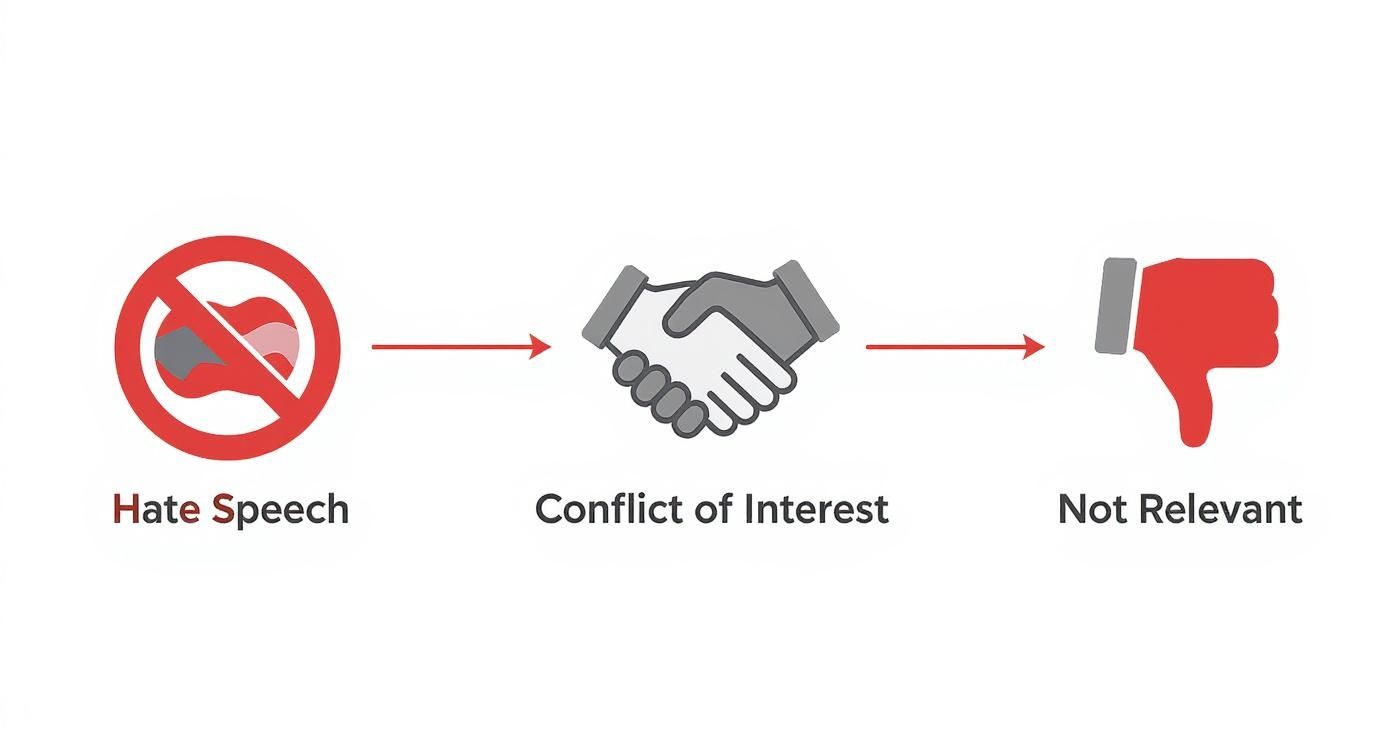
When you build your report around clear-cut violations like hate speech, conflicts of interest, or irrelevance, you're starting from a position of strength. It's far more effective than just disagreeing with someone's opinion.
Gathering and Presenting Your Evidence
Evidence transforms your report from a simple complaint into a compelling case. While you can't attach files directly to the initial report form, you should start gathering any proof you have right away. This will not only prepare you for a potential follow-up from Yelp but also helps keep your own records straight.
My Advice: Keep a separate folder for every review you flag. In it, save screenshots of the review itself, any internal records that contradict its claims (like customer service logs or sales receipts), and a copy of the report you submitted. Staying organized is critical if things need to be escalated later.
Let's say a reviewer named "John D." claims he visited on a Sunday and got terrible service. If your business is closed on Sundays, a quick screenshot of your hours of operation is undeniable proof. Or, if you suspect a review is from a disgruntled ex-employee, having their employment dates on file helps establish a clear conflict of interest.
The battle against fake reviews is an ongoing one. Yelp is constantly dealing with review manipulation, a problem that keeps many small business owners up at night. With 78% of owners worried about negative reviews and 43% feeling that online reviews can be deeply unfair, knowing how to report violations properly is essential.
A strong report is your best first move, but it’s just one part of a bigger puzzle. For more in-depth strategies that apply across multiple platforms, our guide on how to remove negative reviews offers a much broader playbook for managing your online reputation.
What to Do When Yelp Won't Budge
So you did everything right. You flagged the review, built a solid case, and sent it off to Yelp, only to get that dreaded email: "This review doesn't violate our Content Guidelines." It’s a frustrating moment for any business owner, but it's not the end of the line. It just means it's time to switch gears from removal to reputation management.
When a bogus review sticks, your goal shifts to controlling the narrative for every potential customer who will see it from now on. This is where a strategic public response becomes your most powerful tool. A carefully written reply can completely neutralize a bad review and, in many cases, actually make your business look better.
How to Write a Public Response That Wins Over Future Customers
Forget about trying to win an argument with the original reviewer—that's a losing battle. Your response is for the 97% of consumers who read reviews before making a decision. You're speaking to them.
Think of it as your chance to show everyone what your business is really about. Here’s a simple framework I've seen work time and time again:
- Acknowledge and Empathize: Always start by acknowledging their feelings, even if their claims are completely off base. You're not admitting fault. A simple, "We're sorry to hear your experience wasn't what you expected," is all it takes to show you're listening.
- Correct the Record (Gently): If the review is full of misinformation, you have to correct it. But do it calmly and professionally. For example, "Just to clarify for others reading, our return policy is 30 days, which is printed on all receipts, not 14."
- Move the Conversation Offline: The last thing you want is a public back-and-forth. Always offer a direct line to resolve the issue privately. It shows you're serious about making things right. Try something like, "Our manager, Sarah, would appreciate the chance to discuss this with you directly. You can reach her at [email/phone]."
A professional public response is your opportunity to have the last word. It shows prospective customers that you're engaged, responsive, and committed to doing right by people, even when faced with negativity. That builds far more trust than radio silence ever could.
Is Legal Action an Option?
In a few extreme cases, you might be tempted to call a lawyer. I'll be blunt: this should be your absolute last resort. It's an incredibly expensive, time-consuming, and uphill battle.
To have any shot at a defamation claim, you must prove that a review contains factually false statements that directly caused financial harm to your business. We're not talking about opinions here.
For instance, a review claiming, "The owner is a convicted felon," is a factual statement that can be proven false. But a review that says, "The pasta was bland and the service was slow," is just an opinion, and it's protected speech. Dealing with reviews on other platforms like Google presents its own unique hurdles, as you can see in our guide on how to get a review removed from Google.
Before you even think about going down this road, speak with an attorney who specializes in internet law. Honestly, for 99% of businesses, the time and money spent on a lawsuit are far better invested in a strong public response strategy and a proactive campaign to generate new, positive reviews.
Building a Proactive Reputation Strategy
While knowing how to flag a rogue review is a useful skill, the best defense is always a good offense. Instead of sitting back and waiting for a bad review to hit, a proactive strategy focuses on building a reputation so solid that one piece of criticism barely registers. It’s about shifting your energy from damage control to creating a business environment where positive feedback naturally thrives.
The most effective way to do this is by consistently earning and highlighting genuine, positive reviews. Over time, you’ll build a powerful buffer that drowns out the occasional negative comment and paints a far more accurate picture of your business. This is a long-term play, but it's the only one that truly pays off.
Optimize Your Yelp Profile to Attract Quality Feedback
Think of your Yelp for Business profile as more than a simple listing—it’s your digital storefront and a direct line to potential customers. An incomplete or outdated profile can send the wrong message and attract the wrong kind of attention. A well-maintained page, however, sets clear expectations and draws in customers who are a better fit for what you offer, making them much more likely to leave a glowing review.
Here are a few essential things you can do right now:
- Upload High-Quality Photos: Show off your space, your products, and your team. Good photos help people visualize their experience before they even walk through the door.
- Keep Information Current: Make sure your hours, address, and contact details are always accurate. Nothing sours a potential customer faster than driving to your location only to find it closed.
- Complete All Sections: Don't skip any fields. Fill out everything from your business history to special offerings. This detail helps Yelp’s algorithm understand your business and shows customers you’re engaged and professional.
A well-managed profile doesn't just attract better-fit customers; it signals that you're an active and attentive business owner. That simple display of professionalism can be enough to discourage unfair criticism from the start.
Monitor and Encourage Organic Reviews
A huge part of any proactive reputation strategy is keeping a close eye on your brand's online presence. Using programmatic content monitoring tools for brand reputation can help you track new reviews and mentions as they happen, giving you the chance to respond quickly and make strategic adjustments. This constant awareness is what allows you to stay in control of your online narrative.
While Yelp's policies are very clear about not soliciting reviews, you can absolutely create an environment that encourages organic feedback. Simple, non-intrusive reminders—like a "Find us on Yelp" sticker on your front door or a subtle link in your email signature—can make a real difference. The goal is just to make it easy for your happy customers to find your page.
It’s worth remembering that Yelp is one of the largest review ecosystems in the world, with over 287 million reviews and counting. The platform sees an average of 26,830 new reviews every single minute. That staggering volume is exactly why burying a single negative review under a wave of authentic, positive ones is the most powerful strategy you have. Building that positive momentum is the real answer to the question, "Can you delete a Yelp review?"
Common Questions About Removing Yelp Reviews
When you're staring down a negative review, a dozen questions probably pop into your head. It's a stressful situation, and the details of how Yelp handles these things can feel a bit mysterious. Let's clear up some of the most common questions we hear from business owners who are in your shoes.
How Long Does Yelp Take to Respond?
Once you've flagged a review, the waiting begins. In my experience, you'll usually hear back from Yelp's moderators within 3 to 5 business days.
Keep in mind, that's a general guideline. If the review is particularly complex or if they're swamped with reports, it might take a bit longer. They'll send you an email with their decision, so just hang tight. Bombarding them with more reports on the same review won't speed things up—it'll just create more noise.
Does Paying for Yelp Ads Help Get Reviews Removed?
Let's get this one out of the way immediately: No. Absolutely not. This is a myth that just won't die, but Yelp is incredibly strict about keeping a firewall between their advertising side and their content moderation team.
Think of it this way: their entire business model rests on their credibility as a review platform. If advertisers could pay to have bad reviews scrubbed, that trust would evaporate overnight. So, whether you spend $0 or $10,000 a month on Yelp ads has zero bearing on whether they'll remove a review. The decision comes down to one thing only: does the review violate their policies?
Key Takeaway: Your ad budget is completely irrelevant to the review removal process. The rules are the same for everyone, which keeps the platform fair for both paying and non-paying businesses.
What Does the "Not Recommended" Section Mean?
You’ve probably seen that little link at the bottom of your Yelp page for "reviews that are not currently recommended." This is where Yelp's own software kicks in, automatically filtering out reviews it finds suspicious or untrustworthy. These reviews aren't deleted, but they are tucked away from plain sight and, most importantly, they don't factor into your star rating.
So what lands a review in this purgatory? It could be a few things:
- The review comes from a brand-new user with no other activity.
- The system detects it might be biased (like a competitor, or maybe even a fired employee).
- It's an unhelpful rant rather than a genuine consumer experience.
Since Yelp's algorithm has already quarantined these reviews, you can't report them. The system has already done the heavy lifting for you by neutralizing their impact.
Is It Worth Suing Over a Defamatory Review?
Tread very, very carefully here. While a lawsuit is an option for truly egregious, damaging, and false statements, it's a long, expensive, and difficult road for most small businesses.
To even have a chance, you can't just be mad about someone's opinion. You have to prove the review contains statements that are factually false and that these false statements directly cost your business money. The legal hurdles are high, the costs can be staggering, and the outcome is never guaranteed. Before you even think about going down this path, you absolutely must speak with an attorney who specializes in internet defamation law.