


Before you can get a negative review removed, you have to understand one crucial thing: Google won't take down a review just because you don't like it. Your disagreement with the customer's opinion isn't enough. Success hinges on proving the review breaks a specific Google policy.
Think of it this way: your job is to show a Google moderator that the review is illegitimate. This means pinpointing a clear violation, like fake content, an off-topic rant, or a blatant conflict of interest, and then flagging it correctly through your Google Business Profile. Getting this first step right is everything.
Knowing When Google Will Actually Remove a Review
Let's be realistic. Google's default position is to protect user-generated feedback, even when it stings. They aren’t going to step in just because a review is unflattering or you feel the customer misunderstood the situation. A successful removal request is built on policy and evidence, not emotion.
So, the first thing you need to do is get familiar with Google’s content guidelines. You have to put on your detective hat and look for clues that disqualify the review. Is it obvious spam? Does it contain hateful language? Do you recognize the reviewer as a disgruntled former employee? These are the kinds of questions that shift a review from being simply "unwanted" to genuinely "removable."
Identifying Clear Policy Violations
Google’s prohibited content policies are your playbook. Focusing your energy on these specific violations is the only reliable path to getting a review taken down.
Here are the most common violations I see in the wild:
- Spam and Fake Content: This is the low-hanging fruit. Think reviews from bots, fake accounts, or content designed purely to manipulate your rating. A sudden flood of 1-star reviews from brand-new profiles with no other activity is a classic red flag.
- Conflict of Interest: Reviews from your own employees (current or former), competitors, or anyone with a direct financial incentive to harm your business are strictly forbidden. If you recognize the reviewer as the owner of the shop down the street, you've got a solid case.
- Off-Topic Rants: The review has to be about a customer's experience with your business. Rants about politics, social commentary, or personal drama that have nothing to do with your services are considered off-topic and can be flagged for removal.
- Harassment and Hate Speech: This is the serious stuff. Reviews with personal attacks, threats, obscene language, or discriminatory comments are major violations. Google typically acts on these reports quickly to keep the platform safe.
The core principle is simple: Google removes reviews based on how something is said, not what is said. A customer can express deep dissatisfaction, but they can't use prohibited language or misrepresent who they are to do it.
To make it even clearer, I've put together a quick-reference table to help you spot the difference between a review that's just negative and one that actually violates policy.
Valid vs Invalid Reasons for Google Review Removal
| Removable Violation (Policy-Based) | Not a Removable Violation (Opinion-Based) |
|---|---|
| Contains hate speech or personal threats. | The customer was rude to your staff. |
| Posted by a competitor or ex-employee. | They disagreed with your prices or return policy. |
| Rants about politics or other unrelated topics. | The reviewer misunderstood your product/service. |
| The review is for the wrong business location. | They had a bad experience but were a real customer. |
| Includes private information like a phone number. | The reviewer is "just being difficult" or "lying." |
This table should be your first checkpoint. If the review falls into the left column, you have a legitimate case for removal. If it's in the right column, your efforts are better spent on a public response.
The Power of Documentation
Before you even think about clicking that "report" button, your first move should be gathering proof. This is where most businesses fail.
If you suspect a review is from an ex-employee, can you find an internal record or a public social media post that connects them to your company? If a review describes an event that never happened, do you have customer records or appointment logs to contradict the claim? The more tangible evidence you bring to the table, the stronger your case will be when you eventually escalate it to Google support.
This is critical because Google holds a staggering 57-58% of all online reviews, making it the single most influential platform for your local reputation. With roughly 81% of consumers using Google to evaluate local businesses, you can't afford to get this wrong. To dig deeper, you can learn more about the impact of reviews and explore key Google review statistics.
This decision tree gives you a great visual for that crucial first question: is it a policy violation or just a negative opinion?
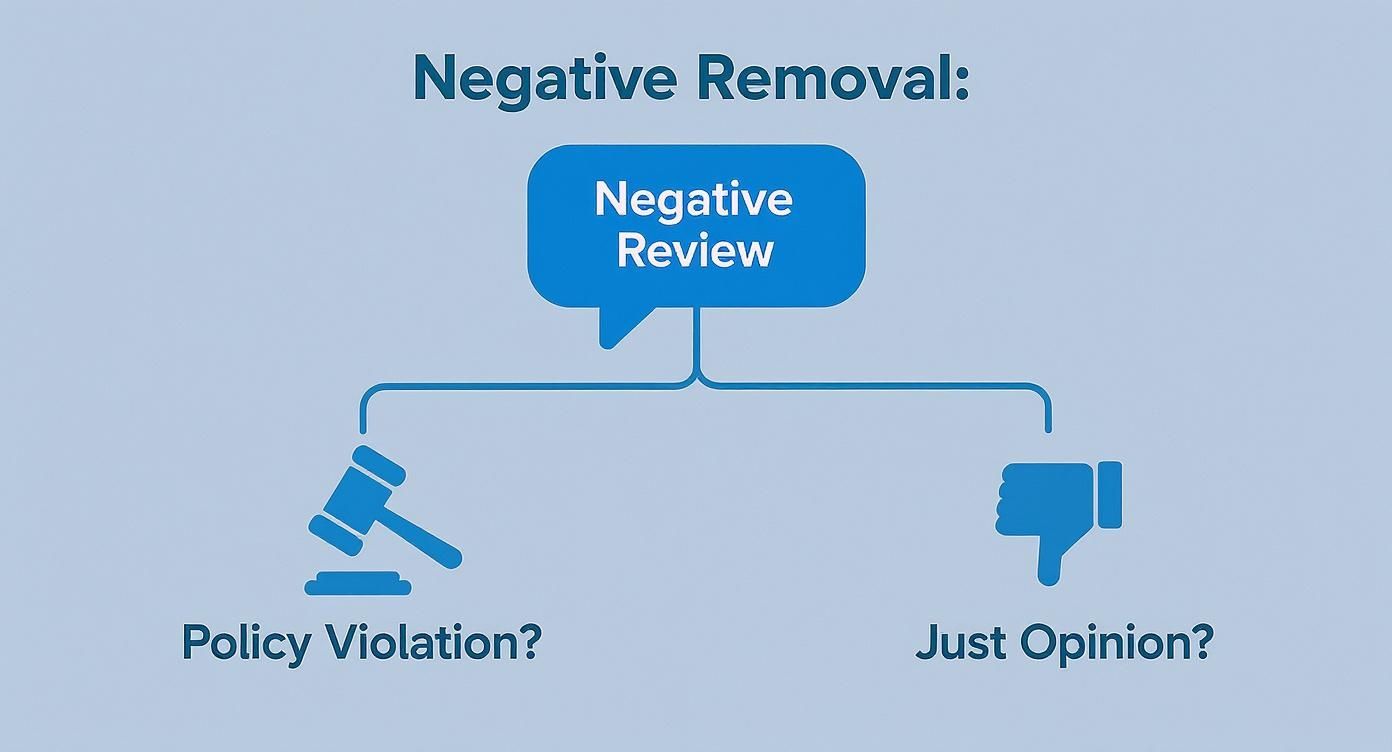
As you can see, the road to removal always starts with a specific policy breach. If you don't have one, your best and only move is to craft a thoughtful, professional public response.
How to Flag a Review Inside Your Business Profile
So, you've identified a review that clearly breaks Google's rules. What now? Your next move is to report it directly through your Google Business Profile. This is your first shot at getting it taken down, and doing it right the first time can save you a lot of headaches later.
Think of it less as just clicking a button and more as making your case. You’re signaling to Google's moderation team—which could be an algorithm or a real person—exactly why this review doesn't belong. The violation you choose is everything.
Finding and Using the Flagging Tool
First things first, you need to find the review. Log into your Google Business Profile dashboard and click over to the "Reviews" section. Scroll until you find the one you need to report.
Look for the three little dots next to the reviewer's name. Click them. A small menu will pop up with the option to "Report review." This is where the magic happens. A new window will appear, asking you to explain why you're flagging the review. This is the crucial step.
Choosing the Right Violation Category
Google gives you a list of reasons for reporting a review. Don't just pick the first one that seems close. A common mistake is selecting a vague reason when a much more specific and serious one applies, which is a fast track to getting your report denied.
Let’s break down the most common options and what they actually mean:
- Off-topic: This is for reviews that have nothing to do with a customer experience at your business. Think political rants, social commentary, or someone complaining about something that didn't happen.
- Spam: The review is obviously fake, posted by a bot, or just there to advertise something else. A good clue is an account with a bizarre name that has posted the exact same 1-star review for 50 other unrelated businesses across the country.
- Conflict of interest: You have solid proof the review is from a direct competitor, a disgruntled ex-employee, or someone you know was paid to leave it.
- Hate speech: The review uses slurs or contains racist, sexist, or other discriminatory language. This is a serious violation.
- Harassment: This covers personal attacks, threats, or obscene language aimed at you or your team.
My Two Cents: Don't muddy the waters by trying to claim multiple violations. Pick the single strongest, most blatant one. If a competitor leaves a review that also includes personal threats, choose harassment. It's the more severe offense and more likely to get immediate attention.
Once you’ve selected the best fit, hit submit. You’ve now officially kicked off the removal process. If you want more real-world examples of what Google considers out of bounds, our guide on how to report fake Google reviews goes into much more detail.
What Happens After You Flag It?
Your report is now in Google’s moderation queue. Be prepared to wait. While some blatant violations get zapped by Google’s automated systems within hours, most reports that require a human touch take time.
Realistically, you can expect to hear back within 3 to 7 business days, but don't be surprised if it takes longer. The key here is patience. Flagging the same review over and over won't speed things up; in fact, it can sometimes work against you.
Thankfully, Google has a tool to help you keep track of things. Inside your GBP dashboard's "Reviews" section, you’ll find the Reviews Management Tool. This page shows you a list of every review you've reported and its current status—"Pending decision," "Report reviewed - no policy violation found," or "Escalated."
This tool is a lifesaver. It gives you a clear window into the process so you aren't left wondering. And if your initial report gets denied, this is where you'll find out, which is your cue to start preparing for an escalation.
What to Do When Flagging a Review Doesn't Work
So, you flagged a review that clearly breaks the rules, waited, and then got that frustrating email from Google: "Report reviewed - no policy violation found." It’s a common scenario, and it feels like a dead end. But it’s not.
Most initial flags are screened by an automated system. It’s fast, but it often misses the nuance of a fake review, a conflict of interest, or a flat-out lie. Getting denied here just means it's time to take your case directly to a human.
Think of the first flag as filling out a basic ticket. Escalating, on the other hand, is about building a solid case file and presenting it to someone who can actually make a judgment call.
Preparing Your Case for Google Support
Before you even open the support contact form, you need to switch into investigator mode. A simple claim that a review is "fake" is going to get you nowhere. You have to prove it beyond a reasonable doubt.
Your entire goal is to make the support agent’s job incredibly easy. Hand them a clear, organized file with irrefutable proof. They're busy, and a well-prepared case is far more likely to get the green light.
Here’s what your evidence toolkit should contain:
- Review Screenshots: Get a full screenshot of the review. Make sure it includes the reviewer's name, the date, and the full text.
- Customer Records: This is your knockout punch. If someone claims they had a terrible experience on Tuesday, pull up your CRM, appointment book, or sales receipts. Showing you have no record of them is incredibly powerful.
- Internal Communications: Suspect a disgruntled ex-employee? Dig up emails or other internal records that can establish their identity and prove the conflict of interest. (Just be mindful of privacy.)
- The Reviewer's Profile: Click on the reviewer's name to see their other contributions. Is there a pattern? Do they only leave 1-star reviews? Screenshot their public profile to demonstrate a history of suspicious or malicious activity.
Once you have your evidence, write up a short, factual summary. This isn't the place for an emotional novel; it’s a report. State the reviewer's name, the date, the specific policy they violated, and a brief, point-by-point explanation of why.
How to Contact Support and Make Your Case
With your evidence in hand, head over to the Google Business Profile support page. You’ll answer a few preliminary questions that will eventually lead you to the contact options—usually email or live chat.
When you connect with an agent, your tone is key. Be professional, direct, and polite. This person is the gatekeeper, and your goal is to make them an ally.
A solid communication framework looks like this:
- Identify Your Business: Start with your business name, address, and the email tied to your GBP account.
- Pinpoint the Review: Clearly state the reviewer’s name and the exact date the review was posted.
- Cite the Policy Violation: This is crucial. Don’t just say it's unfair. Be specific: "This review violates Google's 'Conflict of Interest' policy. The reviewer is a former employee we terminated on [Date]."
- Present Your Evidence: Attach your documents and screenshots. Guide the agent through your proof: "As you'll see in our attached CRM screenshot, we have no customer record under that name or email address."
Pro Tip: Keep it strictly business. Emotional pleas and long, rambling stories will only muddy the waters. A support agent is trained to respond to clear, evidence-based claims, not frustrated rants.
If the process feels overwhelming or you're dealing with a particularly nasty situation, don't be afraid to call in the pros. For those tough cases where even a direct escalation hits a wall, a specialized service for Google My Business content removal has the experience to get it done.
What to Expect: Timelines and Following Up
After you submit your appeal, you’re in a new queue—one handled by people. The wait can be anywhere from a couple of days to a few weeks, depending on how swamped the support team is.
Always, always get a case ID number for your request. This is your lifeline. If you don't hear back within the expected timeframe, you can follow up by referencing that ID. A polite check-in every week or so shows you're serious without being annoying. Taking these steps is often what it takes to finally and successfully get a review removed from Google.
Legal and Advanced Options for Damaging Reviews
It can be incredibly frustrating when you've flagged a review, escalated it with Google support, and still hit a dead end. But for reviews that go beyond simply being negative and enter the territory of being genuinely damaging or defamatory, you have more powerful options. These aren't for everyday complaints; they're for the most serious situations where a review is causing real, tangible harm to your business.
This is where the conversation shifts. We're no longer talking about a difference of opinion. We're talking about content that is legally problematic. The standard reporting tools are great for clear policy violations, but they just aren't built to handle complex legal issues like libel or slander. When the stakes get this high, you have to move from flagging to a formal legal strategy.
Submitting a Formal Legal Takedown Request
Google has a dedicated legal help portal for this exact purpose. It’s a completely separate channel from the "Report review" button you see in your Business Profile and is designed for removal requests based on legal grounds. To go down this path, you need a rock-solid legal basis for your claim, which usually means defamation.
So, what’s the difference? Defamation is a false statement of fact that hurts someone's reputation. A customer saying, "The service was slow," is just their opinion. But a customer falsely claiming, "The owner was convicted of fraud," is a statement of fact that, if untrue, could easily be defamatory.
To have any chance of success with a legal takedown, you’ll need to be prepared. Google's legal team will need:
- The exact defamatory statements from the review, clearly identified.
- A solid explanation of why the statements are factually false, not just an opinion you disagree with.
- Supporting legal documents or, ideally, a court order. Nothing is more persuasive than a court order that has already declared the content defamatory.
This process takes your complaint out of the hands of Google's regular support team and puts it in front of their legal department. They won’t play mediator in a dispute, but they will act on legitimate legal requests, especially those backed by a court order.
When to Hire a Reputation Management Agency
Sometimes, you might find yourself dealing with a full-blown assault—a flood of coordinated fake reviews or a single, devastatingly false post that just won't go away. Trying to manage that fallout can quickly become a full-time job. This is exactly when it makes sense to bring in a professional reputation management agency.
These firms live and breathe the complex removal policies of Google and other platforms. A good agency won't promise you the moon or guarantee a review's removal. What they will do is use their deep experience and established contacts to build the strongest possible case for you. They take over the tedious work of gathering documentation, handling all communication, and persistently following up until there's a resolution.
Just be prepared for it to take time. An analysis of over 50,000 deleted Google reviews showed that 77.19% stayed online for over 10 days before finally being removed. Very few come down in under 24 hours.
If you decide to go this route, make sure you vet the agency carefully:
- Ask for case studies: They should have no problem showing you examples of successful removals for businesses like yours.
- Check their methods: Steer clear of anyone promising "hacks" or other shady tactics. That's a fast track to getting your whole profile suspended.
- Get clear pricing: Their fees should be transparent and based on the work involved, not on a vague promise of removal.
When you're facing truly malicious reviews, understanding how search engines fight other kinds of harmful content, like SEO poisoning, gives you some perspective on why these advanced steps are sometimes necessary. The cost of an agency often pays for itself when a single bad review is actively costing you customers or contains vicious personal attacks.
What to Do When a Negative Review Sticks Around
You’ve gone through all the steps, made your case to Google, and provided clear evidence, but the review is still up. It's a frustrating but common outcome, especially for reviews that sit in that gray area of Google's policies. When removal isn't an option, it's time to pivot your strategy from removal to reputation management.
This is your chance to turn a bad situation into a powerful branding moment. A well-crafted, professional public response can actually do more for your business than a quietly deleted review. It shows everyone looking—including future customers—that you're a business that listens, cares, and is committed to making things right.
Crafting the Perfect Public Response
Responding to a negative review isn't about winning an argument online. It's about demonstrating your professionalism to the silent majority of potential customers reading those reviews. Remember, your real audience isn't just the unhappy reviewer; it's the 9 out of 10 consumers who check reviews before they buy. Your reply is your stage.
Here's how to frame a response that works:
- Acknowledge and Thank: Kick things off by thanking them for the feedback. Yes, even if it's harsh. This simple step immediately diffuses tension.
- Show Genuine Empathy: Use phrases that show you're listening, like, "We're truly sorry to hear you had this experience," or "This isn't the standard of service we strive for." It validates their frustration.
- Own the Situation (Without Admitting Fault): You don't have to agree with every detail of their complaint. You can simply state your commitment to quality. For example: "We pride ourselves on excellent service, and it's clear we missed the mark here."
- Take It Offline: The last thing you want is a public back-and-forth. Provide a direct email or phone number and invite them to connect privately to resolve the issue. It shows you’re proactive and serious about a solution.
A great response turns a public complaint into a public display of excellent customer service. It tells everyone watching that even if there’s a problem, you are the kind of business that will step up to fix it.
When a negative Google review cannot be removed, understanding how to craft thoughtful responses is key. Discovering effective Google review response examples can help you maintain and boost your online reputation by providing real-world templates for different scenarios.
Drown It Out with a Flood of Positives
One bad review can feel like a punch to the gut. But its power fades fast when it's buried under a mountain of glowing 5-star feedback. The best long-term play for a negative review you can't remove is to simply drown it out with positivity.
This isn’t about faking it. It’s about building a simple process to encourage your genuinely happy customers to share their great experiences. A steady flow of new, positive reviews sends a powerful signal to both potential customers and Google’s algorithm.
This is more important than ever. Google has been dealing with a major glitch causing legitimate positive reviews to vanish from business profiles. Owners have watched their ratings drop as real reviews disappear, a problem you can learn more about this widespread Google review issue in this video. Building a proactive review generation system is your best defense against this kind of volatility.
Here's how to start getting more positive reviews today:
- Strike While the Iron is Hot: The best time to ask for a review is right after a great experience, when the customer's satisfaction is at its peak.
- Make It Incredibly Easy: Don't make them hunt for your profile. Give them a direct link via email, a text message, or a simple QR code they can scan at your location.
- Keep the Request Personal: A short, personal note asking for feedback is always more effective than a generic, automated email blast.
By focusing your energy here, you'll not only lift your overall star rating but also push that stubborn negative review so far down the page that it becomes an irrelevant footnote.
Common Questions About Removing Google Reviews
When you're dealing with a review that's hurting your business, you're bound to have questions. It's a tricky process, and a lot of myths and bad advice float around. Let's clear up some of the most frequent questions I hear from business owners.
Will Deleting and Relisting My Profile Get Rid of Old Reviews?
I see this question a lot, and my answer is always the same: don't do it. It might seem like a clever workaround to nuke a bad review, but it's a disastrous strategy for your business.
Think about it. Deleting your Google Business Profile means you lose everything. All those hard-earned positive reviews? Gone. Your search ranking authority you've spent years building? Wiped out. You're literally starting from zero, which is far more damaging to your visibility and reputation than a couple of negative comments. It's like burning down your house to get rid of a spider.
Can I Pay Someone to Take Down a Negative Review?
This is a minefield, so tread very carefully. There's a big difference between a legitimate reputation management expert and a scam artist.
A reputable service, like LevelField, operates by the book. They know Google's policies inside and out and can help you build a compelling, evidence-backed case to present through official channels. They can't promise a magic bullet, but they can significantly improve your odds.
On the flip side, you'll find plenty of shady operators promising "guaranteed removal" for a price. That's a huge red flag. These services often use tactics that violate Google's terms, which can get your entire profile suspended.
The only legitimate way to get a review removed from Google is to prove it breaks a specific policy. There are no secret backdoors or pay-to-play options.
How Long Does This Whole Removal Process Take?
This is where you need to be patient. It's not an overnight fix. Here’s a realistic breakdown of the timeline you should expect:
- The Initial Flag: Once you flag a review, Google's automated systems or first-level reviewers will take a look. This usually takes about 3 to 7 business days.
- Escalating to Support: If that initial flag gets denied, your next step is to appeal to the support team with your evidence. This manual review can take a lot longer—anywhere from 2 to 4 weeks is pretty standard, and it can sometimes stretch out even further if they're swamped.
Google's systems are getting smarter. In 2024 alone, their AI blocked or removed over 240 million reviews that violated their policies, many before anyone ever saw them. But for the tricky cases that need a human eye, you just have to wait your turn.
What Happens if the Reviewer Just Deletes Their Comment?
Occasionally, you get lucky and the reviewer takes care of the problem for you. They might have cooled off after a bad experience, or maybe you managed to connect with them offline and resolve their issue.
When a reviewer deletes their own post, it's gone for good—no appeals or flagging needed. This is the best-case scenario, and it really highlights why a calm, professional public response is so important. Sometimes, showing you care is all it takes for someone to reconsider and remove their review themselves.