


That sinking feeling when a negative review pops up on your Facebook Page is all too familiar for business owners. It feels personal, like a direct attack on your hard work. While your first instinct might be to find a "delete" button, it's not that simple. But don't worry, you're not powerless.
You have two main ways to handle this: you can either report the review for violating Facebook's policies or you can turn off the Recommendations feature on your Page altogether. Success hinges on playing by Facebook's rules, not just wishing the bad feedback away.
Your First Moves Against Negative Facebook Reviews
When a problematic review surfaces, your immediate reaction sets the stage for everything that follows. It's crucial to understand that Facebook views its review system as a place for authentic customer feedback, which is why they don't give page admins a simple delete button.
A rushed, emotional response or a baseless report on a review that's simply unflattering can backfire, making you look unprofessional and drawing more attention to the issue. Your strategy needs to be calm, calculated, and grounded in the platform's guidelines.
The Two Primary Paths
Let's break down your options. Each path has its own pros and cons, so choosing the right one depends entirely on the situation you're facing.
Reporting a Review: This should be your go-to when a review is clearly out of line. Think spam, harassment, hate speech, or a review that has absolutely nothing to do with your business. If Facebook agrees with your report, that specific review gets taken down, leaving all your hard-earned positive reviews intact.
Disabling Reviews: This is the nuclear option. It hides every single review on your Page—the good, the bad, and the ugly. It’s a drastic but sometimes necessary move if you're dealing with a coordinated spam attack or a wave of fake reviews. The major downside? You lose all that valuable social proof from your happy customers.
This flowchart lays it out perfectly. It helps you decide whether to report the review or shut down the feature based on what the review actually says.
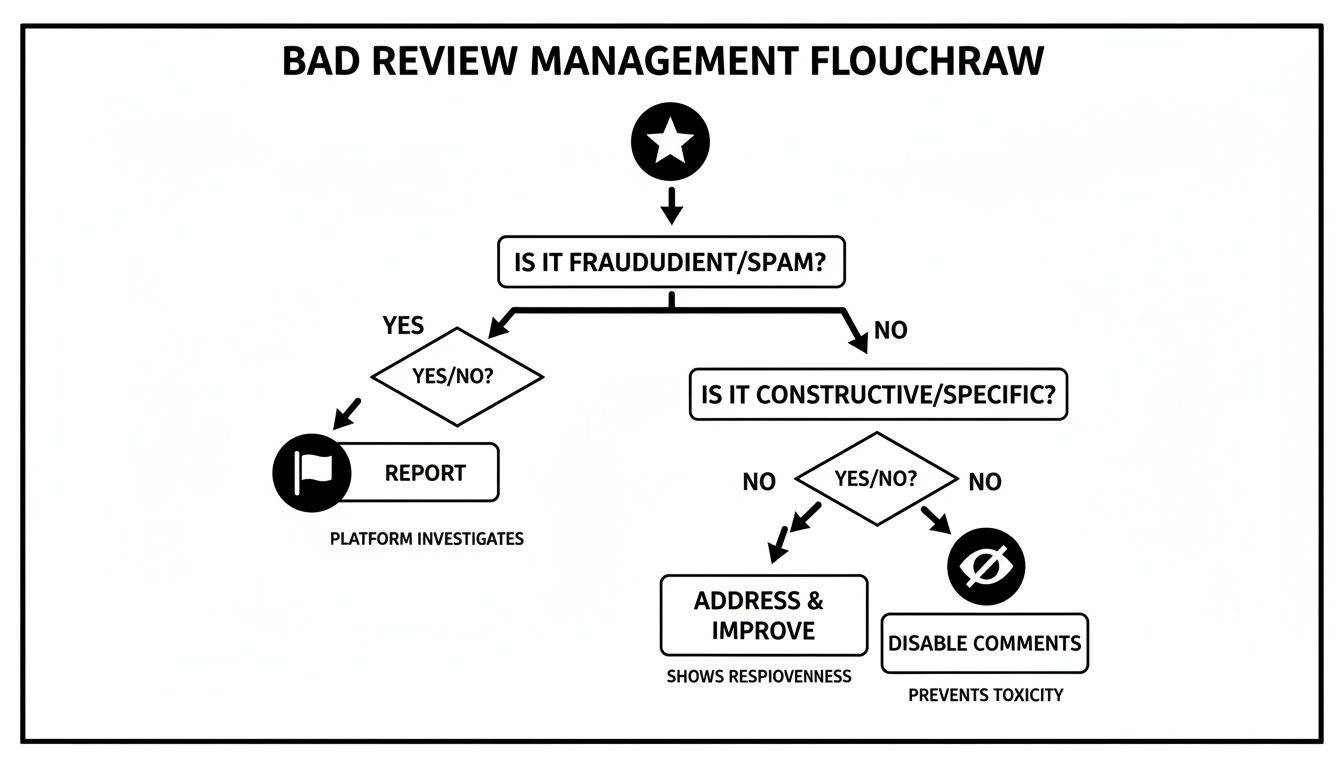
Think of it as a quick decision-making guide to keep your response strategic, not emotional.
Key Takeaway: You can't remove a Facebook review just because it's negative. Your only options are to prove it violates Facebook's Community Standards or to turn off the entire review feature on your Page.
A Quick Glance: Your Immediate Options
Here’s a simple table to help you decide on your first move when a problematic review appears.
Immediate Options for Unwanted Facebook Reviews
| Action | Best Used For | Likely Outcome |
|---|---|---|
| Report Review | Spam, fake accounts, harassment, hate speech, or content completely irrelevant to your business. | If successful, the single offending review is removed. Positive reviews are unaffected. |
| Disable Reviews | Coordinated attacks, review bombing, or when you need to stop a flood of malicious feedback immediately. | All reviews (good and bad) are hidden from your Page. Offers a clean slate but sacrifices social proof. |
| Respond Publicly | Legitimate, but negative, customer feedback where you can offer a solution or show accountability. | Demonstrates excellent customer service and can turn a negative into a positive. The review remains. |
This table should give you a clear, at-a-glance understanding of the tools at your disposal and when to use them.
Setting Realistic Expectations
Before you jump into action, you need to be honest with yourself. Is the review truly a policy violation, or is it just an opinion you don't like? A customer complaining about slow service is sharing their experience—unpleasant for you, but perfectly within the rules. On the other hand, a review loaded with hate speech or posted by a known competitor is a clear violation and should be reported immediately.
Sometimes, you'll encounter damaging reviews that exist in a gray area, making them difficult to remove through standard channels. In these more complex cases, getting help from professional review removal services can be a smart move. Understanding this distinction is the first and most important step in building a solid plan to remove reviews from Facebook that are genuinely harming your business.
Reporting Reviews That Violate Facebook Policy
Let’s get one thing straight: a negative review isn't automatically a removable review. Facebook is built on the idea that users can share their genuine experiences, even the bad ones. But that protection has its limits. When a review stops being an opinion and starts breaking the rules, you have every right to take action.
Your entire success hinges on proving a review violates a specific rule in Facebook's Community Standards. Think of these not as loose guidelines but as firm policies against things like spam, harassment, hate speech, and content that’s completely off-topic. Simply not liking what someone said won't cut it.

When you hit that report button, you’re telling Facebook’s moderation team that the content fails to meet their core standards for safety and authenticity. Your job is to make it easy for them to agree with you.
Identifying Reportable Violations
So, what actually qualifies as a violation? It's usually less of a gray area than people think. You just need to draw a clear line from the review's content to a specific policy breach.
Here are the most common violations I see in the wild:
- Spam: The review is an ad, full of irrelevant links, or is a generic message you've seen spammed across other Pages. That "review" promoting a crypto scheme? Classic spam.
- Harassment: The post is a personal attack on an employee, uses abusive language, or feels like part of a coordinated pile-on. A review calling your receptionist nasty names is a textbook case of harassment.
- Hate Speech: This is a zero-tolerance issue. If a review attacks people based on race, religion, gender, sexual orientation, or other protected traits, it needs to be reported immediately.
- Irrelevant Content: The review has absolutely nothing to do with your business. I've seen one-star ratings complaining about traffic or bad weather. That’s an easy one to flag as irrelevant.
- Fake Content: This one is huge. If you can show the reviewer was never a customer—or better yet, is a competitor in disguise—you've got a solid case. It happens more often than you'd think.
Pro Tip: Keep good customer records. Even a simple spreadsheet is better than nothing. If a review pops up from a name you can't find anywhere in your sales history, make sure you mention that in your report. It's powerful evidence.
The Step-by-Step Reporting Process
Once you’ve spotted a review that crosses the line, the reporting process itself is pretty straightforward. The real skill is in making your report count.
First, head to the "Reviews" or "Recommendations" tab on your Page and find the problem post.
Click the three dots (•••) in the top right corner of the review itself. From the little menu that appears, select "Find support or report recommendation."
Now for the most important part: choosing the reason. Facebook gives you a list of potential violations. Don't just guess. Carefully match the review to the most accurate category. If it’s hate speech, choose "Hate Speech." If it’s spam, choose "Spam." This single choice can determine whether an AI handles it instantly or if it gets escalated to a human reviewer.
Finally, follow the last couple of prompts to submit the report.
Writing an Effective Report
If Facebook gives you a text box to add more detail, use it. This is your chance to plead your case. A lazy "this is fake" isn't going to convince anyone.
You need to make the moderator's job as simple as possible. State the violation, reference the policy, and provide the proof.
Check out the difference between a weak report and a strong one for a suspected fake review from a competitor:
| Weak Report | Strong Report |
|---|---|
| "This review is fake. The user is a competitor trying to hurt my business. Please remove it." | "This review violates the Spam and Inauthentic Behavior policies. The reviewer, [Reviewer's Name], owns [Competitor Business Name], a direct competitor two blocks away. We have no record of this person as a customer. This is a clear attempt to manipulate our rating." |
The strong report is specific, confident, and gives the moderator everything they need to make a quick decision. It's a night-and-day difference.
The principles of gathering evidence are pretty universal across platforms. The same logic applies when you need to report fake Google reviews, a topic we cover in another guide. For a deeper dive into platform policies, this detailed guide on removing negative reviews also has some excellent, transferable advice.
What to Do When Your First Report Goes Nowhere
So, you did everything by the book. You found a review that was a textbook violation of Facebook’s policies, you hit "report," and… crickets. Maybe you got an automated denial, or perhaps your report just disappeared into the void. It’s a frustratingly common scenario for business owners, but it is definitely not the end of the line.
When that initial report fails, your role has to change. You're no longer just flagging a problem; you're building a case. The goal now is to get your situation in front of a real person and give them such clear, compelling evidence that they simply can't ignore the violation.

This is especially true for more serious attacks. Think coordinated review-bombing campaigns where a dozen one-star ratings pop up in an hour, or blatantly defamatory content that's doing real damage to your brand. Standard reporting tools often fall short here because the automated systems just don't get the context.
Building Your Evidence Dossier
Before you even think about reaching out again, you need to arm yourself with evidence. A simple complaint like "this review is fake" is guaranteed to go nowhere. You have to build a complete dossier that proves your claim without a shadow of a doubt.
Put on your detective hat. Your evidence file needs to be organized, clear, and persuasive.
- Screenshot the Review: Get a full, uncropped image of the review itself. You need the reviewer's name, the star rating, all the text, and the date it was posted to be clearly visible.
- Document the Reviewer's Profile: Head over to the reviewer's public profile and take more screenshots. Does it look shady? A profile created yesterday with no friends, no posts, and a generic profile picture is a huge red flag.
- Note the Timestamps: Write down the exact date and time the review was posted. If you're dealing with a review-bombing attack, showing that ten negative reviews all landed within a 30-minute window is powerful proof.
- Check Your Own Records: This is crucial. Cross-reference the reviewer's name with your customer database, booking software, or POS system. A simple, factual statement like, "We have searched our records and have no history of a customer named Jane Doe," is one of your strongest arguments.
- Connect the Dots: Is the reviewer an employee of a competitor? Or maybe a disgruntled ex-employee? If you can find a public connection (like their LinkedIn profile or a Facebook post), screenshot it.
Get all of this saved into a dedicated folder on your computer. Doing this prep work makes the next step infinitely smoother and dramatically increases your odds of success.
Contacting Meta Business Support
With your evidence file ready, it's time to contact Meta Business Support. This isn't the same as the public "report" button. It’s a dedicated channel for advertisers and business page owners, which means you have a much better shot at connecting with a human support agent.
Finding the contact portal can feel like a bit of a scavenger hunt, but it's usually located within your Meta Business Suite or Ads Manager. Look for a "Help" section or a "?" icon. Once you start a chat or open a support ticket, be ready to present your case clearly.
My Pro Tip: When you finally connect with an agent, stay calm, professional, and get straight to the point. I always start with something like, "Hi, I'm writing to appeal a decision on a review report. I've compiled evidence that shows a clear violation of Community Standards that was missed by the automated system." This immediately frames the conversation and shows them you've done your homework.
When it's time to share your evidence, guide them through it. Don't just attach five files and hope they figure it out. Explain what each piece proves. For instance:
- "File 1 is a screenshot of the review, which was posted on [Date]."
- "File 2 shows the reviewer's profile. You can see it was created just hours before the review was left and has no other activity, which points to it being an inauthentic account."
- "And finally, File 3 is a confirmation from our booking system showing no customer record for anyone with this name or associated details."
This structured, step-by-step approach helps the support agent quickly grasp the situation and gives them the justification they need to take action and remove the reviews from Facebook.
When You Need a Legal Takedown
In some rare and serious situations, a review might cross the line into actual defamation. We're not talking about a customer's negative opinion; we're talking about false statements of fact that cause provable financial or reputational harm to your business.
If Meta Support is unresponsive and the content is truly damaging, you might need to explore a legal takedown request. This is a formal process where your lawyer submits a report directly to Facebook's legal department, citing specific laws around libel or defamation. This isn't a route to take lightly—it involves legal fees and a higher burden of proof. But for the most severe cases where a malicious review is actively costing you money and customers, it can be the ultimate and most effective final resort.
The Nuclear Option: Should You Turn Off Facebook Reviews Completely?
Sometimes, reporting individual reviews feels like playing whack-a-mole. You get one taken down, and two more pop up. If your Page is getting hammered by a wave of fake accounts or a coordinated smear campaign, it might be time for a more drastic measure: shutting down the Recommendations feature entirely.
Make no mistake, this is the "nuclear option." It’s incredibly effective at stopping the immediate damage, but it comes with some serious collateral damage.

Flipping the switch instantly hides every single Recommendation on your Page—the good, the bad, and the ugly. It stops all new reviews cold, giving you some much-needed breathing room to figure out your next move.
The downside? You lose one of the most powerful forms of social proof you have. All those fantastic, hard-earned five-star reviews from your loyal customers disappear from public view right alongside the malicious ones. It’s a major strategic trade-off, and one you shouldn't make in a moment of panic.
When Does It Make Sense to Disable Reviews?
Pulling the plug on reviews should be a calculated business decision, not an emotional one. This move is really only justifiable in a few specific, high-stakes situations where the incoming negativity is causing more harm than your positive reviews can offset.
Think about hitting the off switch if you're dealing with:
- A Coordinated "Review-Bombing" Attack: This is when a mob, often riled up over a single issue, floods your Page with one-star reviews. Reporting them individually is usually too slow to stop the bleeding.
- Persistent Harassment: If a disgruntled former employee or a competitor is creating a stream of fake profiles to post nasty reviews, disabling the feature cuts them off at the source.
- A Business Model That Doesn't Depend on Facebook: If you get most of your customers from other channels like referrals, trade shows, or a strong Google profile, the loss of Facebook social proof might be a hit you can afford to take.
Expert Insight: Think of disabling reviews as a temporary shield, not a permanent fix. Use the time it buys you to beef up your reputation on other platforms and come up with a plan to eventually re-enable reviews once the storm has passed.
How to Turn Off Facebook Recommendations
Thankfully, the process is quick and simple. You can get immediate relief from an attack in just a few clicks.
Here's how to do it:
- Go to your Facebook Business Page and find Settings in the management menu on the left.
- Click on Templates and Tabs.
- Scroll down the list until you find the Reviews (or Recommendations) tab.
- Click the toggle switch to the Off position.
- Save your changes. The tab, and every review it contains, will now be hidden from your Page.
The good news is that this is completely reversible. If you decide to turn reviews back on down the road, all of your previous Recommendations will reappear just as they were.
Even when you do everything right, the system can fail you. Platform takedowns can be hit-or-miss. In fact, Meta's own Community Standards Enforcement Report shows that a significant percentage of their enforcement actions are later found to be mistakes. This reality check is why, sometimes, the only guaranteed way to stop harmful content is to take direct control yourself. It's a key factor to consider when you're weighing whether to report or just disable when you need to remove reviews from Facebook.
Building a Proactive Reputation Defense Strategy
Instead of just playing defense and fighting fires, the best way to handle your brand's story is to get ahead of it. The real goal is to build a reputation so solid that a single bad comment is just a blip on the radar, not a full-blown crisis.
This comes down to two things: mastering the public response and actively encouraging a steady flow of positive feedback. Think of it less as damage control and more as community building. When you're proactive, potential customers see you as engaged and confident, which means you won't have to spend all your time trying to get reviews removed in the first place.
Crafting the Perfect Public Response
When a legitimate negative review pops up, your public reply is often more important than the original complaint itself. It’s your stage to show every single person reading that you're professional and you genuinely care. The trick is to cool the situation down and take ownership without getting dragged into a public argument.
A great response always has a few key ingredients:
- Acknowledge and Empathize: Always start by thanking them for the feedback and validating their feelings. A simple, "We're really sorry to hear your experience wasn't what it should have been," can work wonders.
- Take it Offline: This is critical. Never go back and forth in a public comment thread. Give them a direct line to resolve the issue privately, like an email for a specific manager. It shows you're serious about fixing it.
- Keep it Short and Sweet: No one wants to read a long, defensive essay. A concise, polite, and solution-focused reply is always the way to go.
Here’s a real-world example: A local coffee shop gets a review that says, "The latte was cold and the barista was rude."
A perfect response looks like this: "Hi Jane, thank you for letting us know about this. We're very sorry your visit didn't meet our standards. This is not the experience we want for our customers. Please email our manager, David, at manager@coffeeshop.com so we can learn more and make this right."
That reply nails it. It acknowledges the problem, offers a clear next step, and moves the conflict out of the public spotlight.
Creating a Reputation Buffer with Positive Reviews
Your best defense against a negative review is an overwhelming offense of positive ones. When your Page is brimming with glowing recommendations, that one-star review starts to look like an outlier, not a pattern.
But you can't just sit back and hope good reviews roll in. You have to ask for them.
- Timing is everything. The absolute best time to ask is right after a great customer interaction. Did you just solve their problem or close a big sale? That's your moment.
- Make it incredibly easy. Don't make people search for your Facebook Page. Put a direct link in your email signature, on receipts, or in a follow-up text. The fewer clicks, the better.
- Personalize the ask. A generic email blast is easy to ignore. Something more personal, like, "Hi John, we're so glad we could help you with [specific service] today. If you have a moment, a review on our Facebook Page would mean the world to us," is way more likely to get a response.
Beyond just handling individual reviews, it's wise to adopt comprehensive online reputation management strategies to keep your online image polished and professional.
Understanding the Platform's Scale
It also helps to remember the sheer size of a platform like Facebook. Meta removes content and accounts on an industrial scale, which is a reality that shapes how all of this works. For perspective, Meta reported removing roughly 1.1 billion fake Facebook accounts in Q3 2024 alone. That number is staggering.
This context explains why their automated systems sometimes miss a legitimate report and why a human touch can feel so far away. You can discover more insights about Facebook's platform moderation on Hootsuite's blog. Given the massive scale of abuse and the very real limits of moderation, building your own resilient reputation isn't just a good idea—it's absolutely essential.
Answering Your Questions About Facebook Reviews
When you're dealing with the thorny issue of bad reviews, it's easy to feel stuck. Questions pop up fast when your reputation is on the line, and getting a clear answer from Facebook isn't always straightforward. Let's walk through some of the most common questions business owners ask when they need to get a handle on their Facebook reviews.
Can I Just Delete a Single Bad Review from My Page?
The short answer is no. Facebook doesn't give page admins a simple "delete" button for reviews they don't like. The platform is designed to maintain a certain level of transparency, which means you can't just erase feedback because you disagree with it.
So, what can you do? Your options are pretty specific. You can either report the review for violating Facebook's Community Standards or you can respond to it publicly. If you report it and Facebook’s team agrees it’s spam, harassment, or some other policy violation, they'll take it down. Otherwise, that review is staying put unless you decide to disable the entire review feature.
How Long Will Facebook Take to Look at My Report?
This is probably one of the most frustrating parts of the process—Facebook's response times are all over the map. There’s no set timeline, and how quickly you hear back really depends on what you're reporting.
Based on my experience, here's a general idea of what to expect:
- Obvious violations, like a review full of spammy links, are often caught by automated systems and can disappear in as little as 24 hours.
- More complex cases, like subtle harassment or a review you believe is fake, need a real person to investigate. These can take anywhere from a few days to a couple of weeks.
Don't assume a slow response means your report has been ignored. It could just be sitting in a queue. But if a week or more goes by and a truly harmful review is still live, that's your cue to start gathering more evidence and escalate the issue through Meta Business Support.
My Advice: The first report you file is almost always screened by an algorithm. When you escalate, your main goal is to get your evidence in front of a human who can actually understand the context and make a reasoned decision.
If I Turn Off Reviews, Will the Old Ones Go Away?
Yes, they will. When you disable the Recommendations or Reviews tab on your Page, all of your existing reviews—the good, the bad, and the ugly—are hidden from public view. They aren't deleted forever, but no one visiting your Page will be able to see them.
This can be a lifesaver if you're hit with a "review bomb" and need to stop the bleeding immediately. It gives you back control over your Page's narrative. And if you ever decide to turn the feature back on, all those old reviews will reappear just as they were. Think of it as a powerful on/off switch.
What if a Review Contains Outright Lies About My Business?
When a review goes beyond a simple bad opinion and includes false statements that damage your reputation, you're dealing with something much more serious: defamation.
Your first step is still the standard reporting process. Report the review for whatever fits best—usually "Harassment," "False Information," or "Spam." But be prepared for this to fail. Automated systems are notoriously bad at catching the legal nuances of defamatory content.
If (or when) that initial report gets denied, you need to escalate right away. Here's how:
- Collect your evidence. Screenshot everything: the review itself, the reviewer's profile (especially if it looks fake), and any proof you have that their claims are false.
- Contact Meta Business Support. Open a support case and lay out your evidence clearly. Don't just say it's "fake"—explain why it's a factually false statement that violates their policies.
- Explore legal options. For reviews causing serious, measurable harm to your business, it's time to talk to a lawyer. A formal legal takedown notice is often the only way to get these types of reviews removed.