


Taking your Google Business Profile down isn't as simple as hitting a delete button. The right way to do it depends entirely on your situation. Are you closing up shop for good? Battling a fake listing that's impersonating you? Or just trying to tidy up some accidental duplicates? Figuring out why you need to act is the crucial first step in protecting your brand’s presence online.
Why You Might Need to Remove a Google Business Profile
Let’s be clear: getting rid of a Google Business Profile is rarely about trying to vanish from the internet. It's usually a strategic move to make sure customers are seeing the right, most current information about your business. When these profiles are left unmanaged or contain bad info, it can cost you real money, frustrate potential customers, and tarnish your hard-earned reputation.
The reasons for removal tend to fall into a few common buckets, and each one requires a different game plan. If you pick the wrong path, you can make things worse, so it's vital to know what you're dealing with from the start.
Common Scenarios for Profile Removal
The most obvious reason is that your business has permanently closed. If you're no longer in operation, your digital storefront needs to be closed, too. This prevents old and new customers from getting confused and showing up at an empty location. Other big changes, like a major rebrand or moving to a completely new address, might also require you to take action, though not always a full removal.
A much bigger headache is dealing with duplicate listings. These pop up more often than you'd think, sometimes created by well-meaning employees or even automated marketing tools over the years. Duplicates are a real problem because they:
- Split your SEO power: Your hard-earned customer reviews and search ranking signals get spread thin across multiple profiles, which hurts your visibility.
- Confuse your customers: People might find an old phone number on one listing and a new one on another, leading to a frustrating experience that sends them straight to a competitor.
- Weaken your brand control: An unclaimed duplicate profile can collect negative reviews or display wrong information without you even knowing it's there.
To help you figure out which path to take, this decision tree lays out the options based on what you're facing.
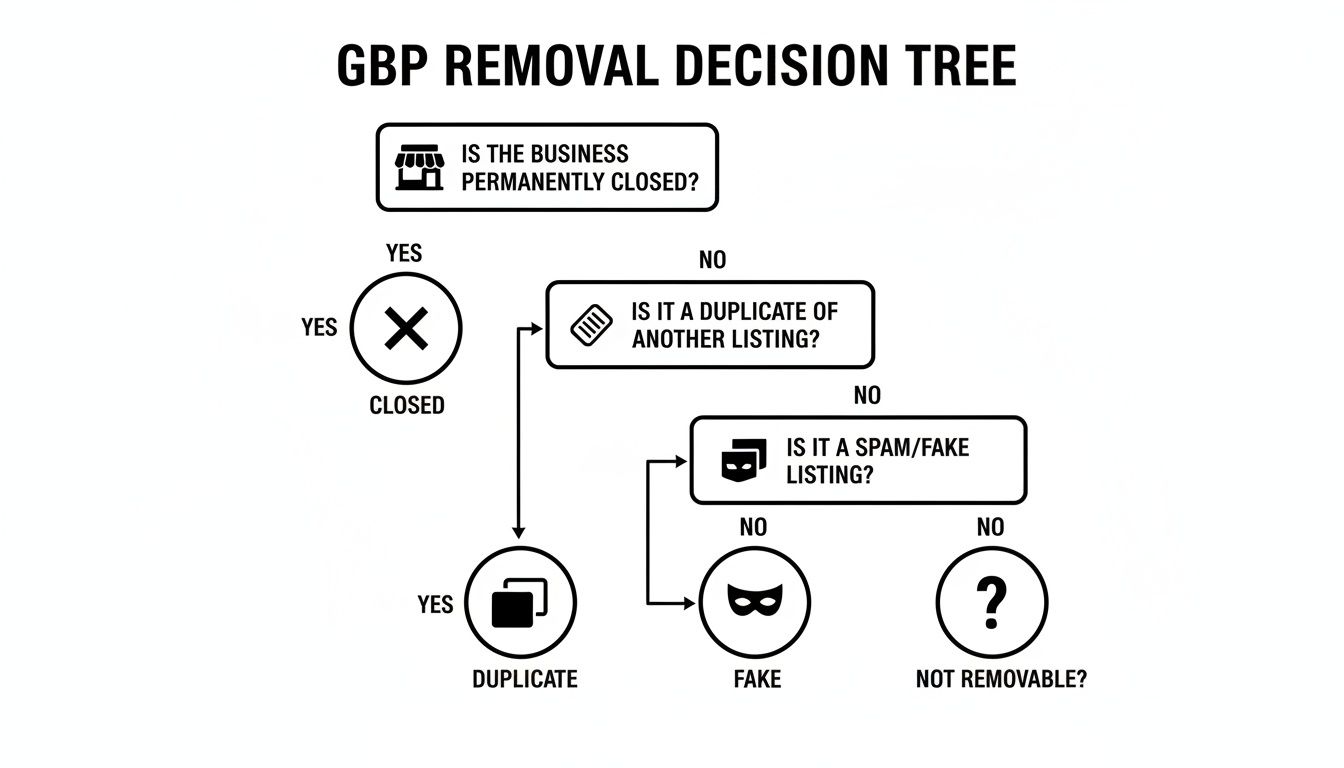
As you can see, what you need to do—whether it's marking your business as permanently closed, merging duplicates, or reporting a fake listing—is dictated by the root of the problem.
To make it even clearer, here’s a quick breakdown of the most common situations and what to do.
Quick Guide to GBP Removal Scenarios
| Your Situation | Recommended Action | Reasoning |
|---|---|---|
| Business permanently closed | Mark profile as "Permanently closed" | Keeps your listing visible for a while so customers know you've closed, preventing confusion. |
| Found multiple listings for my business | Request to merge duplicate profiles | Consolidates all your reviews and SEO authority into one strong, official profile. |
| Someone created a fake listing for my brand | Report the profile as spam or fraudulent | This is a direct attack on your brand; reporting it is the first step to getting it removed by Google. |
| I'm moving to a new address | Update the address on your existing profile | Preserves all your reviews and history. Do not create a new listing. |
Choosing the right action from the start saves you time and protects your online reputation from further damage.
The Fight Against Fraudulent Listings
The most urgent reason to act is when you're up against a fake or malicious listing. These are profiles set up by scammers, competitors, or even disgruntled ex-employees to impersonate your business. Their goal might be to steal your customers or post damaging, false information.
If you let these fake profiles linger, the damage can be severe.
A fraudulent Google Business Profile is more than just an annoyance; it's a direct assault on your brand's integrity. You have to take swift, decisive action to neutralize the threat before it erodes customer trust and hits your bottom line.
Properly managing your online reputation means actively policing your digital turf. By staying vigilant, you ensure your official profile is the one and only source of truth for your business, maintaining the trust you’ve worked so hard to build.
Taking Down a Business Profile You Own and Control
So, you have the keys to your Google Business Profile and need to take it down. It sounds simple enough, but there's a right way and a wrong way to go about it. Just hitting a "delete" button isn't the whole story. You need to understand the difference between "closing" and "removing" the profile to avoid leaving a confusing digital ghost behind for your old customers.
The main thing to get straight is what actually happens when you ask Google to remove your listing. You're not just instantly wiping it off the map. You're starting a process that tells Google your business is no longer operating, and that has a lasting effect on how your information shows up.
Closing vs. Removing: What's the Real Difference?
Let's break it down with a simple analogy. Marking your business as "Permanently closed" is like hanging a "Closed for Business" sign on your front door. People can still see the old shop, they know what it used to be, but they also know not to stop by. For most businesses shutting down, this is the perfect first step because it’s clear and direct.
On the other hand, removing profile content and managers is more like boarding up the windows and walking away for good. You're cutting your ties to the profile, but the listing itself might just linger on Google Maps. It can become an unmanaged "ghost" that might display old, wrong information or even get claimed by someone else down the line.
For almost every business owner I've worked with, the best practice is always the same: first, mark the business as permanently closed. Only after that should you even think about removing yourself as a manager. This ensures a clean break for the public.
Following that order will save you a ton of potential headaches and make sure you don't have customers showing up at an empty location months later.
How to Properly Mark Your Business as Permanently Closed
This is the most common and recommended route. It keeps your profile visible for a bit but clearly tells everyone you’ve shut down, which is crucial for good communication.
Here’s the right way to do it:
- Go to your Business Profile. The easiest way is usually to just search "my business" on Google while you're logged in.
- Click on Edit profile, then find Business information.
- Near the top of that section, click the Hours tab.
- You'll see a little pencil icon next to "Hours"—click it to make changes.
- A clear option for Permanently closed will be there. Select it.
- Hit Save, and you're done.
Once you save, Google starts updating your profile across Search and Maps to show you're no longer open. It's not always instantaneous; give it a few days to show up everywhere. Your old photos and reviews will stick around for a while, almost like a historical marker.
Removing Your Content and Cutting Ties as Manager
If you've already marked the business as closed and you're ready to completely sever your connection, you can remove all the content and your own access. This is the final step for when you want absolutely no more association with the listing.
Think of this as telling Google, "I'm no longer responsible for this place." Just be aware that this is a one-way street—you can't undo it.
Here’s what you’ll need to do:
- Head back to your Business Profile settings.
- Find and select Remove Business Profile.
- You'll see an option to Remove profile content and managers. Choose it.
- Click Continue and then confirm by clicking Remove.
This image from Google's support docs shows you exactly what the interface looks like, which is especially handy if you manage more than one business location.
So what happens after you click that final "Remove" button? It’s important to know. All the content you personally added—your posts, your photos, your videos—gets permanently deleted. Even your old replies to customer reviews will disappear.
But the profile itself might not. The listing, complete with its name, address, and all the reviews left by customers, can remain on Google. Why? Because Google sees those reviews as content owned by the user who wrote them, not by the business. You effectively become a bystander to a profile you used to manage.
This is the digital equivalent of handing over the keys. You lose all ability to edit info, respond to new reviews, or control how the listing is presented. And that is precisely why it’s so critical to mark the business as permanently closed first. It's your last chance to leave a clear, final message for anyone who stumbles upon your old listing in the future.
Handling Duplicate and Unclaimed Business Listings
Duplicate listings are the silent killer of local search performance. I've seen them pop up for all sorts of reasons—an old profile from a previous owner, an accidental creation by a well-meaning employee, or even Google's own algorithm piecing one together from scattered data. Whatever the cause, they create a fractured online identity.
This isn't just a minor annoyance. When duplicates exist, they split your customer reviews, photos, and SEO authority between multiple profiles. That confusion frustrates potential customers and actively damages your ranking in local search results.
Your mission is always to consolidate your online presence into a single, authoritative source. Think of it like having two front doors to your shop, but only one is real. Customers will get lost. You need to board up the fake door and put a big, welcoming sign on the right one. Tackling these rogue listings takes a bit of detective work and a clear understanding of Google's processes.

Hunting Down and Merging Duplicate Profiles
You can't fix what you can't find. Start by searching Google and Google Maps for your business name, but get creative. Search for slight variations, common misspellings, old addresses, or former phone numbers. You might be surprised what you dig up.
Once you’ve identified a duplicate, your first choice should be to merge it with your main, correct profile. A merge is ideal because it transfers valuable assets like customer reviews over to your primary listing, so nothing gets lost. Removing the duplicate entirely is the next best option, usually reserved for when a merge isn't possible (like a listing at a completely wrong address).
Here’s how to kick off the merge process:
- Find the duplicate listing on Google Maps.
- Click the “Suggest an edit” option.
- Choose “Close or remove,” and then select “Duplicate of another place” as the reason.
- Google will then prompt you to pinpoint the correct, primary listing on the map.
This sends a request to Google's team, but it’s not an instant fix. The review can take several weeks, and you may need to follow up. Always keep a record of the duplicate's URL and take some screenshots as evidence, just in case.
Don't underestimate the damage a single duplicate can do. I've seen clients lose up to 50% of their new reviews to an old, unclaimed profile they didn't even know existed. Consolidating these is non-negotiable for serious local SEO.
Claiming an Unmanaged Business Profile
Sometimes you’ll stumble upon a profile for your business that exists but has no owner. This is common when a new business takes over an old location or when Google auto-generates a profile. This "unclaimed" listing might have wrong hours, an old phone number, or irrelevant photos. Leaving it out there is a huge risk to your brand.
Instead of trying to remove it, your first move should be to claim it. Unclaimed profiles will have a link that says, “Own this business?” Clicking this starts the verification process.
You’ll need to prove to Google that you're the legitimate owner, which usually involves getting a verification code. The code can be sent a few different ways:
- Postcard: A physical postcard with a code is mailed to the business address. This is the old-school, most common method.
- Phone Call or Text: An automated system calls or texts the business's listed phone number with the code.
- Email: A code is sent to an email at your business's domain (for example,
you@yourbusiness.com). - Video Verification: This is a newer option where you record a short video showing your location, signage, and proof you manage the business.
Once you gain control, you can fix all the information, respond to any reviews, and fold it into your marketing strategy. If you already have another verified profile for the exact same business, you can then follow the merge process we just covered to combine them into one powerful listing.
Fighting Fake and Malicious Impersonator Profiles
Finding a fake profile masquerading as your business isn't just irritating—it's a direct shot at your reputation and your bottom line. These malicious listings are built to confuse your customers, steal your leads, or drag your name through the mud with bogus information. You have to act fast and decisively to shut them down before they do real harm.
This is one fight you can't afford to back down from. Fake profiles can be anything from a sloppy copy-and-paste job to a sophisticated scam that’s nearly impossible to tell from the real thing. Their end goal is always the same: post defamatory reviews, send your customers to a competitor, or even commit fraud using your good name.
Identifying the Impersonator and Building Your Case
Before you can take down a fake profile, you need to build an airtight case. The first move is to methodically gather every piece of evidence you can find to prove the listing is a fraud and that you are the real deal. Vague complaints get tossed aside by Google's automated systems, so documentation is your best weapon here.
Start by documenting everything that proves the profile is fake. Your evidence file should include:
- Screenshots: Grab clear, full-page screenshots of the fake profile. Make sure you capture the name, address, phone number, and any phony reviews or photos.
- Official Business Documents: Get copies of your business license, incorporation papers, or utility bills. Anything that officially lists your business name and address is gold.
- Website and Social Media: Round up links to your official website and any social media profiles you actively use. This helps establish your legitimate online footprint.
- Photos: Take pictures of your actual storefront, your signage, and any branded vehicles. Visual proof of your physical location is incredibly powerful.
The strength of your entire case comes down to the quality of your evidence. Put on your detective hat and assemble a file so thorough it leaves no room for doubt. Your goal is to make it incredibly easy for a Google support agent to look at it and say, "Yep, that's a fake."
Using Google’s Official Reporting Tools
Once you have your evidence locked and loaded, it’s time to report the impersonator through Google's official channels. The main tool for this job is the Business Redressal Complaint Form. This form was created specifically for reporting misleading information and fraudulent activity on Google Maps.
Filling out this form correctly is absolutely critical. Be precise. Be professional. Clearly state that the profile is impersonating your legitimate business and attach all the evidence you’ve gathered. Don’t just say it’s fake—explain why. Does it use your trademarked name at an address you don't operate from? Are the photos stolen from your website? The more specific details you provide, the better.
After you submit the form, you'll get a case ID. Guard that number with your life; you'll need it for any follow-up.
When Standard Reporting Fails
Unfortunately, the first report doesn't always stick. Automated systems can easily miss the nuances of a clever impersonation. If your complaint gets denied or you hear nothing but crickets after a few weeks, it's time to escalate. This is where your persistence really counts.
You can try engaging with support again through the Google Business Profile Help community, always referencing your original case ID. But honestly, this is where things can get incredibly frustrating and time-consuming for a busy owner. It’s especially true if you’re dealing with a coordinated negative SEO attack.
Things have gotten more complicated lately, too, as Google has ramped up its enforcement.
We're seeing a huge spike in Google Business Profile suspensions, largely driven by aggressive AI spam filters and much stricter verification rules. This means a lot of legitimate profiles are getting caught in the crossfire, while some fakes manage to slip through. For a small business, disappearing from Google Maps can mean losing thousands in potential revenue. You can read more about the rise in Google Business Profile suspensions and what’s behind it.
Trying to navigate this environment on your own requires a deep understanding of Google's ever-changing rulebook. When you’re up against a persistent threat, bringing in professional help is often the smartest move.
Services like LevelField specialize in this exact fight. They know the policies inside and out and can build a compelling case for takedown, handling all the documentation and relentless follow-up required. They know how to frame the issue to get it past the bots and in front of a human who can actually take action. This is often the turning point in getting your brand’s integrity back. You can explore a detailed analysis of the impact of fake Google my business profiles in our whitepaper.
When to Call in Professional Reputation Experts
Trying to get a Google Business Profile taken down can feel like you're banging your head against a wall. You follow all the steps, submit your proof, and… crickets. Or worse, you get an automated rejection email that makes it clear no human ever saw your request. This is the point where the DIY approach usually breaks down.
If you find yourself stuck in a loop—submitting, getting denied, and submitting again—it's a sure sign you need to change your strategy. You're no longer just dealing with a simple admin task; you're up against a complex system that often requires a specialist's touch to get results.
Red Flags That Signal You Need an Expert
Knowing when to call for backup is a critical business decision. Wasting weeks or months fighting a losing battle costs you more than just time; it costs you potential customers and peace of mind. For some problems, the stakes are just too high to leave to chance.
Here are the situations where I've seen business owners realize they need professional help:
- You're under attack from fake reviews. A sudden flood of one-star reviews hits your profile, and no matter how many times you flag them, they stick. This isn't just a disgruntled customer; it's often a coordinated negative SEO attack.
- Google Support has gone silent. You’ve filled out the redressal form multiple times with crystal-clear evidence, but your case either gets closed with no explanation or vanishes into thin air.
- The impersonation is sophisticated. Someone has created a fake profile that looks almost identical to yours. It's so well-done that Google's automated systems can't tell the difference, leaving you to deal with the fallout.
- The content is legally problematic. The fake listing isn't just annoying—it's defamatory, infringes on your trademark, or contains other slanderous claims that demand a more serious legal response.
In these cases, you’re not just trying to fix a data error. You might be up against someone actively working to harm your business, all while trying to navigate a platform whose internal rules are famously opaque.
The Strategic Advantage of Professional Intervention
Reputation protection experts don't just click the same buttons you do. They approach the problem from a completely different angle, armed with a deep understanding of Google's policies, established communication channels, and a systematic method for building an airtight case. They know exactly how to frame the violation to get a support agent's attention.
This involves meticulously documenting every detail, citing the specific policies that have been broken, and handling the relentless follow-up that’s almost always required. For businesses in high-stakes fields like law or healthcare, where a single malicious listing can cause immense damage, this isn't a luxury—it's essential risk management. If you're considering this path, understanding what a how much is a lawyer consultation fee might be can help you budget for the necessary expertise.
Bringing in an expert transforms the process from a frustrating guessing game into a strategic operation. They handle the bureaucratic grind so you can focus on running your business, confident that the problem is being handled by someone who knows the rules of the game.
The digital world has also gotten a lot more unpredictable. We're seeing more and more profile instability, with some businesses losing up to 2% of their reviews every week during certain periods. It’s chaotic. You can read more about how Google's review deletions reached record levels to understand the full scope of the problem. When your online identity is under threat from forces this random, having a specialist in your corner is the best way to protect your brand.
Answering Your Top Questions About Removing a Google Business Profile
Deciding to remove your Google Business Profile can feel like a big, permanent step. It's totally normal to have some last-minute questions and worry about losing things like your hard-earned reviews or making a mistake you can't take back.
Let's walk through the most common questions I hear from business owners so you can move forward with confidence.
Will I Lose All My Customer Reviews Forever?
This is easily the biggest worry for most people, and the answer isn't a simple yes or no. When you follow the steps to "remove" your profile—which really means marking it as permanently closed and then removing yourself as a manager—you're deleting your content. Think photos you uploaded, posts you made, and, importantly, all your replies to customer reviews.
But the reviews themselves? Those stick around.
Google considers reviews user-generated content, meaning they belong to the customer who wrote them, not the business. So, the star ratings and comments will not be deleted. They’ll likely stay visible on the now-unmanaged listing, acting as a historical snapshot of the business that used to be there.
The key takeaway is this: The profile and its reviews can live on in Google Maps long after you've walked away. That’s why marking the business "Permanently Closed" is the single most critical step. It gives crucial context to anyone who finds the old listing.
You aren't wiping the slate clean; you're just handing over the keys and stepping away from the driver's seat.
How Long Does It Take for My Business to Disappear from Google Maps?
The timeline here is a bit unpredictable. Once you mark your business as "Permanently Closed," that change usually shows up on Google Search and Maps pretty quickly, often within a few days to a week. The listing will still be there, but it will have that clear "closed" label, which stops customers from trying to visit.
Getting it to disappear completely is another matter entirely.
Google's mission is to map the entire world, and that includes a record of what used to be at a location. A closed, unmanaged profile might hang around for months or even years. The good news is its visibility will plummet. It won't show up for active searches like "coffee shop near me" anymore, but someone searching for your exact business name might still be able to find it. There's simply no guaranteed timeline for when a listing gets fully purged from Google's system.
Can I Get My Profile Back if I Change My Mind?
Once you hit that "Remove profile content and managers" button, it's a done deal. That action is permanent and irreversible. All your administrative access is gone, and there is no "undo" button to click.
If you want more general information about Google Business Profile and how these entities work, there are great resources out there.
Should you ever decide to reopen at the same location, you’d have to start over from square one. That means trying to claim the old, unmanaged profile and going through the entire verification dance all over again. There's absolutely no guarantee you'd be able to get it back or recover any of the content you previously removed.
What’s the Difference Between "Temporarily Closed" and "Permanently Closed"?
Choosing the right status is crucial. It sets expectations for your customers and sends the right signals to Google's algorithm.
| Status | When to Use It | What Customers See | How It Affects SEO |
|---|---|---|---|
| Temporarily Closed | Perfect for short-term situations like renovations, a seasonal break, or an unexpected emergency. | It lets people know you'll be back and even allows you to post a reopening date. | Your rankings and visibility are protected because Google knows it's just a temporary pause. |
| Permanently Closed | Use this when the business is shutting down for good, you've sold it, or you're rebranding entirely. | It's a clear signal to customers not to visit because you are no longer in business. | The profile's search ranking will slowly fade until it no longer appears in active local searches. |
Picking "Temporarily Closed" when you're actually gone for good is a surefire way to create a bad experience and wind up with angry, confused customers. Be honest and choose the option that reflects what's really happening with your business.