


When a fake or malicious review pops up on your Google Business Profile, your first move is to report it. It’s a straightforward process: find the review on either Google Search or Google Maps, click the three-dot menu next to it, and hit "Report review." This sends it directly to Google's moderation team to see if it violates their policies.
Your First Line of Defense Against Fake Reviews

Think of your Google star rating as the digital front door to your business. For many potential customers, it’s the first thing they see and it heavily influences whether they click to learn more or move on to a competitor. That single number carries immense weight, impacting everything from your revenue and customer trust to your rank in local search results.
It's easy to dismiss a single bad review as a minor annoyance, but a fake or malicious one is a direct threat to your bottom line. You have to understand the real-world damage it can cause.
The Tangible Threat of Illegitimate Reviews
Let’s get specific. A fabricated review claiming a local contractor did shoddy work can stop a homeowner from even requesting a quote. For a doctor's office, a false accusation about patient care can destroy the trust required to book an appointment. A restaurant can watch its reservations dry up after just one unsubstantiated claim of food poisoning.
The pattern is always the same:
- Financial Impact: Fake negative reviews actively scare away good customers, which means lost sales and lower revenue.
- Trust Erosion: They plant a seed of doubt, making it much harder to build the credibility you've earned.
- Brand Damage: If left unchecked, a string of bogus reviews can permanently tarnish your brand's reputation.
This is exactly why knowing how to report these reviews isn't just a reactive task—it's a core business strategy. You're taking control of your online story and protecting the reputation you worked so hard to build.
Understanding the Scale of the Problem
The numbers paint a clear picture of just how big this challenge is. Google is the king of reviews, holding a massive 67% of all reviews posted online. But here’s the kicker for business owners: an estimated 11% of those reviews are thought to be fake.
The consequences are severe. Research shows that businesses with just four negative reviews can lose up to 70% of potential customers. On the flip side, companies with positive profiles can see an 18% lift in revenue from search alone.
Knowing how to report Google reviews is your power move. It allows you to push back against this trend and ensure your star rating is a true reflection of your hard work.
Of course, not every negative review is fake. It's also smart to have a broader strategy for handling legitimate customer feedback. Learning what you should do about 1-star reviews can give you a more complete toolkit for managing your reputation. But when a review is clearly out of line, your first and best defense is to report it.
Knowing Which Reviews You Can Actually Report
Before you start flagging every bad review that comes your way, let's get one thing straight. Google isn't here to protect your feelings; it's here to protect the integrity of its platform. A genuinely unhappy customer leaving a scathing-but-honest review is almost never going to get removed. And honestly, they shouldn't.
So, where's the line? The trick is to stop thinking like a business owner and start thinking like a Google policy enforcer. They don't care if the customer was right or wrong. They only care about one thing: Did the review break a specific rule?
Getting a handle on this difference is the single most important skill you can develop in managing your online reputation.
The Real Difference: A Bad Experience vs. a Policy Violation
Every time a negative review pops up, ask yourself this: "Is this just someone's bad day and poor opinion of my business, or did they cross a line?"
A one-star review that says, "The service was slow and my pizza was cold," is just a customer's experience. It stings, but it's legitimate feedback. But a one-star review from a disgruntled ex-employee? That's a textbook conflict of interest and a clear policy violation.
To help you spot these violations in the wild, I’ve put together a quick cheat sheet. Think of it as your field guide to identifying what's reportable and what you just have to live with.
Google Review Violations Cheat Sheet
This table breaks down the most common violations. Use it as a quick reference when a questionable review comes in.
| Violation Type | What It Looks Like (Example) | Why It's Reportable |
|---|---|---|
| Spam & Fake Content | "Great work! [Link to shady website]" or a user who has reviewed 50 random businesses across the country in one hour. | The review isn't based on a real experience and is meant to manipulate ratings or promote something else. |
| Off-Topic | "I can never find parking on this street. One star." or "I just hate this entire industry." | The feedback isn't about their direct experience with your business, products, or services. |
| Hate Speech & Harassment | Any review containing slurs, personal attacks on an employee ("The cashier, Jane, is an idiot"), or threats. | It creates an unsafe environment and targets individuals or groups based on identity, which is a zero-tolerance issue for Google. |
| Conflict of Interest | A one-star review from a competitor, or a glowing five-star review from a current employee. | Reviews must be impartial. People with a direct financial or personal stake (positive or negative) can't leave reviews. |
| Impersonation | A review left by someone pretending to be a city official, a celebrity, or even you. | The user is actively trying to mislead others by faking their identity. This is different from just using a fake name. |
Getting familiar with these categories is your first and most powerful step.
Spotting the Obvious Violations
Some reviews are so clearly against the rules that they're practically screaming to be taken down. You should be on high alert for these.
- Spam and Fake Content: This is probably the most frequent offender. Look for the tell-tale signs: generic praise or criticism that could apply to any business, links to unrelated websites, or weirdly promotional language. A user profile that's clearly a bot (think random letters and numbers for a name) is another dead giveaway.
- Off-Topic Rants: The review has to actually be about the customer's experience with you. If someone is ranting about the local government, the economy, or their bad day before they even walked in your door, it’s off-topic. It’s not a journal entry; it’s a business review.
- Restricted Content: This is the easy stuff. Reviews promoting illegal services, guns, gambling, or containing sexually explicit language are slam-dunk removals. Google's filters often catch these automatically, but some slip through.
- Hate Speech or Harassment: There's absolutely no room for this. Any review that attacks people based on race, gender, religion, or disability is a major violation. This also covers direct threats or bullying aimed at you or your staff. These get taken very seriously.
My Pro Tip: Don't get hung up on the star rating. A five-star review loaded with spam is just as reportable as a one-star review filled with hate speech. The content is what matters, not the score.
Dealing with the Sneakier Violations
Then there are the trickier cases. These violations are just as serious, but they might require a bit more digging and a clearer explanation when you submit your report.
Conflict of Interest This is a big one and it goes both ways. Google is adamant that reviews should come from unbiased customers. That means:
- Current or former employees are not allowed to review your business.
- You can't go review a direct competitor to sink their rating.
- Offering freebies, discounts, or cash specifically in exchange for a review is a huge no-no.
Impersonation This isn't just about someone using a silly username like "Batman." Impersonation is an active attempt to deceive by pretending to be someone they're not. For example, if a user leaves a review claiming to be a health inspector and fabricating a report, that's clear impersonation. It’s about the intent to mislead the public.
Understanding these finer points is what separates a business that successfully cleans up its profile from one that just spins its wheels, frustrated.
Getting Your Hands Dirty: How to Actually Report a Google Review
Alright, you've found a review that clearly violates Google's policies. It's time to move from analysis to action. This is where you tell Google, "Hey, this one doesn't belong here." Knowing exactly how to do this is a vital skill for any business owner.
The good news is that the process is fairly simple, whether you're at your desk or on the go. The trick is knowing where to click and, more importantly, what to say to give your report the best chance of being successful.
This flowchart breaks down the basic decision-making process. Remember, a bad review isn't necessarily a reportable one. It has to specifically break a rule.
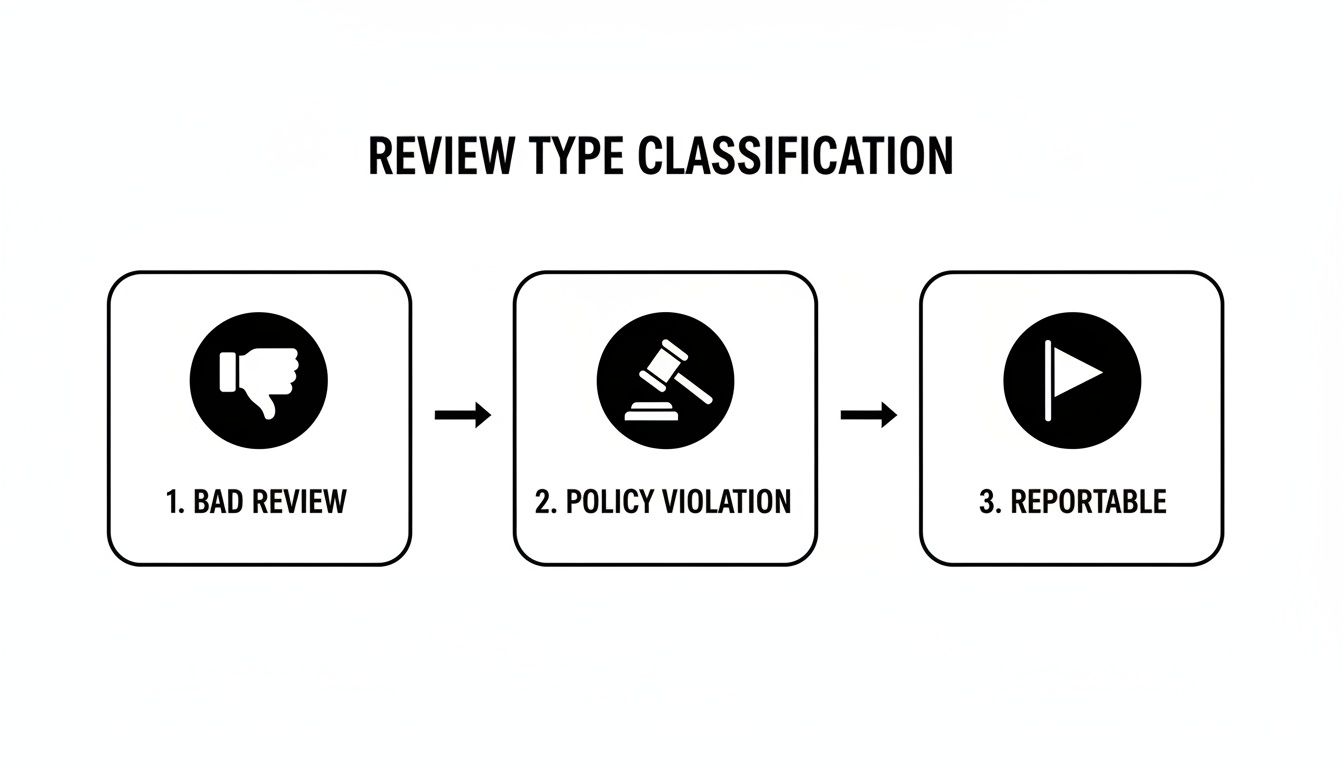
As you can see, a simple negative experience doesn't cut it. The review has to cross that line into a clear policy violation to be something you can—and should—report.
The Standard Method: Reporting from Google Search or Maps
This is your go-to method for flagging a problematic review. It's quick, direct, and works the same way whether you're on a computer or your phone. The best part? You don't even need to be logged into your business profile to do it.
Here’s the rundown:
- Find your business profile. Just open Google or Google Maps and search for your business name.
- Locate the review in question. You might have to scroll a bit to find the one you need to report.
- Click the three little dots. You'll see them right next to the reviewer's name.
- Select "Report review." This will kick off the reporting process.
After you click report, a new window pops up asking you to explain why you're flagging it. This is the most critical step of the whole process. Choosing the right violation is key to getting a moderator to take action.
Choosing the Right Violation Category
You’ll see a list of potential violations. Your job is to match the review's content to the most accurate category.
- Off-topic: The review is a rant about something unrelated to the customer experience at your business.
- Spam: It's clearly fake, posted by a bot, or just contains promotional links.
- Conflict of interest: The review is from a competitor, a disgruntled ex-employee, or someone with a clear bias.
- Hate speech or Harassment: This covers personal attacks, threats, discriminatory language, and bullying.
- Personal information: The review contains private data like a phone number, home address, or email.
My two cents: Be precise. If a review feels both off-topic and like spam, pick the violation that is more obvious and easier for a Google moderator to verify at a glance. Don't muddy the waters.
Once you’ve made your selection, just hit submit. Your report is now in the queue for Google's moderation team to review.
The Business Owner's Method: Reporting from Your GBP Dashboard
Another way to handle this is directly from your Google Business Profile (GBP) dashboard. This is a great option if you're already logged in and managing other aspects of your profile. It keeps everything in one place.
The steps are pretty much the same:
- Log into your Google Business Profile.
- Head over to the "Reviews" section in the menu.
- Find the review you need to deal with.
- Click the three dots next to it and choose "Flag as inappropriate."
From there, the process is identical. You'll select the violation type and submit your report. The interface is slightly different, but the engine under the hood is the same. Whether you report from Maps or your dashboard is really just a matter of what's more convenient for you at the moment.
While the reporting system is designed to be user-friendly, its real power comes from giving Google a clear, unambiguous signal. The process is intentionally simple: find, flag, and categorize. However, it's worth noting that even with powerful automated systems that removed over 55 million fake reviews in 2020, Google still relies heavily on business owners like you to flag what slips through the cracks. According to research on Taggbox, the issue is massive. Your report is more than just a complaint; it's a vital part of keeping the ecosystem honest.
What to Do When Your Report Is Ignored
So, you flagged a review that clearly breaks Google's rules, followed all the steps, and then... nothing. It’s a maddeningly common experience. You’re left waiting while a bogus review continues to tank your reputation. But that first report is just the opening move, not the end of the game. If it doesn't work, it’s time to escalate.
This means moving past the simple “flag as inappropriate” button and into a more formal removal request process. It's how you show Google you're serious and get your evidence in front of the right people.
Escalating Your Case Directly with Google
When that initial flag gets you nowhere, your next best move is Google's official removal request tool. You'll usually find this tucked away in your Google Business Profile help section. This isn't the same as just flagging a review from Maps—it's a more structured system that lets you add crucial context and actually track the status of your reports.
This tool is especially powerful when you're dealing with a coordinated attack or a pattern of fake reviews from the same bad actor. In those bigger cases, you can even email Google support directly, attaching spreadsheets that document every single violation. It's a critical step when you consider that 98% of consumers check online reviews, with Google being their most trusted source.
Getting this right has a huge impact. Businesses with over 25 positive reviews can see a revenue jump of up to 108%. You can dig into more of the data on Google review management and its effects.
To build a strong case for escalation, get these details ready:
- Your Business Info: Name, address, and the email tied to your Google Business Profile.
- The Review's URL: Grab the direct link to the specific review. Don't make them hunt for it.
- The Violated Policy: Name the exact rule from Google's content policy that's been broken (e.g., Conflict of Interest, Hate Speech).
- A Factual Summary: Write a quick, clear explanation of why the review violates that policy.
Crafting a Removal Request That Actually Works
When you fill out that form, get straight to the point. The moderators reviewing these are swamped, so a request that is clear, concise, and backed by evidence is far more likely to get approved.
Key Takeaway: Drop the emotion and stick to the facts. Instead of, "This person is a liar trying to ruin my business!" try this: "This review violates the 'Conflict of Interest' policy. The reviewer was terminated from our company on [Date], and we have attached internal records as proof."
Let’s walk through a real-world scenario. Say a competitor leaves a fake one-star review to hurt your rating. Your summary could look like this:
Example Summary "This review is a clear violation of Google's 'Conflict of Interest' policy. The reviewer is the owner of [Competitor Business Name], located at [Competitor Address]. Their public profile directly links them to this business. We are requesting removal on the grounds that this review is an attempt to manipulate our rating."
See how that works? It’s direct, it names the specific policy, and it presents information that a Google employee can actually verify. It gives the moderator a slam-dunk reason to approve your request. For even more detailed strategies and templates, our full guide on how to get a review removed from Google has you covered.
When It's Time to Consider Legal Action
In rare but serious cases, a review crosses the line from a simple policy violation into something illegal, like defamation. For a review to be defamatory, it has to be a false statement of fact (not opinion) that causes real harm to your business's reputation.
If someone posts a specific, false, and damaging accusation—like "The owner steals from customers" or "They use expired ingredients that made me sick" (and you have proof they were never even a customer)—you might have a legal case.
Before you go down this road, you absolutely must speak with an attorney specializing in internet defamation. They can lay out your options, which could range from sending a cease and desist letter to pursuing a court order to force the review's removal. This is a serious, expensive step, so reserve it for the most extreme situations where the damage is undeniable.
Building a Proactive Reputation Defense

Knowing how to report a bogus Google review is a crucial skill, but let's be honest—it's damage control. You're playing defense after the problem has already hit your profile. The best long-term strategy is to build a reputation so solid that one fake or negative review barely makes a dent.
This means shifting your mindset from just zapping bad reviews to actively cultivating an avalanche of great ones. A steady stream of authentic, positive feedback from your actual customers is the ultimate shield. It builds a powerful foundation of social proof that can easily absorb the occasional unfair comment.
Encouraging a Flow of Genuine Reviews
So, how do you get more reviews? The secret is simple: ask at the right moment and make it ridiculously easy. Most happy customers are more than willing to share their experience, but life gets in the way. Your job is to remove every ounce of friction from the process.
Just remember, never offer incentives for reviews. It’s a fast track to getting penalized by Google. Focus on genuine encouragement instead.
- Timing is everything. The absolute best time to ask is right after a positive moment. For a restaurant, that's when a customer is glowing after a great meal. For a roofer, it’s when the homeowner is standing on their lawn admiring your pristine work.
- Make it effortless. Put a QR code on your receipts that links directly to your Google review page. Send a follow-up text or email with a single, direct link—no hoops to jump through.
- Personalize the ask. Ditch the generic "Leave us a review." Try something more human, like, "We loved having you in today! If you have a second, sharing your thoughts on Google means the world to our small business."
This proactive approach completely dilutes the power of any single negative review. When a potential customer sees one grumpy comment buried under 50 glowing five-star reviews, they're going to trust the overwhelming majority.
The Art of Responding to Every Review
Your public replies are just as vital as the reviews themselves. Potential customers don't just read what others say; they read how you respond. Answering every review shows you're an engaged, attentive business that actually cares about customer feedback—the good, the bad, and the ugly.
A smart response strategy can transform a negative review into a positive signal for your brand. While you can't remove a legitimate bad review, you can absolutely neutralize its sting with a professional reply. For a deeper dive into this, our guide on managing your online reputation breaks down specific response tactics.
A professional reply to a negative review isn't for the person who wrote it—it's for every future customer who reads it. Your goal is to demonstrate accountability and a commitment to service.
Here's a solid framework for responding:
- Acknowledge and Apologize: Always start by thanking them for the feedback and apologizing that their experience wasn't up to par. It doesn't matter if you think they're wrong; this is about showing you care.
- Don't Get Defensive: Publicly arguing or making excuses is the fastest way to look unprofessional. It never ends well.
- Take it Offline: Provide a direct line of contact—an email or a phone number—to resolve the specific issue privately. This proves you’re serious about making things right.
A simple response like, "We're very sorry to hear this and want to learn more. Please contact our manager, Sarah, directly so we can personally address this for you," is perfect. It's concise, professional, and shows a clear path to resolution.
If you want to manage your entire online presence and ensure your brand image stays strong, look into how online review management services can help build out your proactive defense. A comprehensive approach ensures every piece of your reputation is carefully monitored and managed.
Common Questions About Reporting Google Reviews
Going through the process of reporting a review often stirs up a few key questions. You've flagged it, maybe even tried to escalate it, but what actually happens next? Knowing what to expect in terms of timing, evidence, and outcomes can help you navigate the process with a lot less stress. Let's break down the most common things business owners ask when they're trying to get a bogus review taken down.
How Long Does It Take Google to Remove a Review?
This is the million-dollar question, and the answer is... it depends. After you flag a review, it goes into a moderation queue. A decision can come through in just a few days, but it can also stretch out for a couple of weeks.
There's no hard-and-fast rule here. Really obvious violations, like hate speech or spammy links, usually get zapped pretty quickly—often within 24 to 72 hours. But the trickier cases, like trying to prove a conflict of interest, need a deeper dive from Google's team and will naturally take more time.
My rule of thumb? If you haven't heard or seen anything after two weeks, it’s time to act. That's your signal to escalate the case using the Google Business Profile support form we covered earlier.
What Evidence Should I Gather for My Report?
Solid evidence is the most powerful tool you have. The initial flag-and-report feature is pretty basic and doesn't let you attach anything, but you absolutely should start building a case file for when you need to escalate.
Your proof needs to be factual, direct, and clearly tied to the policy violation you're claiming.
- Screenshots of the Reviewer's Profile: This is gold for spotting a fake. I've seen profiles where a user has reviewed 50 different businesses across multiple countries in a single day. That's a huge red flag.
- Internal Business Records: The best way to prove someone wasn't a customer is to show they aren't in your records. This could be CRM data, sales receipts, or appointment logs. A simple, direct statement like, "We have searched our records and have no history of providing services to anyone by this name," is incredibly effective in an escalation.
- Documentation of Harassment: If the reviewer is harassing you elsewhere, grab screenshots. If you can show a pattern of malicious behavior from the same person on social media or email, it strengthens your case that their intent is to harm, not to provide genuine feedback.
Having all this ready to go makes your escalation far more compelling.
Will the Reviewer Know I Reported Them?
This is a big concern for many, but you can relax. No, the reporting process is completely anonymous. The user gets no notification that you, or anyone else, flagged their review.
The only thing the reviewer will ever see is your public reply to their review, if you decide to write one. Think of reporting as a quiet, administrative action—you're simply letting Google know that someone might be breaking the rules on their platform.
It's not a confrontation; it's just part of maintaining a fair and honest review ecosystem for everyone.
When Should I Hire a Professional Removal Service?
You can definitely handle most one-off fake reviews yourself. But sometimes, you run into situations that are bigger than just a single bad actor. That’s when it might be time to call in the pros, like a reputation protection service such as LevelField.
Consider bringing in an expert when you’re dealing with:
- A coordinated "review bomb" attack, where dozens of fake negative reviews flood your profile all at once.
- A persistent, anonymous user who keeps creating new accounts to post defamatory content.
- A situation where you've followed all the steps, escalated your case, and still hit a dead end with Google.
These specialized services live and breathe Google's policies and often have a much better handle on the legal side of defamation. They can build a more robust case, manage all the follow-up, and honestly, save you a massive amount of time and frustration when your reputation is truly on the line.