


Flagging a Suspicious Review Sets the Process in Motion
The quickest way to report a fake Google review is by flagging it as inappropriate straight from your Google Business Profile or within Google Maps. That simple click notifies Google’s moderation team, kicking off an investigation and, if the content violates policies, its removal.
Why Fake Google Reviews Demand Your Immediate Attention
Imagine seeing a one-star review from a stranger, describing an experience you’ve never had. It’s tempting to shrug it off as a fluke, but fake feedback carries real consequences. It chips away at your reputation, sows doubt among potential customers, and ultimately hits your bottom line.
A study of 4 million store reviews revealed that 10.7% of Google reviews are fake—the highest rate among major platforms. Even a handful of bogus one-star ratings can send prospects running to competitors, translating directly into fewer calls, clicks, and in-store visits.
The Scale Of The Fake Review Problem
In certain sectors, the battle against fraud is especially fierce. Locksmiths deal with 14.5% fake reviews, and moving companies see 13.7% of their feedback flagged as inauthentic. Competitors sometimes create bogus profiles to drag rivals down, while others use bots or bulk services to flood listings with generic negatives. You can explore MediaPost’s in-depth analysis of fake review rates for more context.
Common Sources Of Fraudulent Reviews
Knowing who might be behind a bogus post helps you spot it faster:
- Unethical Competitors: Rival businesses sometimes generate fake one-star reviews to make their own ratings look stronger.
- Disgruntled Ex-Employees: Someone who left on bad terms may mix inside details with outright fabrications to cause harm.
- Review “Bombing” Scams: Fraudsters pile on low ratings in bulk, then demand payment for removal.
- Bots and Paid Services: Automated accounts or black-hat providers churn out poorly written negatives at scale.
The most dangerous fakes aren’t the obvious tirades but the subtle, believable ones. Spotting those nuances is key to defending your good name.
Before you move forward with reporting, it pays to double-check your suspicions.
Quick Guide to Spotting a Fake Google Review
Use this checklist to identify common red flags associated with fraudulent reviews before you begin the reporting process.
| Red Flag Indicator | What to Look For | Why It’s Suspicious |
|---|---|---|
| Reviewer Profile Lacks Depth | Only one review, no photo, little or no activity elsewhere | Often a ghost account set up just to leave a bad review |
| Generic or Vague Language | No specifics, broad statements like “Worst experience ever” | Usually auto-generated or bot-created feedback |
| Review Flooding In A Short Time | Several one-star reviews posted within minutes or hours | Classic review bombing to overwhelm your overall rating |
| Similar Wording Across Multiple Posts | Identical phrases, structure or unusual word choices repeated | Copy-and-paste tactics common with black-hat services |
Once these signs line up, you can report with confidence—knowing you’re armed with clear evidence, not just a hunch.
Building an Irrefutable Case Before You Report
It’s tempting to just hit the “report” button and hope for the best, but that’s one of the biggest mistakes you can make. Google's moderators are swamped with claims, and a vague report without any backup is just going to get lost in the noise. To get a fake review taken down, you have to switch gears—from being frustrated to being methodical.
Your mission is to build such a solid case that it’s impossible for Google to ignore. Think of yourself as a detective handing over a perfectly organized file. The clearer your evidence, the faster you’ll get a resolution. This prep work is what separates a successful removal from a frustrating dead end.
Gather Your Primary Visual Evidence
First things first: document everything immediately. You need to grab screenshots before the reviewer gets spooked and deletes their post. These images are your timestamped proof.
And don’t just screenshot the review itself. You need to tell a story. Properly documenting the fake reviews is critical, and mastering screen capture annotation helps create undeniable proof. Use arrows and circles to highlight the most damning details for the moderator.
Here’s your screenshot checklist:
- The Full Review Text: Get the whole thing—the reviewer’s name, the star rating, the date, and every word they wrote.
- The Reviewer’s Profile: Click on their name and screenshot their profile page. Are there red flags? A blank profile picture, a generic name, or zero other reviews are all suspicious.
- Suspicious Review History: If their profile shows a weird pattern—like they only leave 1-star reviews for other businesses in your industry or city—grab a screenshot of that. It points directly to a conflict of interest or a spam campaign.
This collection of images creates a powerful visual narrative that makes the policy violation obvious to anyone at Google support.
Cross-Reference with Your Internal Records
Now that you have the external proof, it’s time to look inward. You have to prove to Google that you’ve done your homework and can confirm this person was never a real customer. This is where you show the interaction they described never actually happened.
Dig through every business record you have for any sign of this person. In this situation, a complete lack of evidence is your evidence.
Pro Tip: Don't just say they weren't a customer. Get specific. When you submit your report, explicitly state which systems you checked. A sentence like, "We have no record of this individual in our CRM, appointment scheduler, or payment processing system" carries so much more weight.
Be sure to check these sources:
- Customer Relationship Management (CRM) System: Search for the reviewer's name or any possible variations.
- Invoicing or Point-of-Sale (POS) Records: Look for any matching transaction history.
- Appointment or Booking Logs: Confirm they never scheduled a service or consultation.
- Email and Phone Logs: Do a quick search for any past communication.
Documenting this search process is a great move. A simple spreadsheet with the reviewer’s name, the date of the review, and a "No Record Found" status for each system is a fantastic piece of supporting documentation to have ready.
Identify and Document Patterns of Attack
A single fake review is bad enough, but often it’s not an isolated incident. It could be part of a coordinated attack from a competitor or a review-bombing scheme. When you can identify a broader pattern, your case becomes incredibly strong. You’re no longer reporting a single dispute; you’re flagging systemic platform manipulation.
Did you suddenly get three 1-star reviews from brand-new profiles within the same hour? That’s not a coincidence; it's a campaign.
Document the names, dates, star ratings, and any identical phrasing across the reviews. By compiling this comprehensive file—visual proof, internal verification, and pattern analysis—you’re turning a hopeful click into a fact-based request that Google’s team can act on decisively.
Getting to Grips with Google's Flagging Tool
With your evidence in hand, your first port of call is Google’s own flagging tool. This is your direct line to Google's moderation team and the fastest way to report a review that breaks the rules. It might seem like a simple click, but how you handle this step can make or break your case.
Don't think of it as just firing off a complaint. You're submitting an official report, and your job is to make it incredibly easy for the person at Google to see what you see and agree with you. You can flag a review from two places: right from your Google Business Profile dashboard or directly on the public review in Google Maps. Either way, you'll end up at the same reporting form.
How to Flag the Review
The process itself is pretty simple. Find the review you want to report, click the three little dots next to it, and hit "Report review" (sometimes it says "Flag as inappropriate"). A new window will pop up asking you to pick the specific rule the review violates.
This is where you need to pause and think carefully. This is the most important part of the whole process. If you pick the wrong reason, your report could get tossed out immediately.
Here's the menu you'll be working with when you report a review:
This isn't just a formality. The category you choose sends your report down a specific path, telling Google's automated filters and human reviewers exactly what to look for.
Choosing the Right Violation
Resist the urge to just click the first option that sounds about right. Each category targets a specific kind of bad behavior, and your choice needs to perfectly match the evidence you’ve gathered.
- Conflict of Interest: This is your go-to if you're sure the review is from a competitor, a bitter ex-employee, or anyone else with an obvious axe to grind. Your proof of their connection to a rival business or their employment history is crucial here.
- Spam: Choose this if the reviewer has a history of spamming other businesses with the exact same generic comment, or if the review is just a blatant advertisement for another company. Think bot-like activity.
- Off-topic: Perfect for when a review has absolutely nothing to do with a customer's experience. If someone is using your profile for a political tirade or a personal rant unrelated to your business, this is the one.
- Hate Speech or Harassment: This is for the serious stuff—reviews that include threats, discriminatory language, or personal attacks on you or your team. Google takes these very seriously.
Expert Tip: Don't be lazy here. Take a second to really match your evidence to the violation. If you have screenshots proving the reviewer works for the shop across the street, "Conflict of Interest" is your slam dunk. Don't just fall back on a generic reason.
So, You've Flagged It. What Now?
After you hit submit, the review goes into Google's moderation pipeline. You’ll usually see a "Pending decision" status, which means it’s in line to be looked at. This is where patience comes in, as it can take anywhere from a few days to a couple of weeks.
I know, this part is frustrating. But try to keep the scale of the problem in perspective. Google is fighting a massive war against fake content. In 2023 alone, it blocked or zapped 170 million reviews that violated its policies—a 45% jump from the year before. That's a staggering volume, and your report is just one drop in that ocean. You can get a better sense of these huge moderation efforts and why things take time by checking out the latest fake review statistics.
So, Your Flagged Review Was Denied. Now What?
You flagged the review, waited patiently, and then got that frustrating email: "Our team has reviewed your request and we have not found a violation of our policies." It’s a common scenario, but don’t throw in the towel. This is simply when you move past the automated first line of defense and escalate your case to a real person.
Think of it this way: flagging a review is like reporting a problem to a computer. Escalating it means presenting your evidence directly to the Google Business Profile (GBP) support team. This is your chance to appeal the initial verdict, especially for nuanced cases that an algorithm would likely miss.
This visual guide shows the main paths to begin the reporting process, which ultimately leads to a direct escalation if the initial flag is denied.
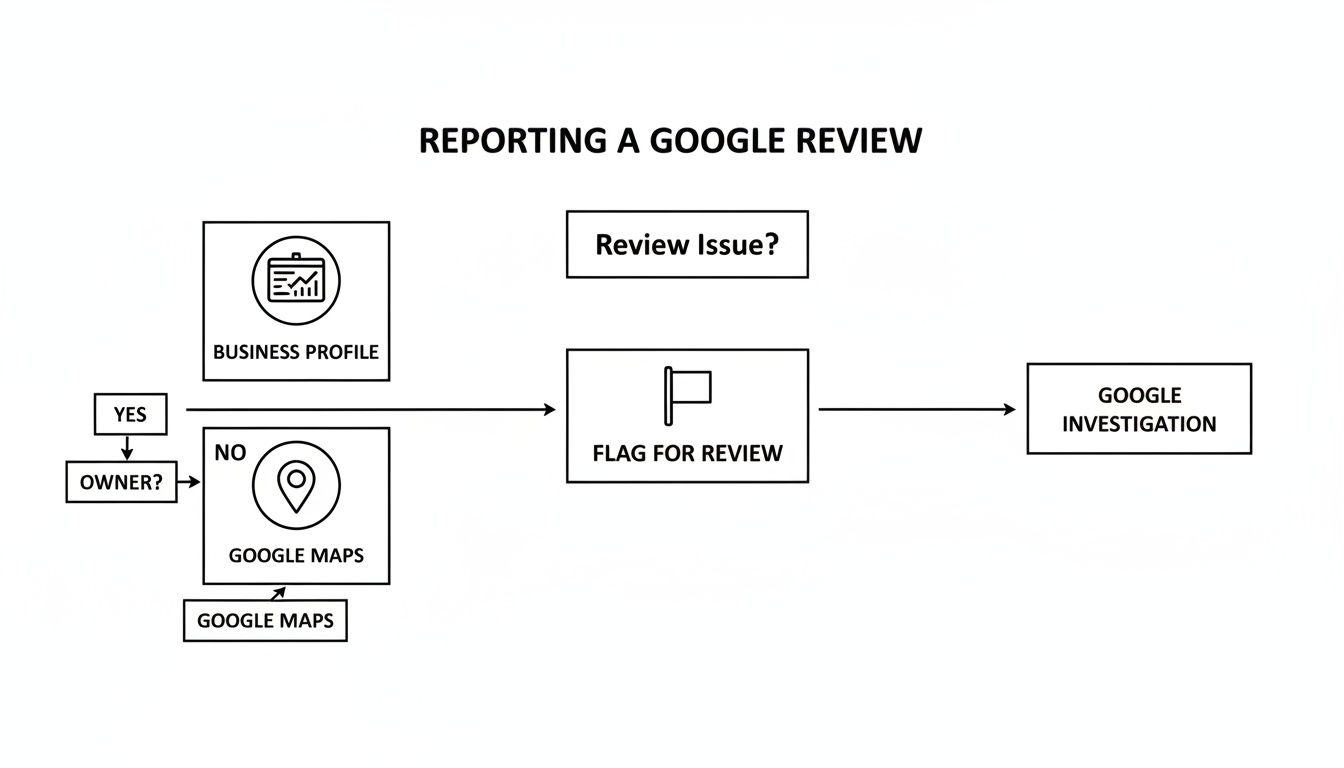
As you can see, whether you start from your Business Profile or Google Maps, flagging is the first step. When that doesn't work, escalation is your next move.
How to Get Your Case in Front of the Support Team
You won't find a direct phone number to call; instead, you have to work through Google's support workflow. It’s designed to filter issues, so you need to know which buttons to press to get to the right place.
Here’s the path I take:
- Head over to the Google Business Profile Support page.
- Pick the business profile that has the problem review.
- A text box will ask what you need help with. I usually type something simple like "appeal review removal" and click "Next."
- Google will offer a bunch of help articles. Ignore them. Just scroll down, choose "Other," and hit "Next Step."
- Finally, you'll see your contact options. Email is almost always available and is the best route for these cases.
Choosing the email option opens up a form. This is where you’ll present your case.
Crafting a Support Ticket That Actually Works
The message you send to Google Support needs to be laser-focused on policy violations. This isn't the place for emotional appeals about how the review is hurting your business. Stick to the facts, because that's what the support agent is trained to look for.
Keep in mind, the person on the other end is sifting through tons of these requests every day. Make their job easier by giving them a clear, organized argument they can quickly act on.
What to include in your message:
- Case ID: If you've contacted them before about this, lead with your old case ID. It gives them instant context.
- Direct Links: Don't make them search. Provide a direct URL to the review itself and another one to the reviewer's profile.
- The Specific Violation: Name the exact policy the review breaks. For example, "This review is a Conflict of Interest because it was posted by a former employee terminated last month."
- A Quick Evidence Summary: Briefly list what you've attached. Something like, "I've attached screenshots of the review, the user's profile, and a document showing we have no record of this person in our customer database."
My Two Cents: Keep it short and sweet. Long, rambling emails get skimmed. Put your most important info at the top and use bullet points to make your arguments pop.
A Proven Message Template You Can Use
No need to start from a blank page. Here’s a template I've refined over the years that gets the job done. Just swap out the bracketed info with your details.
Subject: Appeal for Removal of Policy-Violating Review – [Your Business Name]
Hi Google Support Team,
I'm writing to appeal the decision on a review posted to my Google Business Profile. The initial flagging was denied, but this review is a clear violation of Google’s policies and I have evidence to support its removal.
- Business Name: [Your Business Name]
- Business Address: [Your Full Business Address]
- Link to the Review: [Paste the direct URL to the review here]
- Reviewer's Name: [Name of the Reviewer]
- Link to Reviewer's Profile: [Paste the direct URL to the reviewer's profile]
This review violates the [Specify the policy, e.g., Conflict of Interest, Spam, Fake Engagement] policy.
Here is why:
- We have checked our CRM, payment, and appointment records and can confirm we have no record of this individual ever being a customer.
- The reviewer’s profile shows a pattern of suspicious activity, including [Describe the pattern, e.g., leaving 1-star reviews for 5 other local competitors in the last 24 hours].
- [Add any other clear evidence, e.g., The language is identical to two other reviews we received from different accounts last week].
I have attached all supporting documents for your review. Please escalate this for a manual inspection and remove this fraudulent post.
Thank you,
[Your Name]
[Your Title/Role]
What Happens Next? (And a Reality Check)
Once you hit send, you'll get an automated reply with a case ID. Guard that number—it's your reference for any follow-up. A real person should get back to you within 3 to 5 business days.
It’s a tough truth, but a huge number of online reviews are fake—some studies suggest as many as 15-30%. This is why knowing how to report effectively is so critical. Google knows it's a massive problem; they removed over 55 million fake reviews in 2020 alone.
If a week goes by and you haven't heard anything, reply directly to the email thread (don't start a new one!) and politely ask for an update, making sure to reference your case ID. Stay professional, but be persistent.
For really tough situations, like a coordinated attack from multiple fake profiles, it might be time to bring in the pros. Specialized Google My Business content removal services have the experience and tools to handle complex cases that go beyond a simple support ticket.
What to Do When Google Support Isn't Enough
You’ve flagged the review. You’ve submitted a case to Google Business Profile support. And still… nothing. It’s incredibly frustrating when you’ve followed all the rules and the fake review is still sitting there, damaging your reputation.
But don’t give up just yet. For the most stubborn and harmful fake reviews, you have a couple of heavy-duty options left. These aren't your everyday tools; think of them as the last line of defense for serious situations where the damage is real and the standard process has let you down.
Filing a Legal Removal Request
Sometimes, a fake review crosses the line from merely violating Google's policies to being straight-up illegal. This is where Google’s Legal Removal Request tool comes in. This isn’t for reviews you just don’t like—it’s for content that you believe breaks the law.
Before you go down this road, you need a very clear and specific legal reason. This usually falls into one of a few categories:
- Defamation: The review makes a false statement of fact (not just an opinion) that hurts your reputation. A customer saying, "The food was cold," is an opinion. A fake review claiming, "The owner was arrested for health code violations," when that never happened, is potentially defamatory.
- Copyright Infringement: The reviewer stole and used your original content, like a photo from your website, without your permission.
- Other Illegal Content: This could include things like content that violates a court order or exposes someone’s private, confidential information.
Think of this as making a formal legal declaration to Google. You can’t just say, "This is defamatory." You have to explain why it meets the legal standard in your jurisdiction. Be prepared to provide detailed evidence, because a weak claim will be rejected almost immediately.
When to Bring in a Professional Reputation Service
Let’s be honest: fighting a coordinated smear campaign or a high-volume review bombing attack can feel like a second job. If you’re completely overwhelmed, it might be time to call in the experts.
A professional reputation management service, like LevelField, can step in and manage the entire process for you. They’re specialists who live and breathe this stuff.
It's a common misconception that reputation agencies have a secret hotline to Google. They don't. Their power comes from knowing Google's policies inside and out, building airtight cases with meticulous evidence, and handling the persistent, professional follow-up that most business owners simply don't have time for.
When does it make sense to hire a service?
- You're Under a Coordinated Attack: If you're getting slammed with dozens of fake reviews at once, a pro can spot the patterns, connect the dots, and present a single, comprehensive case to Google that’s far more compelling than flagging them one by one.
- The Allegations Are Severe: When a review makes a serious accusation that could cripple your business (think fraud, illegal activity, or discrimination), you can't afford to get it wrong.
- You're Out of Time: Your energy is best spent running your business, not chasing down fake reviewers. Outsourcing this fight frees you up to focus on what you do best.
These services take the chaos off your plate. They handle the investigation, the documentation, the submissions, and all the back-and-forth, giving you a structured, expert-led approach to get your reputation back on track.
Building a Proactive Reputation Defense Strategy
Chasing down and reporting fake Google reviews is a reactive game—and frankly, it's exhausting. The best long-term strategy isn't just playing whack-a-mole with bogus posts. It's about building a reputation so strong, so authentic, that a few fake reviews barely even register. Think of it less as cleaning up a mess and more as building a reputational firewall.

The idea is simple but powerful: drown out the noise. Your most effective weapon is a constant flow of genuine, positive reviews from actual customers. When your profile is flush with authentic feedback, a random one-star review from a fake account just looks out of place. It quickly gets buried, losing its visibility and its power to hurt your business.
Dilute Negativity with Authentic Feedback
Getting legitimate reviews doesn't need to be a huge, complicated push. The secret is to ask at the right time and make it ridiculously easy for happy customers to share their thoughts.
Here are a few simple tactics I've seen work wonders:
- Automated Follow-Ups: Set up your POS or CRM system to send a simple email or text message a day or so after a transaction. Make sure it includes a direct link right to your Google review page.
- In-Person Prompts: A small, well-placed sign at your checkout counter or a QR code on a receipt can be a gentle and effective nudge.
- Personal Requests: When your team has a fantastic interaction with a customer, that's the golden moment. A simple, "It was a pleasure helping you today. If you have a moment, we'd be so grateful if you shared your experience on Google," feels personal and often gets great results.
Here’s a non-negotiable tip from the trenches: respond to every single review, good or bad. It shows potential customers you're listening, you care about their experience, and you're confident enough to engage with feedback. That public engagement builds a massive amount of trust.
Monitor and Respond Swiftly
You can't address a problem you don't know exists. By setting up alerts for new reviews, you can jump on them immediately—whether that means thanking a supporter or flagging a suspicious post before it does real damage.
For businesses that want to take it a step further, using a dedicated reputation monitoring service can keep a 24/7 watch on your brand's online presence, so you’re never caught off guard.
This proactive mindset does more than just shield you from fake reviews; it strengthens your entire brand. You create a positive feedback loop that not only builds a trustworthy reputation but also attracts more of the right customers. If you're curious about just how much those fake negative posts can hurt your bottom line, our fake reviews calculator can help you estimate the financial impact.
Your Top Questions About Fake Google Reviews, Answered
When you're dealing with a fake Google review, it's easy to feel frustrated and unsure of what to do next. I get it. Over the years, I've helped countless businesses navigate this exact problem. Here are some straightforward answers to the questions I hear most often.
How Long Does It Take for Google to Remove a Fake Review?
This is the million-dollar question, and unfortunately, the answer is: it varies. A lot.
After you flag a review through the standard process, you’re basically in a queue. It could be a few days or even a few weeks before you see any action. The first pass is usually automated, and if it gets flagged for a human to look at, the timeline extends.
If you take the extra step of contacting Google Business Profile support directly with your evidence, things tend to move a bit faster. In that case, you can usually expect some kind of response within 3 to 5 business days. But a quick response doesn't always mean a quick removal. Patience is key, but don't be a pushover. If a week goes by with radio silence on your support ticket, a polite follow-up is perfectly reasonable.
What’s the Difference Between a Fake and a Negative Review?
This is a crucial distinction, and getting it right is the foundation of your entire reporting strategy.
A fake review is fundamentally dishonest. It's a review that breaks Google's rules because it doesn't come from a legitimate customer experience. Think reviews from disgruntled ex-employees, shady competitors, paid-for spam, or someone who has clearly never set foot in your business. These are the ones you should report.
A negative review, on the other hand, is from a real customer who simply had a bad time. As much as it stings to read, it's their genuine opinion. You can't get these removed just because you disagree with them. The best course of action here is a thoughtful, professional public reply that aims to resolve the issue.
Should I Reply to a Review I Suspect Is Fake?
This is a tactical decision. In many cases, a carefully worded public reply can actually work in your favor by showing other potential customers that you're engaged and that the review itself is questionable. The trick is to stay calm and professional—never get into a messy public fight.
A great go-to response sounds something like this: "We take all feedback seriously, but we can't seem to find any record of a customer or transaction matching your name and details. We'd welcome the chance to discuss this further, so please reach out to us directly at [your email or phone number]."
This response shows you're proactive without validating their claim. It subtly casts doubt on the reviewer's legitimacy for everyone else to see.
However, if the review is obvious spam, contains hate speech, or is completely unhinged, don't engage at all. Just report it immediately and move on.
Can I Sue Someone for a Fake Google Review?
Technically, yes, you can sue for defamation. But I'll be blunt: it’s an absolute slog. The legal route is incredibly expensive, drags on forever, and is very difficult to win.
To even have a chance, you'd have to prove three things:
- The review contains false statements of fact (not just someone's negative opinion).
- Your business suffered real, measurable financial damage as a direct result.
- You can successfully unmask and identify the anonymous person who wrote it.
Honestly, this is a last-ditch effort for the most damaging and clear-cut cases. Always talk to an attorney before even thinking about going down this road.