


A single fake or malicious review isn't just a nuisance. It's a direct hit on your credibility and your bottom line. That's why knowing how to report a review on Google is an essential skill for any business owner serious about protecting their brand. This guide is your no-fluff roadmap to defending the reputation you’ve worked so hard to build.
Why You Can't Afford to Ignore Your Google Reviews
Think of your Google Business Profile as your digital front door. For most potential customers, it's their first interaction with your business, and the reviews they find there are incredibly powerful. Being proactive about managing your online reputation isn't just "good practice" anymore—it's a core business function.
To get a handle on this, it helps to understand the importance of online reviews in general. When a review is blatantly fake, misleading, or breaks Google's own rules, you have every right to fight back.
The Unmatched Influence of Google Reviews
Google isn't just a player in the review space; it is the space. It hosts a mind-boggling 57-58% of all online reviews worldwide and controls about 73% of the entire review platform market. This dominance means a single bogus review on Google can do more damage than on any other site. If you want to dive deeper, these Google review statistics paint a very clear picture.
This influence isn't just theoretical. It directly impacts how customers behave.
- A massive 81% of consumers turn to Google to check out local businesses.
- Even more telling, 88% of people read Google reviews before they ever decide to open their wallets.
These aren't just vanity metrics. They prove that customers are actively looking for social proof on Google, and what they find dictates where they spend their money.
A solid review management strategy isn’t about silencing critics. It’s about making sure the story being told about your brand is fair, accurate, and authentic. Letting rule-breaking reviews sit there means you're letting spammers and competitors control your narrative.
Getting Ready to Take Action
The good news is that you're not helpless. Google has specific policies that outline what's allowed and what crosses the line—think spam, harassment, or a review from a disgruntled ex-employee. Your first job is to get familiar with these rules. Once you know what to look for, you can spot violations with confidence and build a solid case for removal.
Consider this guide your playbook. We'll walk through the entire process, step-by-step, from spotting a review that's out of line to escalating your case when Google's first response isn't enough. By the end, you'll have the practical know-how to defend your business and keep your online reputation intact.
How to Know If a Google Review Actually Breaks the Rules
Before you even think about hitting that "report" button, you need to be sure the review in question actually violates one of Google's policies. This is the single most important part of the process. Reporting a review just because you don't like it or disagree with it is a waste of your time—Google simply won't remove it.
There's a world of difference between a genuinely unhappy customer and someone with a malicious agenda. A customer leaving a scathing one-star review about slow service is, unfortunately, fair game. But a competitor posing as a customer to tank your rating? That's a clear violation and something you can and should fight.
Is It a Bad Opinion or a Real Violation?
The first step is to take a breath and look at the review objectively. I know it's hard when you feel your business is being attacked, but you have to separate your emotional reaction from the facts. Does the review critique your business, or does it cross a line?
For instance, "The pizza was greasy and the delivery driver was 20 minutes late" is a painful but legitimate piece of feedback. On the other hand, a review that says, "Don't eat here, go to Joe's Pizza down the street for a better deal!" is pure advertising spam and a slam-dunk for removal.
The entire online review ecosystem hinges on trust. When that trust is broken by fake, off-topic, or malicious content, it hurts everyone—customers and business owners alike. By flagging legitimate violations, you’re not just protecting your business; you’re helping maintain the integrity of the system.
And that trust is a powerful thing. Research shows that a staggering 88% of customers trust online reviews as much as a recommendation from a friend. What's more, 52% of consumers won't even consider a business with less than a four-star rating. You can dive deeper into these numbers with these Google review statistics from shapo.io, but the takeaway is clear: keeping your profile free of fraudulent reviews is non-negotiable.
Spotting Common Policy Violations
Google has a long list of policies, but in my experience, most of the reviews you'll want to report fall into just a few buckets. Getting familiar with these will make it much easier to spot a removable review and build a strong case.
To help you out, here’s a quick-reference table breaking down the most common violations I see business owners dealing with every day.
Common Google Review Policy Violations
| Violation Type | What It Looks Like in the Real World | Why It's a Reportable Offense |
|---|---|---|
| Spam & Fake Content | A review with just a star rating and no text, a post filled with links to another website, or multiple identical reviews posted from different accounts. | This isn't a real customer experience. It’s often automated or designed to manipulate ratings or promote something else. |
| Conflict of Interest | A glowing review from a current employee, a scathing review from an ex-employee you just fired, or a one-star review from a known competitor. | Reviews must be impartial. People with a direct financial or personal stake in the business (positive or negative) can't leave reviews. |
| Off-Topic Content | Someone complaining about your political yard sign, ranting about a national issue, or telling a personal story that has nothing to do with your business. | Reviews must be about a customer's experience with your specific location or service. Personal grievances or commentary don't belong. |
| Harassment & Hate Speech | Reviews that use slurs, make threats, personally attack an employee by name with obscene language, or discriminate against a protected group. | This is the most serious category. Google has a zero-tolerance policy for content that is abusive, threatening, or promotes hatred. |
Once you can confidently identify these infractions, your whole mindset shifts. You’re no longer just a victim of a bad review; you’re an informed business owner who knows how to enforce the platform's rules and protect your hard-earned reputation.
How to Report a Google Review: Your Step-by-Step Guide
So, you've spotted a review that clearly crosses the line. What's next? Getting it removed is a fairly straightforward process, but how and where you report it actually matters.
Let's walk through the different ways you can flag a review. While you can do it on the fly from your phone or at your desk, one method gives you a serious advantage when it comes to tracking your request.
Reporting from Google Maps and Search (The Quick Flag)
The most common way to report a review is directly from Google Maps or a Google Search result. It's fast and convenient, especially when you first come across a review that makes you go, "Wait a minute..."
Simply find your business profile on either platform and locate the review you want to report. To the right of the reviewer's name, you'll see three vertical dots. Click on those dots, and a menu will pop up with an option like "Report review" or "Flag as inappropriate."
After clicking, Google asks you to specify why you're reporting it. You'll see a list of potential policy violations—things like spam, hate speech, or a conflict of interest. Pick the one that fits the situation best, hit submit, and you're done.
The downside? It feels a bit like sending a message in a bottle. You report it and then... you wait. There's no built-in way to check on the status of your flag, which can be frustrating.
The Best Way: Using Your Google Business Profile Dashboard
If you want a more powerful and transparent way to manage review reporting, always go through your Google Business Profile (GBP) dashboard. I can't stress this enough—this is the professional standard for a reason. It keeps everything in one place and actually lets you see what's happening.
First, log in to your Google Business Profile. On the left-hand menu, click on "Reviews." This will pull up a list of every review your business has received.
Find the review in question, click the three-dot menu next to it, and select "Report review." The process from here is the same as before, but the magic happens after you submit.
By reporting through your GBP dashboard, you gain access to Google's Review Management Tool. This tool is a lifesaver. It lets you check the status of all your reported reviews, so you'll know if Google has made a decision. No more guessing.
Pro Tip: Remember, this process is for reviews that violate policy. Legitimate, honest-to-goodness negative feedback is a different beast entirely. Your best move there is a prompt, professional public response. We have a whole playbook on how to respond to negative Google reviews that can help you turn a bad experience into a positive impression.
This flowchart gives you a great visual breakdown of what Google considers a violation.
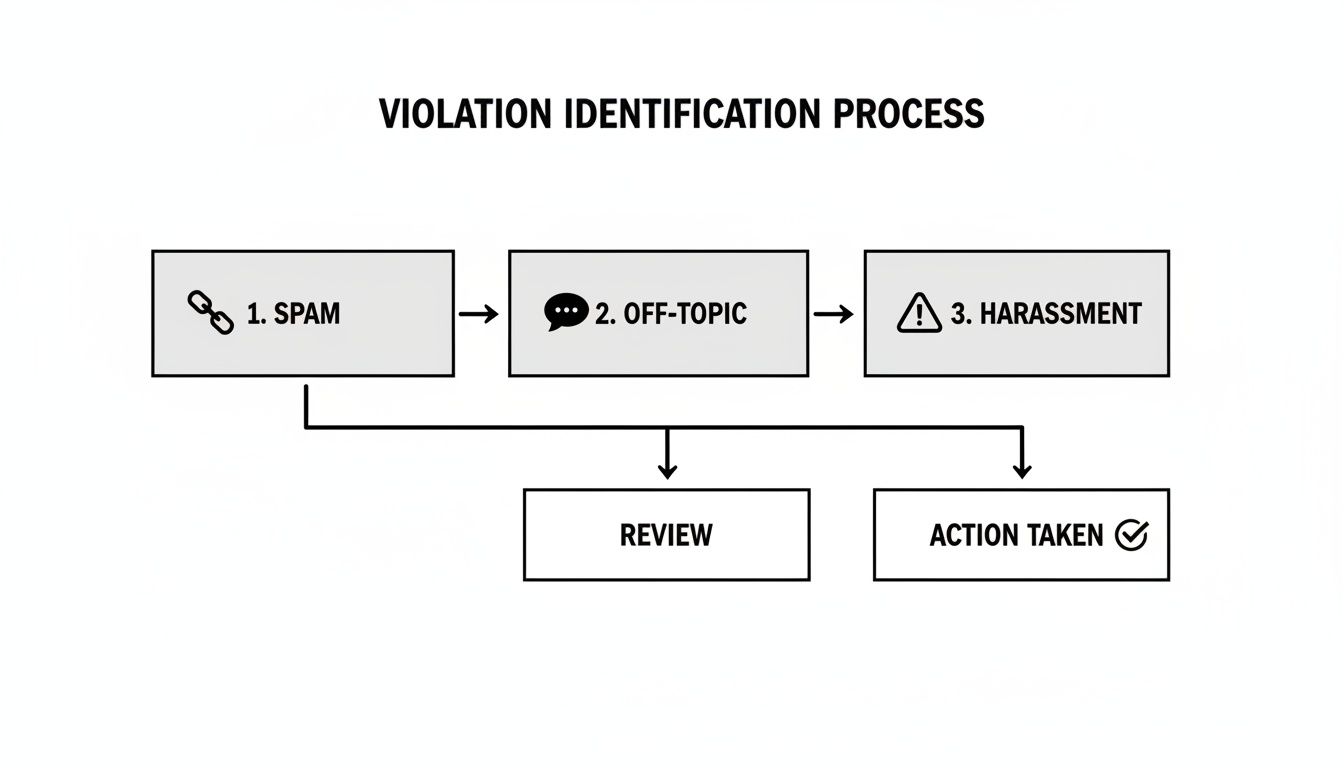
Getting familiar with these categories—spam, off-topic content, restricted content, and so on—is the single most important factor in getting a review successfully removed.
No matter which method you use, it all starts with identifying the specific rule the review breaks. But by using your GBP dashboard, you not only submit the report but also give yourself the tools to follow up and stay in control of your business's reputation.
So, You've Reported the Review. Now What?
After you hit that 'submit' button, it can feel like your report just vanished into the digital ether. It's a bit of a waiting game, but knowing what's happening behind the curtain at Google can help manage your expectations.
Your report has officially entered Google's moderation queue. This isn't just one person looking at a screen; it’s a mix of automated systems and real people. Google's AI is the first line of defense, scanning for the obvious stuff—spam, hate speech, and other clear-cut violations. If the algorithm catches something blatant, you might get a quick resolution.
But what about the trickier situations, like a review from a disgruntled ex-employee or a competitor? Those almost always need a human moderator to step in and investigate the context. That, understandably, takes more time. Most of my clients see a decision within a few days, but don't be surprised if it stretches out for up to two weeks.
How to Check on Your Report's Status
Thankfully, Google has given us a way to peek behind the curtain. The best place to track your flagged reviews is the Review Management Tool right inside your Google Business Profile dashboard. This is your command center for everything you've reported.
When you check the tool, you’ll see one of a few statuses. Here's what they actually mean in plain English:
- Pending decision: Your report is in line, waiting to be reviewed. Simple as that.
- Report reviewed - no policy violation: A moderator looked at it and decided it doesn't cross any of Google's lines. This is the one that stings, but it’s not always the final word.
- Escalated: This means you’ve appealed the initial decision, and it’s getting a second look from a different team.
Checking this tool every few days is far better than just crossing your fingers and hoping the review disappears. It gives you a clear picture of where things stand.
What Are the Possible Outcomes?
Ultimately, this all boils down to one of three results. Best case scenario: Google agrees with you, and the review gets zapped. The other possibility is that Google decides the review is fair game and it stays up. And sometimes, you won't get an email or any notification at all—you'll just have to check the tool or your public profile to see what happened.
It's also worth noting that Google is getting much more aggressive with its policing. We've seen a massive spike in the number of reviews being deleted across the board. They aren't just targeting one-star review bombs anymore; their systems are also sniffing out fake five-star reviews. This is great news for legitimate businesses. It shows their algorithms are getting smarter and looking at more than just the star rating. For a deep dive into the numbers, check out the analysis on record-level review deletions on Search Engine Land.
Navigating the review reporting process is a game of patience. Google handles millions of reports, and while the system isn't perfect, understanding the steps and potential outcomes empowers you to manage your reputation effectively and know when it’s time to escalate.
If the first decision doesn't go your way, don't throw in the towel. It’s not necessarily the end of the road. Your next move is to prepare an escalation, which is exactly what we’ll cover next.
What to Do When Google Rejects Your Report

It’s a gut punch. You report a review you know is fake, wait patiently, and then get that dreaded notification: “No policy violation found.” It’s frustrating because the first check is almost always automated, and algorithms often miss the context that a human would immediately understand.
But don’t throw in the towel. This isn't the end of the road; it just means it's time to escalate and get your evidence in front of a real person.
Your first attempt was just the opening act. Now, you need to appeal the decision directly, and this time, you’re coming prepared with hard evidence.
Contacting Google Business Profile Support
Your best bet for a second chance is to go straight to the source: Google Business Profile (GBP) support. This is completely different from just flagging the review. When you contact support, you open an actual ticket, which lets you communicate directly with a support agent and build your case.
This is where your detective work from earlier pays off. You need to present a clear, compelling argument.
- Is there no customer record? If you’ve searched your CRM, sales records, and email lists and can't find a trace of the reviewer, make that your opening statement.
- Do you have screenshot evidence? Maybe the reviewer is a former employee who posted threats on social media, or their profile uses a generic stock photo. Screenshots are your best friend here.
- Is the timing suspicious? Did a cluster of one-star reviews pop up right after a public dispute with a competitor or a messy employee termination? Explain the context.
When you lay out your appeal, keep it concise and factual. Don't rant. Clearly state which specific Google policy was violated and attach all the proof you’ve gathered. This elevates your claim from a simple complaint to a well-documented case that a human reviewer can quickly understand and act on. For a deeper dive into these tactics, checking out expert guidance on how to get Google reviews removed can offer even more advanced strategies.
Key Takeaway: The whole point of escalating is to provide the human context an algorithm can't grasp. Your job is to connect the dots for the support agent and make it easy for them to agree with you.
Submitting a Legal Removal Request
For the most serious situations—we're talking defamation, libel, or other illegal content—Google provides a legal removal tool. This is a much more formal and serious path, reserved for content that breaks the law, not just Google's internal policies.
Think of it this way: if a review contains demonstrably false statements of fact that are actively harming your business's reputation (and you can prove it), it might be a candidate for a legal takedown.
This isn't for a simple spam review or a disgruntled customer. The process is complex and often requires you to cite specific laws and build a legal argument. But for those truly damaging reviews causing significant financial or reputational harm, it's a powerful tool. A legal request signals the gravity of the issue and triggers a completely separate and more rigorous review by Google’s legal team.
Common Questions About Reporting Google Reviews
Running a business means you're going to get reviews, and sooner or later, you'll need to report one. This process can feel like a black box, so let's clear up some of the most common questions I hear from business owners. Knowing what to expect can make all the difference.
How Long Does Review Removal Actually Take?
This is the big one, isn't it? You've reported a review, and now you're hitting refresh, waiting for it to disappear. Unfortunately, it's not instant.
You can typically expect a decision within 3 to 10 business days. I've seen it happen faster, and I've certainly seen it take longer.
A few things can affect the timeline:
- The type of violation: Blatant spam or hate speech often gets zapped quickly by Google's automated systems.
- The need for human review: If the issue is more subtle, like a former employee leaving a bogus review, a real person has to look into it. That takes time.
- The evidence you provide: When you escalate a report to support with a clear, documented case, you can often speed things up.
The best advice is to be patient. But if you haven't heard anything after a week, it’s perfectly reasonable to check the status in the Review Management Tool.
Should I Reply to a Fake Review Before Reporting It?
This is a great strategic question, and the answer is a firm no. Always report the review first.
Your first move should be getting that violation flagged and into Google's moderation system. Replying can sometimes muddy the waters, and you don't want to do anything that might make the review look like a legitimate customer interaction to Google's algorithms.
Once you've reported it, then you can think about a public reply. If you do respond, keep it short, professional, and to the point. A simple, "We take all feedback seriously but have no record of this interaction. We have reported this to Google for investigation," is all you need.
Remember, your public response isn't for the person who left the fake review. It's for the hundreds of real customers who will see it. It shows you're paying attention and managing your reputation professionally while you wait for Google to do its part.
What If a Review Is Unfair but Not a Violation?
This is one of the most frustrating situations to be in. A customer leaves a one-star review complaining that your prices are too high or that they didn't like your perfectly legal return policy. It feels unfair, but it doesn't break any of Google's rules.
Google won't get involved in disagreements over facts or opinions. In these moments, your only recourse is a thoughtful, professional public response. This is your chance to provide context, calmly correct any misinformation, and show other potential customers how you handle criticism. A great reply can completely defuse a negative review.
Can I Report Multiple Fake Reviews at Once?
Unfortunately, no. Google's system requires you to flag and report each review individually. There’s no "batch report" button.
However, if you're facing a coordinated attack—what's often called a "review bomb"—there's a slightly different strategy. Start by reporting every single fake review one by one. While you're doing that, gather evidence of the pattern. Take screenshots, note the similar reviewer names, and document the timing.
When you escalate the situation to Google Business Profile Support, you can present this evidence to show them the full picture of the attack. It helps them see it's not just a few random negative reviews, but a targeted campaign.