


When a negative, and possibly fake, review pops up on your Google Business Profile, it's easy to feel a pit in your stomach. Your first instinct might be to fire back a reply or frantically search for a "delete" button. But a knee-jerk reaction won't get you anywhere.
The only way to successfully get a Google review removed is by proving it breaks a specific Google policy. Simply disagreeing with the reviewer's opinion or being upset about a one-star rating is not enough. Your first move should always be a calm, strategic assessment.
Your First Move When a Fake Review Hits
Before you do anything else, you have to play detective. The goal is to determine if the review actually violates one of Google's content policies. Wasting time trying to remove a review that's just critical but otherwise legitimate is a losing battle. Google's platform is designed to protect genuine customer expression, even when it's harsh.
Identifying a Policy Violation
Focus all your energy on finding a clear, reportable offense. Google has a whole list of prohibited and restricted content, and your removal request must tie back to one of these specific rules. If it doesn't, their automated systems or human moderators will almost certainly reject it.
So, what should you look for? Here are some of the most common violations that give you a solid case for removal:
- Spam and Fake Content: This is the obvious one—reviews from bots, fake accounts, or anything clearly meant to manipulate your rating. A sudden flood of one-star reviews from brand-new profiles with generic names is a dead giveaway.
- Conflict of Interest: Did a disgruntled ex-employee leave a scathing review? Or maybe a local competitor is trying to sink your rating? These aren't authentic customer experiences, and they're a clear violation.
- Off-Topic Content: If a review is just a rant about politics, social issues, or some personal grievance that has nothing to do with your business, it's off-topic. You're running a business, not a public forum.
- Hate Speech or Harassment: This is a serious one. Any review with offensive language, threats, or personal attacks against you, your staff, or your customers needs to be flagged immediately.
This whole process can be boiled down to a simple decision. First, figure out if the review is illegitimate. Then, decide if you should report it to Google or respond to it publicly.
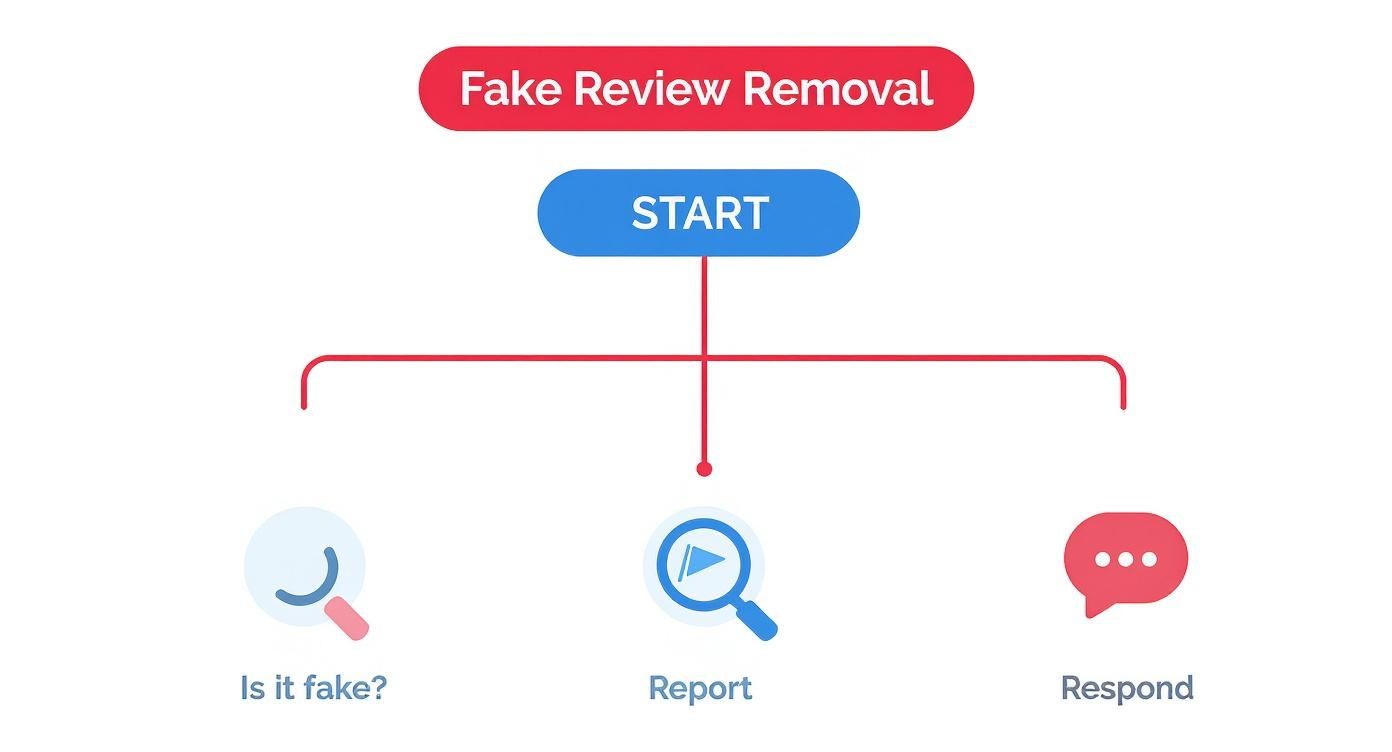
As the flowchart shows, that initial analysis is the critical step. It guides you toward the right action—reporting the fakes and professionally responding to the rest.
Identifying Removable Reviews: A Quick Guide
To help you quickly spot a review that's worth reporting, I've put together this quick-reference table. It breaks down the most common violations with real-world examples to help you recognize a valid removal candidate when you see one.
| Type of Violation | What to Look For | Example Scenario |
|---|---|---|
| Spam | Gibberish text, promotional links, repetitive content from multiple profiles, or a sudden influx of negative reviews. | A local plumbing company receives 5 one-star reviews in an hour from new accounts with generic names, all mentioning a competitor's website. |
| Conflict of Interest | The reviewer’s name matches a former employee, a known competitor, or someone with a personal vendetta against ownership. | A law firm gets a scathing review from an individual who was terminated a week prior, discussing internal company matters unrelated to client services. |
| Off-Topic Rant | The review contains no details about a customer experience and instead focuses on political beliefs, social issues, or personal attacks. | A coffee shop receives a one-star review complaining about the political bumper sticker on a car parked outside, without mentioning the coffee or service. |
| Hate Speech | The use of slurs, discriminatory language, or threats aimed at your staff or other customers based on identity. | A restaurant receives a review that uses racial slurs to describe its staff members. This is a severe violation that should be reported immediately. |
Ultimately, your success hinges on building a case. The more clearly you can connect a review to a specific policy, the better your chances.
Key Takeaway: Success in getting a review removed depends entirely on your ability to connect it to a specific, documented policy violation. Emotion and frustration have no place in a removal request; only evidence-based reporting works.
How to Build a Case Google Can't Ignore
If you want to get a bogus Google review taken down, you can't just flag it and hope for the best. You need to think like a prosecutor building an airtight case. Google's moderators, whether they're algorithms or actual people, run on evidence. Your frustration doesn't count, but well-documented proof does.
This prep work is what separates a successful removal request from one that gets ignored. Your report is the claim, but your documentation is the proof. Without it, you’re just another business owner complaining about a bad review. The goal is to hand Google a file so clear and compelling that removing the review is the only logical outcome.

Start with Pristine Documentation
First things first: capture the evidence exactly as it appears on Google. Don't crop, edit, or alter a thing. The raw data is your most credible asset.
- Screenshot the Full Review: Grab an image of the entire review—reviewer's name, star rating, the full text, and the date. A partial screenshot can look sketchy, so use a browser extension if you need to capture the whole page in one go.
- Screenshot the Reviewer's Profile: Click the reviewer's name to see their public contributions page and take another full screenshot. This is often where the mask slips. You might find a generic name, no profile picture, or a suspicious pattern of leaving similar negative reviews for your competitors.
- Copy the URLs: Don't forget this part. Grab the direct URL for both the review itself and the reviewer's profile page. This makes it incredibly easy for the Google support team to find exactly what you're talking about.
This initial evidence packet establishes the who, what, and when of the situation. It’s the foundation of your entire case.
Connect the Dots with Your Internal Data
Now, it’s time to prove the review is illegitimate by checking it against your own records. Honestly, this is the most important part of the process because it directly refutes the person's claim that they were a customer.
Dig into your CRM, billing software, email lists, or appointment logs. Search for the reviewer’s name. If you come up empty, you’ve found your smoking gun. A simple, direct statement in your report like, "We have no record of a customer named 'Jane Smith' in our systems, past or present," is incredibly powerful.
When you're building your case, specifics are everything. It’s not enough to just say a review is "fake." You have to lay out a logical argument, backed by your screenshots and internal data, that proves why it's fake.
For example, if the review complains about a product you’ve never sold or a service you don’t even offer, point that out directly. This creates a factual contradiction that’s hard for any moderator to dismiss. For more on how to frame your complaint, our guide on how to report fake Google reviews breaks down additional strategies.
Identify and Document Attack Patterns
Sometimes, a single fake review isn't a one-off event—it’s a coordinated attack. I've seen this happen with shady competitors or disgruntled former employees time and time again. Spotting a pattern can seriously strengthen your case.
Keep an eye out for these red flags:
- A Sudden Onslaught: A burst of 1-star reviews all appearing in a short window, like several in a single day.
- Ghost Profiles: The reviewers all have brand-new Google accounts, no profile pictures, and zero review history.
- Copy-Paste Language: The reviews use suspiciously similar phrasing, spelling mistakes, or talking points.
If you notice a pattern, create a simple spreadsheet to track it. List the reviewer names, dates, and links to each review, then add a column explaining the suspicious connections. Presenting this bundled evidence shows Google you're not just dealing with one unhappy customer but a malicious campaign, which almost always triggers a much more serious investigation.
Putting Your Evidence to Work: The Official Google Removal Process
Alright, you've done the detective work and have your evidence lined up. Now it's time to submit your removal request through the proper channels—and yes, this is the only legitimate way to get it done. The key here is precision, patience, and keeping a level head. Your goal is to present a clear, factual case, not to vent your frustrations.
Think about the sheer volume Google deals with. In 2020 alone, their systems and human moderators took down a staggering 55 million policy-violating reviews. That number gives you a sense of the scale they're operating at, especially when you consider that some estimates suggest up to 11% of all Google reviews might be fake. Your well-documented request needs to cut through that noise and make it easy for a moderator to see the clear violation. According to Shapo.io, the problem is massive.
This first submission is your best shot, so let’s make it count.
Submitting the Request Straight from Your Business Profile
The most direct route is to flag the review right from your Google Business Profile dashboard. Google has a "Report a review" tool built for exactly this, but how you use it makes all the difference.
It's a straightforward process:
- Jump into the 'Reviews' section of your profile and find the one you need to report.
- Click the three-dot menu right next to the review and hit "Report review."
- This next part is crucial: you'll see a list of potential policy violations.
The reason you select has to match the evidence you've gathered. Don't just pick something generic. If you have documentation showing the reviewer is a disgruntled ex-employee, you need to choose "Conflict of interest." If the review is just a bizarre, unrelated rant, then "Off-topic" is the way to go.
As you can see, the categories are quite specific. Picking the right one sends your case to the correct team and immediately frames the issue for the person reviewing it.
My Best Practices for a Strong Submission
You don't get a lot of space to plead your case in this initial form, so you have to be direct and professional.
- Facts, not feelings. Avoid emotional outbursts like "This reviewer is a liar!" Instead, state the facts calmly and objectively. Something like, "We have searched our CRM and have no record of a customer matching this name or the details of this transaction."
- Hint at your evidence. You can't upload files here, but you can reference them. I've found a quick note like, "We have screenshots of the reviewer's public profile showing a pattern of similar attacks on other local businesses" can be very effective.
- One and done. Resist the urge to report the same review over and over. It won't speed things up—in fact, it can get your account flagged for spam and sink your chances. Submit it once, then wait.
My Pro Tip: Before you even hit report, consider posting a calm, professional public reply. A simple, "We take all feedback seriously, but we can't find any record of this interaction in our system. We'd appreciate it if you could contact our management team directly to resolve this," accomplishes two things. It shows other potential customers that you're responsive, and it puts the ball in the reviewer's court while you work on removal behind the scenes.
What to Expect: Timelines and Status Updates
Once you’ve submitted your request, the waiting game begins. This isn't an instant process. I've seen decisions come back in as little as 3 business days, but it can easily take 7 business days or longer, especially if the case is tricky or Google's team is swamped.
You can keep an eye on things in the "Report a review" tool. The statuses you'll see are pretty self-explanatory:
| Status | What It Means | Your Next Step |
|---|---|---|
| Pending | They have your request, and it's in line to be reviewed. | Sit tight. There's nothing else to do for now. |
| Decision Made | A human has looked at your case and made a call. You should get an email with the verdict. | If it's approved, the review will vanish. If denied, it's time to think about an appeal. |
| Not Escalated | This is the one you don't want to see. It means the initial review didn't find a policy violation. | This is when you'll need to gather more detailed evidence and escalate the case. |
Seeing "Not Escalated" feels like a punch to the gut, but don't give up. This is often just the result of a first-pass, sometimes automated, review. It's definitely not the end of the road. Your next move is to appeal, which is exactly what we'll cover in the next section.
What to Do When Google Denies Your Removal Request
It’s a frustrating moment for any business owner: you’ve carefully documented a fake review, submitted your request, and then you get that dreaded email from Google. Request denied. It feels like a dead end, but it’s really not.
Think of that initial denial as Google’s automated gatekeeper. It’s a filter, and your job is now to get your evidence in front of a real person. Don't give up. This is where a little persistence and a clear strategy can turn things around.
Rushing into an angry reply or firing off multiple requests won't help. The key is to patiently and methodically escalate your case.
The Appeals Process: Getting a Human Review
If your first flag gets rejected, your immediate next step is to appeal the decision. This is your first real chance to get a human from the Google Business Profile support team to look at your situation.
The appeal process elevates your case beyond the algorithm. It opens a channel where you can provide the context and proof that the simple reporting form just doesn’t have room for.
Here’s how to kick it off:
- Head back to the review management tool where you first reported the review.
- Find the flagged review and check its status. If it was denied, you should now see an option to appeal.
- This is where you bring out your documentation. The appeal form gives you space to provide more information. Use it. Attach your screenshots and clearly explain why the review violates a specific policy.
My Advice: Keep your appeal summary concise and factual. The goal is to make it incredibly easy for the human reviewer to see the violation. Point them directly to the evidence you've gathered. Don't just resubmit; build a compelling case.
Escalating Through Google Business Profile Support
Sometimes, the direct appeal doesn't work, or maybe the option isn't even available. In that case, it's time to contact Google Business Profile support directly. This is often the most effective route, though it takes a bit more effort.
Going through the main support channel lets you communicate directly with a support agent, share your case history, and present all your evidence.
When you open a support ticket, have this information ready:
- Your Original Case ID: This is critical. Always lead with the case ID from your initial removal request so the support team can immediately pull up your file.
- A Clear Summary: State the policy violation in one or two sentences. For example, "This review is from a former employee and represents a conflict ofinterest under your policy."
- Your Evidence: The support interface typically allows you to attach files. Upload your screenshots and any other proof you have.
This direct interaction is often the secret to getting a stubborn review removed. You're no longer just an anonymous flag in a massive system; you're a business owner making a logical argument to another person.
The Final Option: Legal Takedown Requests
In rare and serious situations, a review might go beyond being fake and cross into illegal territory, like defamation. If a review contains libelous statements causing real financial harm or makes false accusations of criminal behavior, you may need to pursue a formal legal takedown.
This is a completely different—and much more serious—process than reporting a simple policy violation. You’ll submit your request through Google's dedicated legal help page, and the documentation standards are understandably high.
Typically, you'll need to:
- Pinpoint the exact statements you claim are defamatory.
- Explain why they are factually untrue.
- Provide a court order or other formal legal document that proves the content is unlawful.
This isn't a path to take lightly and usually requires consulting with an attorney. It’s the last resort for reviews that cause significant, provable harm and violate the law, not just Google’s own rules.
Building a Reputation That Resists Fake Reviews
Winning the battle to remove a fake review is a short-term fix. The real long-term strategy is to build an online reputation so strong that a single negative or fraudulent review barely even registers. Think of it as creating a "reputation buffer"—a solid wall of authentic, positive feedback from your actual customers.
This proactive approach completely dilutes the impact of any random attack. When your Google Business Profile is packed with dozens, or even hundreds, of glowing reviews, one outlier just loses its power. It's the difference between panicked damage control and consistently building a foundation of trust that speaks for itself.

Cultivating a Stream of Genuine Feedback
You can't just sit back and hope for good reviews to roll in. You have to make it incredibly easy for happy customers to share their experiences. The trick is to weave a simple, non-intrusive review request right into your customer's journey. Just remember, Google's policies strictly forbid "review gating"—cherry-picking only happy customers for reviews—so whatever you do, it has to be fair game for everyone.
Here are a few proven methods that work:
- Email and SMS Follow-ups: After a purchase or service, a simple message thanking the customer and providing a direct link to your Google review page is gold. Timing is everything. Send it while the experience is still fresh in their mind, but not so quickly that it feels like a pressure tactic.
- QR Codes in Your Place of Business: A QR code on a receipt, business card, or tabletop sign is a game-changer. Customers can scan it with their phone and land directly on your review page, cutting out all the friction.
- Personal Requests at the Point of Sale: If you've just had a great conversation with a customer, a simple, "We'd be so grateful if you could share your experience on Google," can be incredibly effective. Just keep it casual and never make them feel obligated.
The goal is to create a consistent, natural flow of feedback. This doesn't just boost your star rating; it also sends strong signals to Google’s algorithm that your business is active, legitimate, and valued by customers.
The Power of Responding to Every Review
Responding to reviews is probably the most underrated part of managing your online reputation. It’s not just about putting out fires when negative feedback appears; it's a chance to engage with your entire customer base and put your professionalism on full display. In fact, a thoughtful reply can often neutralize a bad review far more effectively than getting it removed.
Your responses show potential customers that you're listening, you care, and you’re committed to making things right. However, there’s a surprising twist. An analysis of nearly 50,000 deleted reviews found that a shocking 89.6% were actually 5-star ratings. This suggests Google’s algorithms are extremely sensitive to anything that smells like fake positive feedback. It’s a paradox, but even your well-intentioned replies to glowing reviews could trigger scrutiny if they come off as overly promotional.
Key Insight: A thoughtful public response can transform a negative review into a demonstration of excellent customer service. It shows accountability and a commitment to resolution, which can be more persuasive to potential customers than a perfect 5.0 rating.
Managing Your Reputation Proactively
To truly build a reputation that can withstand attacks and consistently attract positive feedback, you need a system. This is where dedicated platforms can make a huge difference.
Exploring various review management software tools can help you automate everything from monitoring new reviews to responding quickly and requesting feedback. This kind of tech ensures you never miss a beat.
The following table breaks down the two core approaches to managing your online reputation—the one you want to avoid, and the one you should be aiming for.
Review Management Best Practices
| Strategy | Proactive Approach (Prevention) | Reactive Approach (Damage Control) |
|---|---|---|
| Focus | Building a consistent stream of positive, authentic reviews to create a "reputation buffer." | Scrambling to remove negative or fake reviews after they've already been posted. |
| Timing | Ongoing, integrated into the daily customer experience. | Sporadic, triggered only by negative events. |
| Tools | Review request automation, monitoring software, QR codes, email/SMS campaigns. | Google's flagging tool, support tickets, legal takedown requests. |
| Outcome | Creates a resilient brand image where single negative reviews have minimal impact. | High-stress, time-consuming, and often with uncertain results. Leads to a volatile rating. |
Ultimately, a proactive strategy gives you control. You're not just waiting for problems to happen; you're building an asset that strengthens your business day in and day out.
A well-managed online presence is a core business asset. For a deeper look into the strategies that can fortify your brand, check out our complete guide on managing your online reputation.
By focusing on these proactive strategies, you shift from a defensive posture to an offensive one. You aren't just protecting your rating; you're actively building a powerful, trustworthy brand that can weather any storm.
Answering Your Top Questions About Google Review Removal
When you're in the trenches trying to get a bogus review taken down, you're bound to run into some specific roadblocks. Let's tackle some of the most common questions I hear from business owners who are navigating this process.
How Long Does It Take for Google to Remove a Review?
I wish I could give you a concrete number, but the truth is, it varies. For your initial removal request made through your Google Business Profile dashboard, you're generally looking at a 3 to 7 business day turnaround for a decision. But that’s just a guideline—sometimes it’s faster, and sometimes it gets stuck in a queue.
If your first attempt gets denied and you have to escalate it, be prepared to wait a bit longer. When you appeal and get a real person involved from Google's support team, that typically adds another 1 to 2 weeks to the timeline.
Legal takedown requests are a whole different ballgame. Since they involve serious legal claims, they go through a much more rigorous process. These can easily take several weeks, and in complex cases, even months. My advice? Keep your case ID somewhere safe so you can reference it in any follow-up communication.
Can I Pay a Service to Get Google Reviews Removed?
Tread very, very carefully here. If any service guarantees they can remove a negative review for a fee, run the other way. That's a massive red flag.
Google has no "pay-to-remove" feature. The companies making these bold promises are often using sketchy, black-hat tactics that can backfire spectacularly. Some will file bogus legal claims, like a fraudulent DMCA notice, claiming the review is a copyright violation just to trigger an automated removal. These tricks not only violate Google's policies but could get your entire Business Profile suspended.
A legitimate reputation management agency will never guarantee removal. What they can do is help you build the strongest possible case based on Google's actual policies and guide you through the official appeals process. They work within the system, not against it.
Will Responding to a Bad Review Hurt My Removal Chances?
Absolutely not. In fact, I always recommend it. A professional public response is a smart two-pronged strategy: it helps manage public perception while you handle the removal request behind the scenes.
A calm, polite reply shows potential customers that you're on top of things. The key is to avoid a public shouting match or admitting any fault if the review is completely fabricated.
A simple, effective formula looks like this:
- Thank them for their feedback.
- Mention you can't find them in your customer database.
- Politely ask them to contact you directly to sort it out.
For instance: "We take feedback like this very seriously, but we don't have a record of your name or visit in our system. We'd appreciate it if you could contact our manager directly so we can understand the situation better." This shows everyone else you're reasonable and puts the ball back in the reviewer's court, all while you're working on getting the review removed privately.
What if a Former Employee Leaves a Fake Review?
This is one of the most clear-cut violations you can report. Reviews from former employees are a direct breach of Google's conflict of interest policy. They aren’t from a real customer; they’re usually a form of retaliation.
When you flag this review, be sure to select "Conflict of Interest" as the violation type. This gets it into the right hands from the start.
If you have to escalate to support, be direct. Don't just report it—explain it. A simple statement like, "This review was posted by a disgruntled former employee, not a customer. This is a direct violation of the conflict of interest policy," gives the support team the exact context they need to act quickly.