


That sinking feeling when a one-star review pops up is something every business owner knows. It feels personal, urgent, and you want it gone—yesterday. But before you jump into action, take a breath. The first, most critical move is to figure out if the review actually breaks Google’s rules.
This is the fork in the road. Google won’t remove a review just because it’s harsh or you disagree with it. It has to violate a specific policy. Understanding this distinction from the get-go will save you a ton of frustration.
Your First Move When a Bad Review Appears
Seeing a negative comment on your Google Business Profile can derail your whole day. The instinct is to fight back or find the "delete" button immediately, but a cool-headed, strategic approach works far better.
First things first: assess the review objectively. A customer who had a genuinely bad experience and is voicing their frustration is, in most cases, allowed to do so. That's just part of doing business. But a review laced with threats, posted by a disgruntled ex-employee, or clearly meant to tank your rating with fake information? That’s a different story entirely. That’s a policy violation.
Understanding Policy Violations
This is where you need to put on your detective hat. Before you even think about flagging it, you have to find the specific rule it breaks. Google has a long list of prohibited content.
Ask yourself these questions:
- Is this review obviously spam or from a fake account?
- Does it contain harassment, hate speech, or threats?
- Is it completely off-topic—maybe a rant about politics that has nothing to do with your business?
- Does it include someone's private information?
If the review is just negative without crossing these lines, your energy is better spent elsewhere. Knowing what to do about 1-star reviews that are legitimate is a crucial skill. Often, the best path forward is to craft a professional, empathetic public response. We have a whole guide on https://levelfield.io/blog/how-to-respond-to-negative-google-reviews that can help you turn a bad situation around.
The most important thing to remember is that Google’s moderators don't care if you think the review is unfair. Your entire case for removal hinges on proving a clear violation of their published content policies.
To help, here's a quick checklist you can run through whenever a questionable review appears.
Quick Checklist for Removable Google Reviews
| Violation Type | Description | Does the Review Qualify? |
|---|---|---|
| Spam & Fake Content | Posted by bots, fake accounts, or contains promotional links. | ☐ Yes / ☐ No |
| Off-Topic | Doesn't describe an experience with your business; focuses on personal rants. | ☐ Yes / ☐ No |
| Restricted Content | Promotes illegal products/services, contains links to malware. | ☐ Yes / ☐ No |
| Illegal Content | Depicts or facilitates illegal acts. | ☐ Yes / ☐ No |
| Harassment | Personally attacks, bullies, or threatens a specific individual. | ☐ Yes / ☐ No |
| Hate Speech | Incites hatred against a group based on race, religion, gender, etc. | ☐ Yes / ☐ No |
| Impersonation | Falsely claims to be someone else or representing an organization they don't. | ☐ Yes / ☐ No |
| Conflict of Interest | Posted by a competitor, ex-employee, or yourself to manipulate ratings. | ☐ Yes / ☐ No |
Keep this table handy. If you can confidently check "Yes" for any of these, you have a solid foundation for a removal request.
This simple decision tree really boils it down.
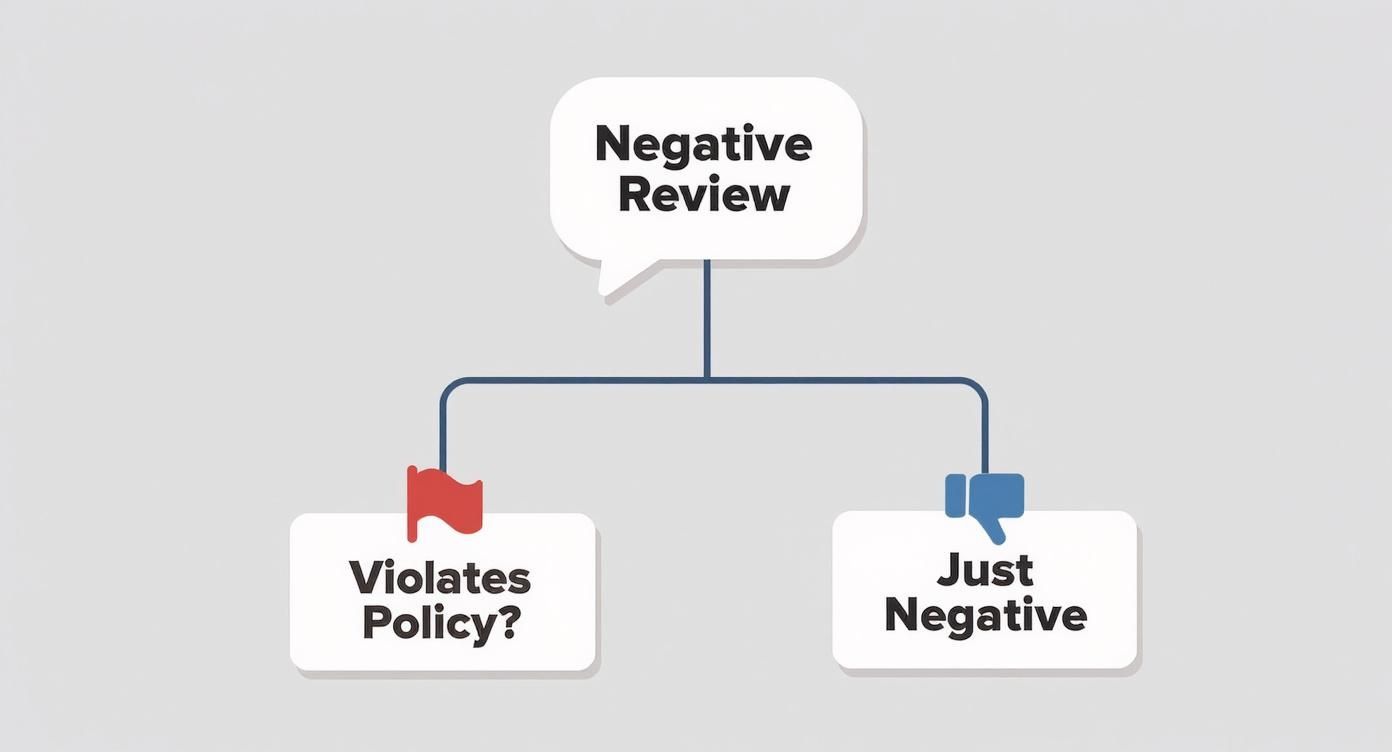
As you can see, your strategy depends entirely on that initial assessment. Is it just negative feedback, or does it genuinely break the rules? Answering that question is always your first and most important step.
Building Your Case for a Review Removal
Getting a fake or malicious review taken down isn't about arguing with Google or trying to prove a customer wrong. It’s about building an airtight case that shows a clear violation of their specific content policies. You have to think like a prosecutor presenting evidence to a judge—your job is to hand them undeniable facts, not just your side of the story.
The whole process kicks off the second you spot a review that doesn't feel right. Your first move, before you even think about hitting that "flag" button, is to document everything. This initial prep work is non-negotiable. If Google denies your first request, this evidence is what you'll need to appeal their decision. A well-organized case file can truly be the difference between a review staying up forever and getting it removed.
Documenting the Evidence
Your documentation needs to be clean, simple, and thorough. I recommend creating a dedicated folder on your computer for each review you challenge. The goal is to capture a complete snapshot of the situation exactly as it is right now, because reviewers can—and do—edit or delete their posts.
Here’s your evidence-gathering checklist:
- A full-page screenshot of the review. Don't just snip the text. Capture the entire screen to show the reviewer's name, their star rating, the date, and the full review content.
- A screenshot of the reviewer’s profile. Click on the reviewer's name and it'll take you to their public contributions page. Screenshot this. It can be a goldmine for spotting suspicious patterns, like a brand-new account with only one review (yours) or a history of copy-pasting the same negative review on multiple business profiles.
- Your internal records. If the review is from a supposed "customer," dive into your CRM or sales records. If you can't find any record of their name, email, or a transaction that matches their story, make a note of it. This is your strongest piece of evidence for proving a review is fake or from a competitor.
Keep your files organized with a simple naming system, like "[ReviewerName]-[Date]-Review.png". When you're dealing with more than one of these, this little bit of organization saves a ton of headaches.
Identifying the Right Policy Violation
Some policy violations, like hate speech, are impossible to miss. But many are more subtle, and this is where most business owners go wrong. You have to look past the star rating and analyze the content for the specific rule it breaks.
Here's a real-world scenario I see all the time: A local coffee shop gets a one-star review saying, "Terrible service and their coffee is way overpriced. Go to [Competitor's Coffee Shop] down the street, they have a 2-for-1 deal this week!"
At first, it just looks like an unhappy customer's opinion. But it’s also a direct promotion for another business, which falls squarely under Google's spam and fake content policy. When you flag it, selecting "Spam" and adding a note that it's promoting a competitor is infinitely more effective than just saying you disagree with it.
Another common tactic is impersonation. Imagine a review from someone claiming to be a "former senior manager" who then spills a bunch of false "insider" information. If you can prove that nobody with that name ever worked for you in that role, you have a slam-dunk case for removal based on impersonation. This is where your internal records become your best friend.
Key Takeaway: Your success rate in getting a review removed is directly tied to how accurately you can match the review's content to a specific Google policy. General complaints fail; specific, documented violations succeed.
The scale of this problem is huge. Google hosts around 58% of all online reviews, and it's estimated that roughly 11% of them could be fraudulent. The stakes are high, too—a business with just four negative reviews can scare off 70% of potential customers. The data also suggests that engagement matters; a staggering 66% of reviews that were eventually deleted had no public reply from the business, which might signal to Google's moderators that the review is less credible. You can learn more about the challenges of managing Google reviews and see how these stats impact a business's online reputation.
By meticulously gathering your evidence and correctly identifying the specific policy breach, you turn a frustrating complaint into a compelling, professional case. This preparation not only gives your initial request the best shot at success but also sets you up to win on appeal if you need to.
Okay, you've done your homework. You've gathered the evidence and pinpointed exactly which Google policy the review breaks. Now it's time to take action and formally report it.
This is the moment where you officially ask Google to step in. Getting this part right from the get-go dramatically improves your odds of getting that harmful review taken down.
You have two main avenues for flagging a review: through your Google Business Profile dashboard or directly on Google Maps. The steps are pretty similar for both, but it’s smart to know your way around each. Let's walk through exactly how to do it.
Flagging a Review from Your Business Profile
This is usually the most direct route. Think of your Google Business Profile (GBP) as your business's command center on Google, and it has a built-in tool just for managing reviews.
First, sign in to the Google account connected to your business.
Once you're in, find the "Reviews" tab, usually in the menu on the left. This will bring up a list of every review your business has ever received.
Now, scroll down and find the problem review—the one you've already documented. Next to the reviewer's name, you’ll see a small icon with three vertical dots. Click on it.
A small menu will pop up. Just select "Report review." This is where your prep work really comes into play, as Google will ask you to explain why you're reporting it.

This next choice is critical. You need to select the violation that best fits the evidence you’ve collected.
Choosing the Most Accurate Violation
Google will show you a list of possible violations. Don't rush this. Pick the option that is the most accurate and the easiest for you to prove.
- Hate speech, harassment, or violence: This is for reviews that cross the line into personal attacks or threats.
- Spam: The perfect category for reviews from bots, fake accounts, or posts that are clearly just advertising something else.
- Conflict of interest: Use this when you're certain the review is from a competitor, a disgruntled ex-employee, or someone with a clear bias.
- Off-topic: This is for reviews that have absolutely nothing to do with a customer experience at your business—like someone complaining about the weather.
After you submit the report, it goes to Google's moderation team for review. Be patient. This can take anywhere from a few days to a couple of weeks. If you’re dealing with a particularly nasty fake review or a coordinated attack, this guide to removing fake reviews quickly might give you some extra strategies.
Using the Review Management Tool
The good news is that you aren't just sending your report into a black hole. Google has a handy Review Management Tool that lets you check the status of every review you've flagged.
To find it, just log into your GBP account, search "my business" on Google, and click the "Reviews" button. You should see a link to the tool. It gives you a running list of your reports and their status—whether a decision is pending, the report was reviewed with no violation found, or if it has been escalated.
Pro Tip: Keep an eye on the Review Management Tool every few days. If Google denies your request, the tool often provides an option to appeal the decision. If you have a strong case, this is your next logical step.
Flagging Directly from Google Maps
You don't actually need to be the business owner to report a review. Anyone can flag a review they see on Google Maps if they believe it violates policy. This can be a helpful strategy if you want to ask a trusted partner or manager to also report a particularly awful review, adding more weight to your claim.
It's incredibly simple:
- Search for your business on Google Maps.
- Click on your reviews to see the complete list.
- Find the review in question, click the three-dot menu right next to it, and hit "Report review."
From there, the reporting process is identical to the one in your GBP dashboard. For a more detailed walkthrough, especially when dealing with fakes, our article on how to https://levelfield.io/blog/report-fake-google-reviews gets into the finer points of the system. Mastering this process is fundamental to protecting your hard-earned reputation.
So, you flagged a review, patiently waited, and then got that dreaded email from Google: "no violation found."
It’s a frustrating moment, for sure. But don't throw in the towel. That initial rejection is almost always automated. It's a bot's take, not a person's. The good news? Your next step is to get your case in front of an actual human being, and that's where you can really make your argument.
This is where your persistence pays off. A rejection doesn't automatically mean you're wrong; it usually just means the algorithm missed the point. Thankfully, Google has a process for exactly this scenario. You just need to know how to use it.
Escalating to Google Business Profile Support
When your first attempt fails, it's time to appeal the decision by contacting Google Business Profile (GBP) support directly. This is your chance to have a real person re-evaluate the evidence you've collected.
You can usually find an appeal option right inside the Review Management Tool. If not, just start a new support ticket through the GBP Help Center. This is where all that documentation you prepared earlier becomes invaluable.
To make a compelling case for a human reviewer, here’s what you need to do:
- Lead with the Case ID: When you first flagged the review, you should have gotten a Case ID. Make sure you include this in every message. It immediately shows the support agent that this isn't a new issue but an appeal.
- Get Straight to the Point: These agents are swamped. Don't bury the lede. State your purpose clearly in the first couple of sentences. For example: "I'm writing to appeal the decision on Case ID [Your Case ID]. This review violates your 'Conflict of Interest' policy, as it was posted by a disgruntled former employee."
- Show, Don't Just Tell: Attach your evidence. This is your moment to present the screenshots of the review, the shady-looking reviewer profile, and any proof you have that their claims are bogus (like an invoice search showing they were never a customer).
Your goal is to make the violation so obvious that the support agent can't miss it. They can connect the dots in ways an algorithm simply can't.
When to Make a Legal Removal Request for Defamation
In some extreme cases, you might need to go beyond the standard support channels. If a review contains a demonstrably false statement of fact that is causing real, measurable harm to your business, you may have grounds for a defamation claim. This allows you to submit a formal legal takedown request.
This is a serious move, so don't take it lightly. "The food was cold" is an opinion. "The owner committed tax fraud" is a false statement of fact that could be considered defamatory.
A legal takedown request is a whole different ballgame. The burden of proof is much higher. You’re no longer just pointing out a policy violation; you're making a legal argument that the content itself is unlawful. Google's legal team reviews these with a fine-toothed comb.
This path is really reserved for the most damaging and blatantly false accusations—the kind that can sink a business. It’s a powerful tool if you're wondering how to remove a Google review that has crossed a legal line.
It might feel like an uphill battle, but it's worth remembering that Google is constantly working to clean up its platform. In a single year, Google removed or blocked over 170 million reviews that violated its policies. What’s really interesting is that a deep dive into the data showed 73% of those deleted reviews were actually 5-star ratings, proving Google is just as focused on weeding out fake positive reviews as it is on fake negative ones. You can dig into more of Google's review moderation data to see the full picture.
Whether you're appealing a simple rejection or weighing a legal request, the strategy is the same: be persistent, be organized, and build a rock-solid case. Don't let that first "no" be the end of the story.
Building a Reputation That Resists Bad Reviews
Learning how to get a bad Google review removed is a necessary skill, but it’s a reactive one. The best long-term play isn't defense—it's building a reputation so solid that the occasional negative comment barely makes a dent. You're shifting from damage control to proactively shaping your own story.
The idea is to create an environment where positive, authentic feedback is the norm. When you have a steady stream of genuine five-star reviews, that one-star complaint from a disgruntled customer looks like what it is: an outlier, not the standard. You're essentially building a fortress of positive sentiment that can withstand a few hits.

Cultivating a Flow of Authentic Positive Reviews
The secret to a great reputation? Just ask. So many of your happy customers are perfectly willing to leave a review, but life gets in the way and they forget. A simple, well-timed nudge is often all it takes.
The key is to make it incredibly easy for them. Nobody wants to fill out a long, complicated survey. A quick email or text a day or two after a purchase, on the other hand, can work wonders.
Here are a few methods I’ve seen work time and again:
- Personalized Email Requests: A short, friendly email thanking the customer and dropping in a direct link to your Google review page is a classic for a reason. It's effective.
- QR Codes in Physical Locations: For any brick-and-mortar business, this is a game-changer. Put a QR code on a receipt, a small sign at the counter, or a sticker on the door. It takes customers right where you want them to go with zero friction.
- SMS Follow-ups: Text messages have sky-high open rates. A simple message like, "Thanks for stopping by! Mind sharing your experience with us?" along with a link, gets fantastic results.
A quick word of warning, though: keep it genuine. Encouraging reviews is smart business, but trying to buy them with discounts or pressuring customers is a direct violation of Google's policies. It's a risky move that often backfires. In fact, a fascinating analysis of 50,000 deleted reviews found that a shocking 89.6% were actually 5-star ratings. This shows Google's algorithm is sharp enough to spot reviews that look artificial. You can dig into more of Google's review deletion trends on localo.com.
Intercepting Negativity with a Feedback Loop
One of the smartest ways to stop bad reviews is to solve the problem before a customer feels the need to complain publicly. A private feedback loop gives unhappy clients a direct line to you, not to the world.
This doesn't have to be some complex, expensive system. It can be as simple as an automated follow-up email that asks, "How did we do?" If they had a great experience, the next step is a link to your Google review page. If they had a bad one, you route them to a private contact form or provide a manager's direct email.
This strategy does two brilliant things at once:
- It contains the fire. You give a frustrated customer a productive outlet and a chance to feel heard, keeping the negativity off your public profile.
- It creates a chance to recover. You learn about a problem and get to fix it. This is how you turn a one-star experience into a five-star resolution and earn a customer for life.
This isn't about hiding from criticism. It's about showing your customers you're committed to getting it right and that their private feedback is just as valuable—if not more so—than a public review.
The Power of a Professional Response
No matter how dialed in your service is, a negative review will eventually pop up. It’s inevitable. But how you respond is what truly defines your business for every potential customer who's watching. A calm, professional, and helpful response can completely neutralize a bad review.
Always respond quickly. Lead with empathy, not excuses. Avoid getting dragged into a public fight at all costs. Just acknowledge their frustration, apologize that you missed the mark, and offer to take the conversation offline to find a solution.
Here’s a simple, effective template: "Hi [Customer Name], thank you for sharing this with us. We're truly sorry to hear your experience wasn't what it should have been. That’s not the standard we hold ourselves to, and we’d like the opportunity to make things right. Please reach out to us directly at [Phone Number/Email] when you have a moment."
This kind of response screams accountability and a real commitment to your customers. It tells everyone reading that you care. By making these strategies a core part of your process, you can stop worrying about how to remove a Google review and start building a truly resilient online reputation.
Common Questions About Removing Google Reviews
When you're dealing with a problematic review, a lot of questions pop up. What's the timeline? What if Google says no? Is it worth getting lawyers involved? It's easy to get lost in the "what-ifs."
Let's cut through the noise and get straight to the answers for the most common questions we hear from business owners.
How Long Does It Take for Google to Remove a Review?
This is the big one, and the answer is… it depends. While there's no official stopwatch, you can typically expect to hear something back within 3 to 10 business days.
Initially, your flag goes through an automated system. Think of it as a first-pass filter looking for blatant, easy-to-spot violations. If the algorithm flags something obvious, the review might come down quickly.
If the situation is more nuanced, it gets kicked up to a human for a manual review, and that can add a few more days to the process. You're not left completely in the dark, though. You can keep an eye on your request's status in the Review Management Tool in your Google Business Profile. If a couple of weeks go by with radio silence, it’s probably time to escalate your case with a direct appeal.
Can I Sue Someone for a Fake Google Review?
Technically, yes, you can. But this should be your absolute last resort. Think of it as the nuclear option—it's expensive, time-consuming, and the bar for success is incredibly high.
To win a defamation lawsuit, you can't just show that a review is negative; you have to prove it's factually false and caused real financial damage to your business.
Here’s what a legal case typically requires you to demonstrate:
- The review contains false statements of fact, not just someone's opinion (e.g., "They have roaches" vs. "The service was slow").
- Your business suffered measurable financial harm because of that review.
- The reviewer published it with malice or a complete disregard for the truth.
The process usually starts with filing a "John Doe" lawsuit to then subpoena Google for the reviewer's identity. It’s a serious step for only the most egregious and damaging attacks.
A word of caution: Lawsuits are public record. Going this route can sometimes shine an even brighter spotlight on the very review you're trying to make disappear.
Will Deleting My Business Profile Get Rid of Its Reviews?
No, and this is a critical point that trips a lot of people up. Deleting your Google Business Profile will not remove its reviews.
The reviews are attached to the physical business location, not your account as its manager. Even if you un-verify and "delete" your profile, the listing often stays live on Google Maps, complete with all its reviews. Walking away from your profile just means you lose the ability to manage it—the problem itself doesn't go away. The only real solutions are to flag the review for removal or pursue a legal takedown.
Should I Respond to a Fake Review?
Yes. Always. Even if you're 100% certain the review is fake and you've already reported it, posting a calm, professional public reply is a smart move. Why? Because other potential customers are watching.
Your response shows everyone else that you're engaged, professional, and on top of your customer service. The key is to keep it short, polite, and non-confrontational. Don't get dragged into a public fight.
Here’s a simple, effective template: "We take feedback from our customers very seriously, but we can't find any record of this person or transaction in our system. We believe this review may have been posted in error. We'd appreciate it if you could contact our management team directly so we can look into this further."
This approach accomplishes two things at once: it professionally questions the review's legitimacy for other readers while you handle the removal process behind the scenes. It's a win-win.