


If you're trying to figure out how to delete a Google Business listing, you might be looking for a "delete" button that just isn't there anymore. Google has shifted its approach, prioritizing a complete public record over simple removal. Now, your primary option through the dashboard is to mark your business as 'Permanently Closed', which keeps the profile and all its precious (or painful) reviews visible to the world.
Why You Can't Just Delete a Google Business Listing
It wasn't always this complicated. In the past, removing a Google Business Profile (or Google My Business, as it was called) was much simpler. But Google's philosophy has evolved. They now see a business's history—its location, photos, and especially customer reviews—as valuable public information that shouldn't just vanish.
This policy change means the old idea of "deletion" is off the table for most business owners. When you go through the standard steps today, you're not wiping the listing from existence; you're just changing its status for future customers.
Closing vs. Removing: A Critical Distinction
Getting a handle on the difference between closing and removing your profile is the first—and most important—step. It's the key to understanding what's possible and whether you can manage this on your own or need to bring in some help.
Marking a business 'Permanently Closed' is the standard, Google-approved path for any business that has shut its doors. This action slaps a big red banner on your profile, letting everyone know you're no longer in business. But—and this is a big but—the profile, along with every single review ever left, stays right there on Google Search and Maps.
Getting a profile permanently removed, on the other hand, means it's gone for good. Wiped from Google's servers. This isn't an option you'll find in your GBP dashboard. It's a route reserved for very specific scenarios, like dealing with fake profiles, duplicate listings, or malicious attacks. In fact, the impact of fake Google My Business profiles can be devastating, making removal a necessity in those cases.
To make it crystal clear, here’s a quick breakdown of what to expect from each action.
Closing vs Removing Your Google Business Profile
| Action | What Happens to the Listing? | Are Reviews Still Visible? | Can Customers Find It? | Best For |
|---|---|---|---|---|
| Mark as 'Permanently Closed' | Stays live but with a "Closed" banner. You lose management access after a while. | Yes, all past reviews and photos remain public. | Yes, it will still appear in search results, especially for direct name searches. | Legitimate businesses that have closed down, moved, or rebranded. |
| Request for Removal | The listing is completely erased from Google Search and Maps. | No, the profile and all associated content, including reviews, are gone. | No, once removed, it's as if it never existed. | Duplicate listings, fake/spam profiles, or listings for ineligible businesses. |
The main takeaway? "Closing" is just a status update. "Removal" is a complete erasure.
Recent Google updates have made it much harder for business owners to get a profile removed on their own. For most, the only self-serve option is to mark it as closed. If you need a profile gone completely, you'll likely need to work with online reputation experts who know how to navigate Google's complex support system.
And before you go down either path, make sure you're not giving up a powerful marketing tool. It’s always worth learning more about optimizing your Google Business Profile to see if you can turn things around first.
What To Do When Your Business Has Permanently Closed
If you've closed up shop for good, the official and most straightforward way to handle your Google listing is to mark it as 'Permanently Closed'. This isn't the same as completely erasing it from Google, but it's the right way to let customers—and Google's algorithm—know you're no longer in business.
Think of it like putting a "Closed" sign on your physical storefront. It's an unambiguous signal to anyone searching for you that you've shut down. The whole process is done right from your Google Business Profile (GBP) dashboard.
Finding the Right Setting in Your Profile
First things first, you need to be logged into the Google account that manages the business profile. Once you're in, the steps are pretty simple. You're basically heading into your main business info settings to make the change.
Navigate to your profile and look for the 'Hours' section. It's the same place you'd go to adjust your daily operating hours.
As you can see, right next to the options for your daily schedule, you'll find choices for "Temporarily closed" and "Permanently closed."
Go ahead and select "Permanently closed" and save your changes. Google usually processes this update pretty quickly, and you should see it reflected on Google Search and Maps within minutes.
How This Looks to the Public
Once your profile is updated, customers will see a very clear change. A bold, red banner appears across your listing, announcing that the business is permanently closed. This is a huge help in managing customer expectations and stops people from making a wasted trip to your old location.
It's also critical to understand what doesn't happen:
- Your old reviews stay put. Every review, good or bad, will remain publicly visible on the profile.
- Photos and other info stick around. Any photos uploaded by you or your customers, along with other business details, will still be there.
- Your profile gets less visible, but doesn't disappear. Your listing will still show up if someone searches for your business name directly, but it will stop appearing in general searches for your industry, like "plumber near me."
The Bottom Line: Marking your business as 'Permanently Closed' is a status change, not a complete deletion. It preserves the profile as a historical record while clearly telling everyone you've closed. For any legitimate business that has shut down, this is the correct move.
Tackling Duplicate and Unauthorized Listings
Sometimes, the problem isn't a business you want to close, but a rogue listing that's misrepresenting your brand. This is a surprisingly common and frustrating issue. You might find accidental duplicates created by Google’s own algorithm, old profiles from a previous owner, or even malicious fake listings set up to intentionally mislead your customers.
Letting these sit online is a recipe for disaster. Unauthorized profiles can siphon away customers, display completely wrong information, and collect bad reviews that have nothing to do with your actual business. Taking action isn't just about cleaning things up; it's a critical defense of your brand's integrity. The game plan involves flagging these listings directly with Google and backing up your claim with solid proof.
The Reporting Process for Problem Listings
Google’s primary weapon for this fight is the “Suggest an edit” feature. When you stumble upon a duplicate or fake listing on Google Search or Maps, this is your first move.
Within that tool, you have two powerful options:
- Mark as a “Duplicate of another place”: This is your go-to when you find an identical, competing profile for your business. Google will ask you to point to the correct profile so they can merge them.
- Flag as “Spam, fake, or offensive”: Use this for listings that are clearly fraudulent, impersonating your brand, or breaking other Google policies.
Once you report a duplicate, Google’s team will review the claim. Be patient here. This isn't an instant fix; the review process can take anywhere from a few days to several weeks, depending on how clear-cut the situation is and the quality of the evidence you provide.
The decision tree below helps visualize when marking a business as "closed" is enough versus when a more direct removal approach is necessary.
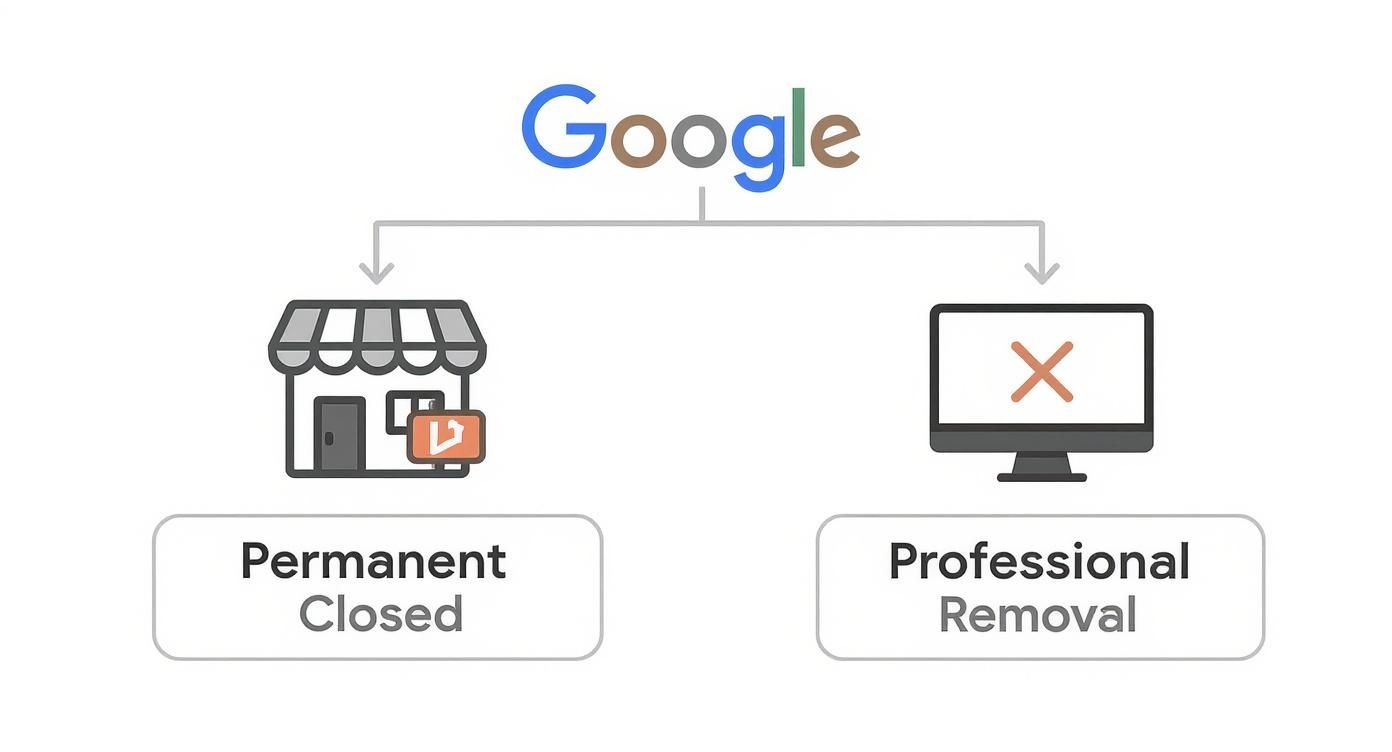
This guide makes it clear: for legitimate closures, marking the business "Permanently Closed" is the standard procedure. But for those pesky unauthorized listings, you need to pursue a professional removal process.
Assembling Your Evidence
Google runs on proof. If you want to successfully get an unauthorized listing removed, you have to build a strong, evidence-based case. Simply saying "that's not me" won't cut it.
To get this done quickly, you need to provide clear, undeniable proof that your business is the legitimate one and the other listing is wrong. Think photos of your permanent storefront signage, a copy of your business license showing the correct address, or even a recent utility bill.
The bar for profile accuracy is higher than ever. Google's verification standards have gotten much stricter, and as new research shows, outdated profiles and fake reviews are costing brands real customers. You can read the full research about these findings from Birdeye.
Your objective is to make it incredibly easy for Google to see that your verified profile is the single source of truth and the other listing is a harmful error that needs to go.
When It's Time to Call in the Pros
Let's be honest: sometimes, the DIY route just doesn't cut it. You can mark a business "Permanently closed" or report a duplicate listing until you're blue in the face, but certain situations are too complex or high-stakes for the standard tools.
This is where you might need to bring in a professional. Think about a nightmare scenario, like a disgruntled ex-employee creating a fake, damaging listing for your business. Or maybe you bought a company, but the previous owner is nowhere to be found, leaving you locked out of the official profile they still control. In these tough spots, you need more than a simple "report" button—you need a real strategy.
Tackling the Trickiest Removal Cases
When you're up against a hostile or locked-out listing, your first instinct might be to contact Google Support. The problem? Reaching the right department and getting them to take meaningful action can feel like shouting into the void. It’s a slow, often frustrating process that can leave you feeling powerless.
This is exactly where professional removal services shine. They live and breathe Google's internal policies and know precisely how to build a case that gets a real person's attention.
These experts are your best bet for situations like:
- Brand Impersonation: Someone has set up a fake profile that's actively misleading your customers and hurting your brand.
- Locked-Out Profiles: You legally own the business but can't access the listing because of lost credentials or an uncooperative seller.
- Malicious Listings: A profile was created with the sole purpose of harassing you or defaming your business.
- Stubborn Duplicates: You've tried everything, but duplicate listings keep popping back up because Google's automated systems can't fix the issue.
How a Removal Service Actually Works
Hiring a professional isn't about finding a magic button or some secret backdoor. It's about leveraging deep expertise. These services meticulously document every policy violation, building a legally and factually sound case that they present directly to the right people at Google.
A good service will be upfront and honest—they'll never guarantee an instant takedown. Instead, they'll give you a realistic assessment, tell you exactly what evidence is needed, and then handle the entire communication marathon for you.
They become your advocate, saving you from the headache of endless follow-ups. They do the research, compile the documentation, and manage the communication needed to escalate your request properly.
While there's a cost involved, the investment often pays for itself by quickly stopping the financial and reputational bleeding a rogue listing can cause. For legitimate cases backed by solid proof, success rates are generally quite high.
If you're facing one of these frustrating challenges, exploring professional help is a smart next step. You can find out more about how a specialized team can assist with your specific Google My Business content removal situation and what that process looks like. When your brand's integrity is at stake, getting an expert in your corner is the fastest way to take back control.
Common Mistakes That Can Get Your Profile Suspended

Thinking about gaming your Google Business Profile? Think again. It's a risky move that almost always ends with a suspension, which is a massive headache you don't want. One day you're getting calls and traffic; the next, you've vanished from Google Search and Maps.
Getting a profile reinstated is a painful, drawn-out process. So, before you even think about drastic steps like figuring out how to delete a Google Business listing just to get a "fresh start," you need to understand what gets you in trouble in the first place. Trust me, Google's systems are incredibly good at spotting people trying to bend the rules.
The Myth of Deleting Bad Reviews
Let's get this one out of the way, because it's a trap I've seen countless business owners fall into. They get a string of bad reviews and think, "I'll just delete this profile and make a new one." It never, ever works.
Google has a long memory. It keeps historical data tied to your business name, address, and phone number. When you create a new profile, its algorithm immediately flags it as a duplicate or an attempt to manipulate the system. Instead of wiping the slate clean, you just get your new profile suspended, leaving you with zero visibility and the original bad reviews still floating around in the digital ether. It’s the definition of a lose-lose.
Key Takeaway: A suspension is infinitely worse than a few bad reviews. Don't ever delete a profile to escape your review history. The only real solution is to focus on earning new, positive reviews and responding professionally to the negative feedback.
Other Common Suspension Triggers
It's not just review schemes that get profiles flagged. A lot of well-meaning business owners make simple mistakes that trigger Google's quality guidelines.
The impact is real. Recent data shows that 61% of businesses with a suspended profile saw a major drop in leads and calls. The top culprits were address verification failures (42%), messing with the business name (28%), and—you guessed it—review manipulation (17%). These aren't just abstract numbers; they represent real lost revenue. You can discover more insights about these suspension trends and see just how common these issues are.
To keep your profile in good standing, steer clear of these common blunders:
- Keyword Stuffing Your Business Name: It's tempting to add descriptive words to your name, like "City Paws Dog Grooming - Best Pet Care in Town." Don't do it. Your profile name has to be your actual, real-world business name. Nothing more.
- Using a P.O. Box or Virtual Office: Google needs to know you're a real business at a real location. A P.O. Box or a shared virtual office address is a huge red flag and will almost certainly get you suspended when Google can't verify your physical storefront or service area.
- Making Abrupt, Major Changes: If you suddenly change your business name, primary category, and address all at once, Google's algorithm sees that as suspicious activity. It often triggers an automatic suspension or a manual review, which can take you offline for weeks.
Avoiding these simple mistakes is the best way to protect your profile, keep your leads coming in, and stay visible to local customers.
Your Questions Answered: Deleting a Google Business Profile
Even with the best instructions, you're bound to have questions when it comes to managing—or removing—your Google Business Profile. Let's tackle some of the most common things people ask.
Do Negative Reviews Disappear if I Close My Business?
This is a big one, and the answer often surprises people. Marking your business as "Permanently Closed" does not get rid of your reviews, good or bad.
Your profile simply transitions into a historical listing. Anyone searching can still find it, read every single review, and look through all the photos. The only way to make those reviews truly vanish is to have the entire profile scrubbed from Google, which is a much more involved process.
How Long Does a Duplicate Listing Removal Take?
Getting a duplicate listing taken down isn't instantaneous. Once you report the duplicate and suggest the edit, it goes into a queue for Google's team to review.
The timeline can be anywhere from a few days to a few weeks. The best way to grease the wheels is to provide clear-cut evidence. When you make the report, include a link to your correct, verified profile. The easier you make it for them to confirm the duplication, the faster they'll typically act.
Can I Get My Profile Back After It's Permanently Deleted?
Simply put: no. Once a profile is permanently deleted (a step usually taken by a reputation service), it's gone for good. All the reviews, photos, ranking signals, and history are wiped clean. If you ever need a Google presence for that business again, you'll be starting from square one with a brand-new profile.
What Should I Do if I'm Rebranding?
If your business is just changing its name or focus, whatever you do, do not delete your profile. This is a massive, costly mistake that I’ve seen business owners make time and again.
Instead, you just need to edit your existing profile. Head into your dashboard and update your business name, categories, website, and photos. This approach preserves everything you've worked for:
- Your entire review history and star rating.
- All the photos and Q&A content from your customers.
- The valuable local search authority you've built up over time.
Deleting it means throwing all that away. If you plan to keep your updated profile active, tools like a GMB Post Generator can help you create fresh content to reflect your new brand identity.