


It’s a sinking feeling every business owner dreads. You log in to check your Google Business Profile, proud of the hard-earned praise from your customers, only to find some of your best reviews have vanished into thin air. This isn't just a random glitch; it's often the collateral damage from Google's own spam-fighting algorithms.
Figuring out what's happening is the first step to getting things back on track.
Why Your Google Reviews Are Disappearing

When reviews go missing, it's easy to jump to conclusions and think a competitor is playing dirty. In my experience, the more common reason is far less sinister: Google's own automated content filters are working a little too well. These systems are designed to weed out fake reviews and policy violations, but they often cast such a wide net that legitimate, glowing feedback gets caught right alongside the junk.
This is a widespread problem. I've seen it happen to clients across every industry. During one particularly aggressive algorithm update, hundreds of thousands of reviews were wiped from profiles worldwide. While some were just temporary display bugs, many businesses lost authentic, hard-won reviews for good.
One analysis really put it into perspective: it found that 73.1% of deleted reviews were 5-star ratings. That shows just how frequently genuine praise is misidentified as spam. You can read more about how this impacts businesses and local search rankings.
Common Triggers for Review Removal
Google's algorithm isn't looking at intent; it's looking for patterns. A perfectly honest review from a happy customer can get flagged if it trips one of these common wires.
Here are a few things that can put a review at risk:
- Reviews from new or empty accounts. If someone creates a brand-new Google account just to leave you a review and then never uses it again, the system gets suspicious.
- Multiple reviews from the same IP address. This is a classic. If you have a guest Wi-Fi and a few happy customers leave reviews from your office, Google might see it as you trying to boost your own profile.
- Including links or forbidden content. A customer trying to be helpful by linking to their blog post about your service can accidentally get their review removed.
- Vague or super-short reviews. A simple "Great service!" with five stars, especially from an account that leaves similar reviews for other businesses, can look like low-effort spam to the algorithm.
Key Takeaway: It’s all about patterns, not people. Google’s system can’t tell the difference between a real customer and a spammer if they both behave in similar ways online. Understanding these triggers is key.
Algorithm Purge or Fake Review Attack?
So, how do you tell the difference between an algorithm sweep and a targeted attack? The signs are usually pretty clear once you know what to look for.
If you see a handful of your best reviews disappear overnight, it’s almost certainly an algorithm purge. These tend to happen in waves and often affect lots of other businesses at the same time.
On the other hand, a fake review attack is the opposite. It’s a sudden flood of negative 1-star reviews, often posted in a short window. They’ll usually have similar wording, come from brand-new profiles, and make claims that are obviously false. Both scenarios hurt, but knowing which one you're dealing with dictates your next move. It’s the difference between asking Google to fix a filtering mistake and preparing to remove fake reviews from your Google Business Profile.
Mastering Google's Review Policies for Takedown Success
If you want Google to remove a bad review, you have to learn to speak their language. Simply telling them a review is "unfair" or "a lie" is a surefire way to get your request ignored.
You need to build a case that proves a specific policy violation. Think of it less like a complaint and more like you're an attorney arguing a case where Google's content policies are the law.
Most business owners get this wrong. They only flag reviews for obvious stuff like profanity or hate speech. While those are easy wins, the most common fake reviews are much sneakier and break more subtle rules. Understanding these nuances is your secret weapon.
Looking Beyond the Obvious Violations
Google’s review policies exist to keep the platform somewhat authentic and relevant. To get good at this, it helps to understand the bigger picture of user-generated content moderation. This gives you the context to pinpoint the exact rule a bogus review is breaking.
Let's dig into some of the most powerful—and most overlooked—policies.
Conflict of Interest: This is a big one. Google explicitly prohibits reviews from current or former employees because their feedback is naturally biased. If you see a review from a disgruntled ex-employee (and you recognize their name or even just their writing style), you have a slam-dunk case. The same goes for a competitor posing as a customer.
Off-Topic Content: A review has to actually be about an experience with your business. I once helped a client get a 1-star review removed because the person was complaining about city parking two blocks away. It had absolutely nothing to do with their shop. We flagged it as "off-topic," and poof—it was gone. This also covers rants about politics or social issues that have zero relevance to your business.
Impersonation: This happens when someone leaves a review pretending to be someone else—maybe a well-known local figure or, in some wild cases, even you. It’s a serious violation, and if you can prove it, Google usually acts fast.
Pro Tip: When you flag a review, Google asks you to pick a violation type. Be precise. Choose the single most accurate violation. Don't check multiple boxes thinking it strengthens your case; it just confuses the automated system and often leads to a quick denial.
Spotting Misinformation and Deceptive Content
Another critical area is misinformation. We're not talking about a simple difference of opinion here. This policy targets content that is deliberately misleading or factually wrong in a way that could cause real harm.
For instance, a review claiming your restaurant uses an ingredient you've never carried—especially if it's a common allergen like peanuts—could be flagged for misinformation. Another classic example is a review that promotes a competitor. If it says something like, "Their service was awful, just go to XYZ Company instead," that's a direct violation of the "Advertising & Solicitation" policy.
Here’s a quick-glance table for spotting these violations in the wild.
| Violation Type | What to Look For (Real-World Examples) | Your Takedown Angle |
|---|---|---|
| Conflict of Interest | A negative review from a recently fired employee. | "This review is from a former employee, which is a direct conflict of interest." |
| Off-Topic | A complaint about the traffic on your street. | "The user's feedback is unrelated to their experience with our business." |
| Advertising | A review that says, "Go to [Competitor Name], they're cheaper." | "This content is being used to advertise a competing business." |
| Misinformation | A claim that your business is "permanently closed" when it is not. | "This review contains harmful and factually inaccurate information." |
Framing your request around these specific, provable violations is key. It shifts your request from a subjective "I don't like this" complaint into a black-and-white compliance issue that Google’s moderators are trained to handle. This is the difference between another frustrating denial and finally getting that fake review taken down. You're just making it easy for them to say "yes."
Your Playbook for Flagging and Reporting Fake Reviews
So, you’ve spotted a review that clearly crosses the line and violates a specific Google policy. Great. But just knowing it’s fake isn’t enough. You have to navigate Google’s reporting system, and you have to do it right. This isn’t about firing off an angry message—it's about building a concise, professional case that makes it easy for Google's moderators to agree with you.
Getting a review taken down is a methodical process. Your first and most direct move is to flag the review right where you see it.
Kicking Off the Takedown Request
You can report a problematic review from a few different places, and thankfully, the process is pretty much the same everywhere. The most important thing is to be precise and factual from the very beginning.
- From Google Maps: Find your business on Maps, go to the review in question, click the three little dots next to it, and select "Report review."
- From Google Search: Just search for your business, find the reviews section, locate the review, and follow the same steps to report it.
- From Your Business Profile Manager: Honestly, this is the easiest way to manage everything. Head to the "Reviews" section, find the review, click the three-dot menu, and hit "Report review."
Once you report it, Google gives you a list of potential violations. This is where your homework on the policies really pays off. You need to select the single best fit for the violation. Don't just pick "Hate speech" because it sounds serious. If the review is clearly from a disgruntled ex-employee, "Conflict of interest" is the correct and far more effective choice.
My Two Cents: If you get a box to add notes, keep your emotions out of it. Stick to the facts. A comment like, "This person was terminated on [Date] for cause and is violating the conflict of interest policy," is infinitely more powerful than, "This person is a liar and is trying to ruin my business!"
This whole workflow is about building your case one step at a time.
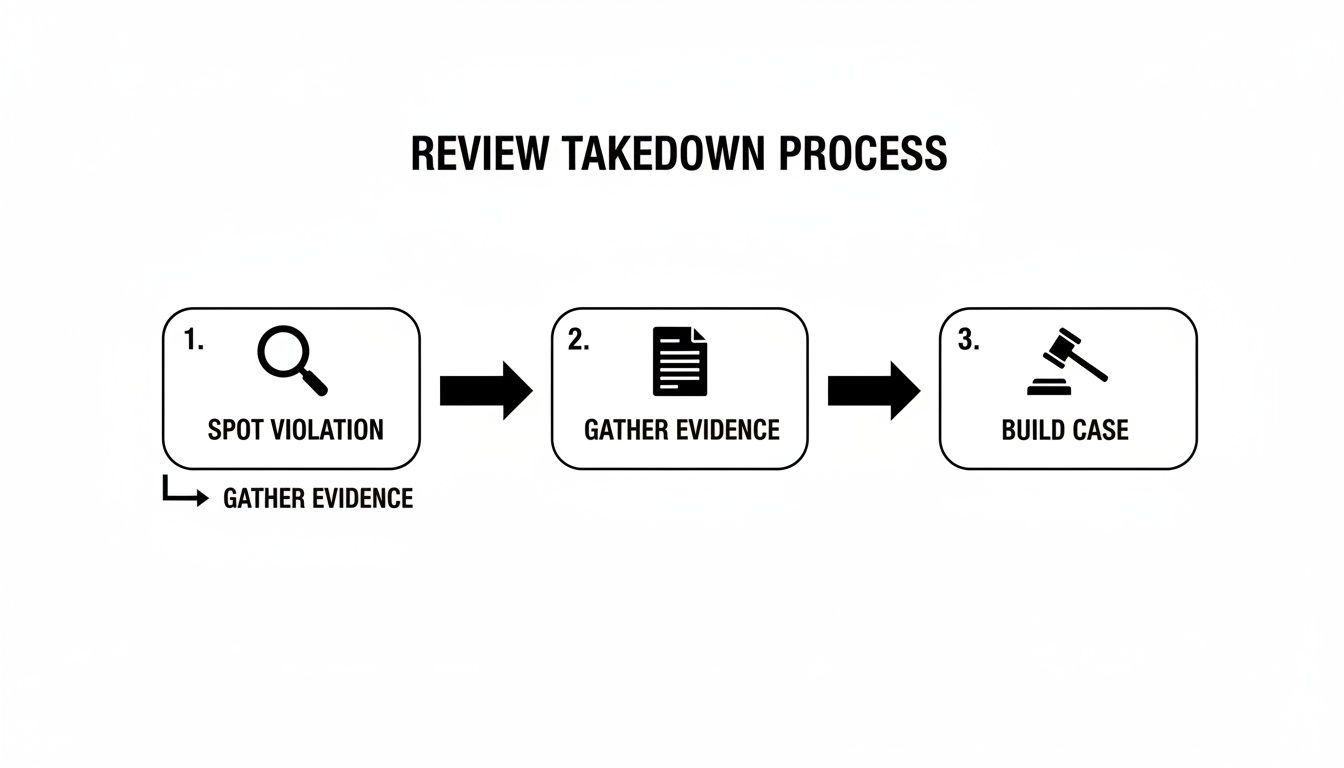
The visual drives home a crucial point: a successful removal is a structured process, not a lucky shot. Every step builds on the last to create a request that Google can't ignore.
Using the Review Management Tool
After you've flagged a review, your job isn't done. Google actually has a tool for tracking these requests, and you absolutely need to use it to stay on top of your case.
This tool, which you'll find in your Google Business Profile dashboard, lets you see the status of any review you've reported. It'll show if the decision is pending, if your request was approved (and the review is gone), or if it was denied. A denial can feel like a dead end, but trust me, it’s often just the first step in a longer process.
For a deeper dive into the ins and outs of this system, you can find a really helpful guide on how to report fake Google reviews that covers some additional strategies.
Document Everything—Thoroughly
Whether you're filing your first report or getting ready to appeal a denial, solid documentation is your best friend. Don't wait for Google to ask for proof. Start gathering your evidence the moment you spot a fake review.
Your evidence file needs to be clean and organized. I recommend including the following:
- Full-page screenshots: Capture the entire review, making sure to include the reviewer's name and the date it was posted.
- The reviewer's profile: Click on their name and screenshot their other reviews. Do they only leave 1-star or 5-star ratings? Are they reviewing businesses in different states on the same day? Patterns like these can help prove the account isn't legit.
- Your internal records: If the review claims they visited on a specific date, be ready to show that you have no record of that person in your CRM, customer database, or appointment logs. This is a powerful way to directly refute their claim of being a real customer.
Having all this ready to go makes any potential escalation so much smoother. It shows you're organized, serious, and have a fact-based claim—which is exactly what a human support agent needs to see to overturn an automated denial. This prep work is the foundation for getting that damaging review removed for good.
What to Do When Google Says No: Escalating Your Case
It’s one of the most frustrating emails a business owner can get: a notification from Google stating the review you reported doesn't violate their policies. It feels like a dead end, but I can tell you from experience, it’s usually just the beginning.
That first "no" is almost always automated. Think of it as a filter, not a final verdict. Your real work starts now: getting your case in front of an actual person at Google.
Building a Strong Support Appeal
Once you decide to escalate, your goal is to make it incredibly easy for a human support agent to see things your way. A quick, emotional message won't cut it. You need to build a clear, evidence-based case they can't ignore.
When you open a support ticket with Google Business Profile, make sure you have these things ready:
- Your Original Case ID: Always lead with this. It shows the agent you’ve already gone through the proper channels and gives them instant access to the case history.
- The Specific Policy Violation: Don't just say, "This review is fake." Be specific. Name the exact policy it breaks, like "Conflict of Interest" or "Off-Topic," and then add a sentence explaining precisely how.
- Hard Evidence: This is the most crucial part. You absolutely must attach proof. This means screenshots of the review itself, the reviewer’s profile (especially if it looks suspicious), and any internal records that contradict their story.
Here’s a perfect example: I was helping a client who got a 1-star review from someone complaining about a late delivery. The problem? My client had zero record of this person or their supposed order. In our appeal, we attached a simple screenshot of a search in their CRM for the reviewer's name, which showed "0 results." The evidence was indisputable, and Google removed the review in less than 48 hours.
How to Handle the Support Process
After you’ve sent your appeal, you’ll need to be patient. You might get an initial automated reply, but the actual investigation takes time. The key is to be persistent without being annoying. If a week goes by with no update, it’s perfectly fine to send a polite follow-up on the same email thread.
Don't get discouraged by the wait. It’s normal. One in-depth study of 50,000 removed reviews found that a staggering 77.19% stayed live for over 10 days before Google finally took them down. As the full Localo study shows, even clear violations can take a while to process.
Knowing When to Explore Legal Avenues
In some rare cases, a review goes beyond a simple bad opinion and veers into defamation. It’s critical to know the difference. "The service was slow" is an opinion. "The owner stole my credit card information" is a false statement of fact that causes real harm—and that’s defamation.
If a review contains a false, damaging, and factual claim, you may have a legal path forward. This typically starts with having an attorney send a cease-and-desist letter. In serious situations, it could involve filing a lawsuit to get a court order, which is a powerful tool for compelling Google to act.
This is a significant step and should be treated as a last resort due to the cost and time involved. If you think you're in this situation, your first move should be to speak with an attorney specializing in online defamation. For more direct help, a specialized service focused on Google My Business content removal can offer expert support for navigating these tricky legal waters.
Proactive Strategies to Defend Your Online Reputation

Getting a fake or malicious review taken down is a win, but it’s a reactive one. A truly resilient business doesn't just play defense. It builds an online reputation so solid that a single negative comment becomes a minor blip on the radar, not a full-blown crisis.
The best long-term strategy is all about being proactive. It's about building a fortress of positive social proof that mitigates the damage from any potshots that come your way. This whole process kicks off with a simple but powerful commitment: respond to every single review, good or bad.
The Power of a Professional Public Response
Ignoring feedback, especially when it's negative, is a huge missed opportunity. A thoughtful, professional response to a critical review can actually be more persuasive to potential customers than a dozen five-star ratings. It shows you're engaged, you care about the customer experience, and you aren't afraid to address problems head-on.
Responding is more than just good customer service—it’s a strategic move. A recent analysis found that a whopping 66-67% of legitimate reviews that Google ended up removing had no response from the business owner. While that doesn't prove causation, it strongly suggests that engaging with your reviewers is a much safer path than just trying to get their comments deleted.
When you're staring down a negative review, your goal isn't to win an argument. It's to show everyone else reading it that you're a reasonable and professional business owner.
Here are a few core principles for responding the right way:
- Acknowledge and Empathize: Always start by thanking them for their feedback. Acknowledge their frustration, even if you think they’re completely off base. A simple, "We're sorry to hear you had a frustrating experience," can work wonders.
- Keep it Brief and Professional: Don't get dragged into a long, messy back-and-forth. State your side of the story concisely and stick to the facts, leaving emotion out of it.
- Take it Offline: The public thread isn't the place to resolve the issue. Always offer a path to a private conversation. End your response with something like, "We'd appreciate the opportunity to discuss this further. Please contact us at [email] or [phone number]."
Real-World Scenario: A restaurant gets a 1-star review claiming a dish was served cold. Instead of getting defensive, the manager replies: "Thank you for letting us know about this. We're very sorry your meal didn't meet our standards for quality. We would love to make this right. Please reach out to our manager directly so we can address your concerns." This response reassures future customers that the restaurant takes quality seriously.
Building a Sustainable Review Generation Engine
What's the most effective way to neutralize the impact of a bad review? Drown it in a flood of authentic, positive ones. Proactively asking for reviews needs to be a consistent part of your business operations, not just something you do in a panic.
Just make sure you're doing it within Google's guidelines. Never, ever offer incentives for reviews—it's a direct policy violation that can get your profile penalized. The real key is to make it incredibly easy and natural for your happy customers to share their great experiences.
Here are a few compliant ways to encourage more reviews:
- Create a Direct Review Link: Google lets you generate a short URL that takes customers straight to the review submission form for your business. Use it.
- Use QR Codes: Put a QR code linking to your review page on receipts, business cards, or table tents in your shop.
- Send Follow-Up Emails: After a service or sale, send a simple email thanking the customer for their business and including your direct review link. Frame it as a request for feedback to help you improve.
Continuously learning new tactics is crucial for staying ahead. To keep your strategies fresh, you can explore the Copycat247 blog for more reputation management insights.
By pairing professional public responses with a steady stream of new, positive reviews, you create a powerful defense. This two-pronged approach not only helps you manage your reputation but also sends strong positive signals to Google's algorithm, reinforcing your business's credibility and trustworthiness for the long haul. You’ll finally shift from reacting to problems to actively shaping your own narrative.
Common Questions About Removing Google Reviews
When you're fighting to protect your business's reputation online, a lot of questions pop up. It can feel like a confusing and often frustrating process. Let's walk through some of the most common hurdles I see business owners face when trying to get a Google review taken down.
How Long Does It Take for Google to Remove a Review?
I wish I had a simple answer, but the timeline is all over the map. For something really obvious—like a review full of hate speech or a spammy link—Google's automated systems might zap it within a few hours.
But that’s the exception, not the rule. Most of the reviews you'll be fighting are in a gray area, like a potential conflict of interest from a competitor. These almost always need a real person at Google to look at them. From my experience, you should expect that initial review to take anywhere from 3 to 7 business days.
If your first attempt gets denied and you have to escalate it, you'll likely hear back from support within 24-48 hours. But be prepared for a bit of back-and-forth that could stretch the final decision out for several more days.
Don't get discouraged by the wait. One study found that over 77% of reviews that were eventually deleted stayed live on a business profile for more than 10 days. The system is slow, but that doesn't mean it isn't working.
Can I Pay a Service to Get Bad Reviews Removed?
Yes, but you have to be incredibly careful here. The internet is littered with companies making bold promises about "guaranteed removals." A lot of them use sketchy, black-hat tactics that can do more harm than good, like creating fake accounts to mass-report a review. That's a fast track to getting your entire Google Business Profile suspended.
A legitimate reputation-protection service, like LevelField, plays by a completely different set of rules. They don't try to cheat the system; they work as your expert guide within it.
Here’s what a professional, above-board service actually does:
- They're Policy Nerds: They know Google's content policies inside and out and can frame your case in the precise language that gets a moderator's attention.
- They Do the Legwork: They handle the entire messy process—finding the evidence, documenting everything, and managing all the communication with Google support.
- They Stick to Official Channels: They only use Google's approved reporting and appeals processes, so your profile stays safe and in good standing.
Think of it this way: you’re not paying to magically delete a review. You're paying for the specialized expertise and the hours it takes to build a solid, evidence-backed case that gets the job done right.
What if Google Removed a Legitimate, Positive Review?
This is one of the most maddening things that can happen. A happy customer leaves you a fantastic five-star review, and then it just… vanishes. This is almost always collateral damage from Google's spam filters, which can be a bit too aggressive and mistake genuine enthusiasm for something fake.
Unfortunately, your customer can't appeal this. The best you can do is contact Google Business Profile support yourself. Explain the situation calmly, state that you believe a legitimate review from a real customer was removed by mistake, and ask if they can investigate. It's not a guaranteed fix, but it's the only official path you have.
The most practical advice I can give is to focus on what you can control. Keep doing great work and keep encouraging new, authentic reviews from your customers. A steady stream of fresh, positive feedback is the ultimate defense against the occasional, accidental loss of a good review.
Does Responding to a Fake Review Hurt My Chances of Removal?
Not at all. In fact, you absolutely should respond. Think of it as a two-pronged strategy: you respond publicly for the benefit of potential customers, and you flag the review privately for Google's moderators. You can and should do both at the same time.
The trick is to keep your public reply short, professional, and calm. Whatever you do, don't get into a public shouting match or accuse them of lying online.
Here's a simple, go-to template that works wonders:
"Thank you for your feedback. We take these matters seriously, but we have no record of a customer transaction matching your name or the details of your experience. We would appreciate the opportunity to learn more. Please contact us directly at [your email or phone number]."
This response is brilliant because it accomplishes two things at once. First, it shows anyone reading the reviews that you're responsive and professional. Second, it gently casts doubt on the reviewer's legitimacy without starting a fight, all while you handle the official removal process behind the scenes.