


So, can you actually get rid of a bad review on your Facebook Page? The short answer is yes, but it’s not as simple as clicking a "delete" button.
You can't just remove a negative review because you don't like it. Facebook allows removal only when a review breaks its rules—things like spam, hate speech, or content that's clearly fake. This is a critical distinction to grasp if you want to manage your online reputation effectively.
The Reality of Managing Facebook Reviews
When a negative review pops up on your business Page, it can feel personal. It's a natural instinct to want it gone immediately. But Facebook's platform is built to reflect genuine customer experiences, which means they deliberately limit a business owner's ability to cherry-pick the feedback that gets displayed.
This isn't an oversight; it's a core feature. It forces the focus away from simply deleting criticism and toward identifying and reporting content that genuinely crosses a line. Getting good at spotting the difference is the first step to taking back control of your narrative.

From Reviews To Recommendations
You might remember Facebook's old 5-star rating system. A few years back, they switched to a simpler "Yes/No" recommendation format. While the look changed, the headache for business owners stayed the same. A "No" recommendation, especially when it comes with a nasty comment, can do a lot of damage.
The point of the change was to get people to write more descriptive feedback. For you, this means the words in the recommendation are what really matter. Is it a legitimate gripe from an unhappy customer, or is it a baseless attack from a competitor or a troll? That's the question you need to answer.
Why You Can't Afford To Ignore Malicious Content
Letting fake or malicious reviews sit on your Page is not a strategy. It's a slow poison for your brand's credibility. Today's consumers are savvy, and they can often smell a fake review from a mile away.
A study in 2021 found that a shocking 37% of consumers believe they've spotted a fake Facebook review. This widespread skepticism is a big reason why Facebook's influence in local business discovery dropped from 54% in 2020 to just 46% in 2022. It was the only major platform to see a decline.
Think about it—one fraudulent review could be enough to turn away dozens of potential customers. This is why knowing how to properly report and remove illegitimate content is so important.
Your success depends entirely on your ability to prove a review violates Facebook's rules, not on how much you disagree with it. For those curious about the technical side, understanding the basics of the Facebook API can shed light on why the platform functions the way it does. It helps explain the built-in limitations and gives you a clearer picture of what's possible and what's not.
To make it crystal clear, let's break down some common situations you might face.
Review Removal Scenarios: What You Can And Cannot Do
The table below outlines different types of reviews and whether you stand a chance of getting them removed. Think of it as your cheat sheet for deciding when to take action.
| Scenario | Is It Removable? | Primary Action Required |
|---|---|---|
| A genuinely unhappy customer leaves a detailed, negative review. | No | Respond publicly and professionally. Offer to resolve the issue offline. |
| Review contains hate speech, threats, or harassment. | Yes | Immediately report the review to Facebook for a Community Standards violation. |
| The review is clearly spam or a promotion for another business. | Yes | Report the review as Spam. |
| A former employee with a grudge leaves a scathing "review". | Maybe | Report it, highlighting the conflict of interest and potential harassment. |
| The review is from a fake profile or someone who was never a customer. | Maybe | Report the review as Not Relevant or Fake. Gather proof if possible. |
| A customer criticizes your prices or policies factually. | No | Acknowledge the feedback. Use it to improve or clarify your value. |
This table should help you quickly assess a situation and choose the right path forward, saving you time and frustration. Mastering this process is key to protecting your brand's integrity and keeping the trust of your real customers.
Identifying What Violates Facebook's Policies
To have any chance of getting a negative review removed, you need to stop thinking like a frustrated business owner and start thinking like a platform moderator. The hard truth is that Facebook doesn't care if a review is unfair, exaggerated, or even factually incorrect. They only care about one thing: does it break a specific rule?
This is the single biggest hurdle for most businesses. We see a one-star review and react emotionally, reporting it because it feels wrong. But a review saying, "The food was cold and the service was slow," is just an opinion. It’s frustrating, sure, but it’s not against the rules.
Now, if that same review said, "The owner is a scumbag, I know where you live and you're going to get what's coming to you," that's a different world entirely. That’s a direct threat, a textbook case of harassment, and it gives you a solid foundation for a removal request.
Pinpointing the Exact Violation
Your entire case hinges on matching the review's content to a specific rule in Facebook's Community Standards. You can't just report something as "inappropriate." You have to build a case, however small, that points to a clear violation.
Focus your attention on these common violations when you're scanning your reviews:
- Harassment & Bullying: This is a big one. Does the review contain personal attacks on you or a specific employee? Does it use threatening language? Is it designed purely to degrade or shame someone? That’s harassment.
- Hate Speech: Any review that attacks people based on their race, religion, sexual orientation, disability, or other protected characteristics is a flagrant violation. This is usually an easy one for moderators to spot and act on.
- Spam: Is the review completely irrelevant to your business? Does it contain bizarre links, promote a competing service, or just consist of gibberish? That's classic spam, and Facebook is generally quick to remove it.
- Fake Content or Impersonation: This one can be tougher to prove, but it's crucial. If you have strong evidence that the reviewer was never a customer (for example, you have no record of their name or transaction) or that they are a competitor in disguise, you have a legitimate case for removal.
Your report to Facebook isn't a complaint; it's an evidence-based request. You’re not saying, "I don't like this review." You’re saying, "This content violates your policy on hate speech, and here’s why."
Real-World Scenarios Unpacked
Let's look at a few practical examples to see how this plays out. The line between a legitimate bad review and a policy violation can be thin, but learning to see it is the key.
Here’s how to tell the difference:
Scenario 1 (Not Removable): "This product fell apart after two days. Absolute junk. Don't waste your money."
- Analysis: This is a classic negative customer experience. It’s direct, it's harsh, but it doesn't violate any policies. The only move here is to respond publicly and try to resolve the issue.
Scenario 2 (Removable): "The manager, Sarah, is a nasty thief. She padded our bill and probably steals from the register. Crooks run this place."
- Analysis: Now we've crossed the line. This isn't about a bad experience anymore; it's a personal attack on an employee, complete with criminal accusations. You can confidently report this for Harassment.
Scenario 3 (Removable): You suddenly get four identical one-star reviews within minutes, all from brand-new profiles with no friends or photos.
- Analysis: This is a clear coordinated attack and a form of Spam or inauthentic behavior. Report each review individually and be sure to mention the suspicious, repetitive pattern in your report.
Once you master these distinctions, you can stop wasting time on reviews that are going nowhere and focus your energy on the ones you can actually get taken down.
How To Report a Violating Facebook Review
So, you've found a review that pretty clearly crosses a line and violates Facebook's policies. Your first move is to report it. This is your most direct path to getting it removed, and thankfully, the process is pretty straightforward.
Just find the recommendation you want to challenge on your Page. In the top-right corner of the post, you'll see three little dots (...). Click those, and a menu will pop up. From there, select "Find support or report recommendation."
Now comes the part that really matters.
Choosing the Right Violation Category
This is where you need to be strategic. The success of your report often hinges on picking the right category. Your first report is almost always going to be reviewed by an automated system, so you need to give it a clear signal.
Facebook will present you with a list of options. Here's a quick rundown of what to pick and when:
- Spam: This is your go-to for anything that's clearly irrelevant, stuffed with promotional links, or just gibberish. Think of copy-pasted nonsense or someone trying to sell crypto in your reviews.
- Harassment: If the review gets personal and starts attacking, threatening, or bullying you or one of your team members by name, this is the category.
- Hate Speech: This is for ugly stuff. Any review that attacks people based on their race, religion, sexual orientation, or other protected characteristics falls squarely under hate speech.
- Fraud or Scam: Use this if the review is part of a larger deceptive scheme or feels like a setup to rip people off.
- Something Else: This is a catch-all for other clear violations, like nudity or graphic violence, that don't fit neatly into the other buckets.
Take a second to really think about which category best fits the situation. Reporting a review with a personal threat as "Harassment" has a much better shot at being successful than just vaguely reporting it.
My Two Cents: Your initial report is your opening argument. Be precise. You aren't just telling Facebook you don't like the review; you're pointing to a specific rule they've broken. This methodical approach is your best bet for a quick resolution.
This decision tree gives you a good visual for figuring out if you're dealing with a policy violation or just a standard-issue negative opinion.
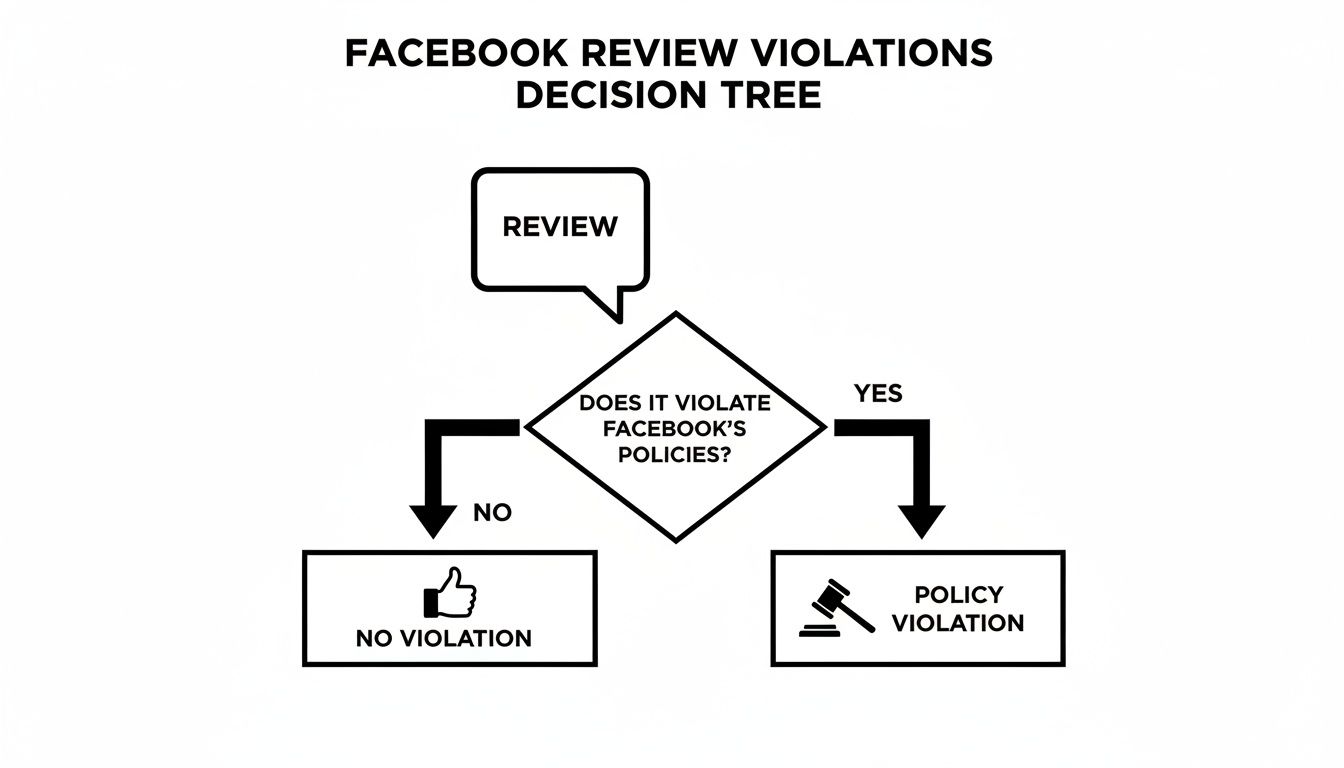
As the flowchart shows, there's a big difference between a customer's legitimate negative experience and content that genuinely breaks the rules. Knowing which is which is the key.
What Happens After You Report
Once you hit submit, your report goes into Facebook's review queue. It’s important to have realistic expectations here. For a more detailed look at the entire removal journey, our guide on how to remove reviews from Facebook dives deeper into the nuances.
Meta's automated systems are incredibly powerful. In a recent quarter, they proactively removed content with over 90% accuracy, and less than 1% of the billions of posts on the platform even required action. You can dig into the numbers yourself in the data published by SocialMediaToday.
But even with that high accuracy, the sheer volume of content means things slip through the cracks. That's why your manual report is so important—it flags things the algorithm might have missed.
Don't panic if your first report is denied. It happens all the time, especially if the violation is subtle. This isn't the end of the road. Your next steps will involve gathering more evidence and escalating the issue, which we'll get into next. For now, getting this initial reporting process down is the first skill every business owner needs to master.
What to Do When Your Report Gets Rejected
So, you reported the review and got that dreaded notification: "This does not go against our Community Standards." It’s frustrating, I know. But don't throw in the towel just yet. Think of this not as a final verdict, but as the moment your real work begins.
Automated systems and first-level reviewers often miss the nuance. They see words, but you see the context—the fake profile, the disgruntled ex-employee, the competitor playing dirty. Now, your job is to build a case file that a human at Facebook can't ignore.
Build a Case File, Not Just Another Report
Simply hitting the "report" button again won't work. The system already flagged it as a no-go. You need to escalate with compelling evidence that proves a violation. It's time to put on your detective hat.
Here’s the kind of proof you need to start gathering:
- Screenshots Are Your Best Friend: Don't just grab a shot of the review. Capture the reviewer's profile page. Is it a brand-new account with zero friends and a stock photo? That’s a huge red flag for inauthenticity. Screenshot it.
- Document Harassment: Did the attack spill over into your DMs or comments on other posts? Get screenshots of everything. Timestamps are crucial here, as they help establish a clear pattern of abusive behavior.
- Show Me the Money (or Lack Thereof): If you're claiming the person was never a customer, you have to prove it. A simple screenshot of a search in your sales system or CRM for their name turning up no results is powerful evidence.
When you re-engage with a well-documented case file, you're no longer just asking a question. You're making a statement and showing Facebook exactly why this review breaks their own rules.
The Nuclear Option: Turning Off Recommendations
If you're under a full-blown assault—maybe a coordinated attack with dozens of fake reviews flooding in—and reporting isn't working, there's a last-ditch option: turn off Recommendations on your Page completely. This hides the entire section, taking both the good and the bad reviews with it.
Let's be clear: this is a drastic move. It solves the immediate problem but at a huge cost—you lose all the positive social proof you've worked so hard to build. It's like taking a sledgehammer to a problem that might only need a scalpel. I only recommend this in the most extreme circumstances, as a temporary shield while you figure out a better long-term strategy.
When to Call in the Pros
Sometimes, you do everything right and the review still won't come down. This is where professional reputation management services can be a game-changer. These teams live and breathe platform policies. They know the unwritten rules, the right language to use, and often have access to back-channels for escalation that the average business owner doesn't.
The sheer volume of fake accounts is mind-boggling. Meta regularly removes billions of them—they took down a staggering 1.1 billion in a single quarter. While that number is huge, it also shows you can't just wait for them to stumble upon your problem. You can dig into the full data on Meta's content removal efforts to see the scale of the issue. When your business's reputation is taking a direct hit, bringing in an expert to fight that specific battle is often the fastest way to get a resolution.
Building a Proactive Reputation Defense
Knowing how to get a bad Facebook review removed is a handy skill, but honestly, it’s not the best long-term game plan. You don’t want to be playing whack-a-mole every time a negative comment pops up. The real win is building a reputation so solid that one or two bad reviews are just tiny specks on an otherwise stellar record. This is about shifting from a reactive mindset to a proactive one.
Instead of just waiting for trouble, you should make gathering positive feedback a regular part of how you do business. When you have a constant flow of genuine, happy recommendations, it creates a powerful buffer. This good stuff naturally buries any negative outliers and shows new customers that the vast majority of people have a great experience with you.

Encourage Authentic Positive Feedback
You don't need to be aggressive to get good reviews. Most of the time, customers who had a fantastic experience just don't think to write about it unless you give them a little nudge. Weaving a simple "ask" into your customer journey can make a world of difference.
Here’s how to do it right:
- Timing is Everything: The best time to ask is right after a win. Think of moments like a successful delivery, a freshly resolved support ticket, or when a client sends you a happy email. The positive feeling is still fresh.
- Make It Easy: Don't make them hunt for it. Give them a direct link to your Facebook Page's recommendation section in a follow-up email or on your website's thank you page. The fewer clicks, the better.
- Never Offer Incentives for Positive Reviews: This is a big one. You can offer a small incentive for leaving any feedback, but you can't pay for a good review. That's a fast track to violating Facebook's policies and losing customer trust.
This consistent, gentle effort builds a foundation of social proof that's worth more than any single review you might get taken down. For more ideas on this, check out our in-depth guide on https://levelfield.io/blog/managing-your-online-reputation.
Turn Negatives Into Positives Through Smart Responses
Look, not every negative review is a fake attack from a competitor. Some come from genuinely unhappy customers, and how you handle it is a public performance. A calm, professional, and helpful reply can often do more for your reputation than getting the review removed ever could.
Your public response signals to everyone—not just the original poster—that you listen to feedback and care about making things right. This is where you can really shine. If you need some help with the wording, this guide on how to respond to negative comments has some fantastic, real-world strategies for turning criticism into an opportunity.
A professional response to a negative review isn't just for the unhappy customer; it's for every future customer who reads it. It transforms a complaint into a testament to your excellent service.
By focusing on these proactive steps, you stop playing defense and start confidently managing your brand. You're building an online presence that is authentic, resilient, and ready for whatever comes its way, ensuring your reputation remains one of your most valuable assets.
Common Questions About Removing Facebook Reviews
When you're dealing with a bad review, a lot of questions pop up, and it can be tough to find clear answers. Business owners I talk to often feel stuck, unsure of what's possible or how long things will take.
Let's cut through the noise and tackle some of the most pressing questions you're probably asking right now.
How Long Does It Take for Facebook to Remove a Review?
There’s no single, satisfying answer here—it really depends. If you're lucky and the review is a blatant violation of the rules, like obvious spam or hate speech, Facebook's automated systems might zap it within 24 to 48 hours.
But what if it's more subtle? Something that feels unfair but isn't an outright attack? That's when a real person at Facebook has to get involved, and the timeline gets murky. This can take several days, or in some frustrating cases, weeks. If your first report gets denied and you have to go back with more proof, the clock resets. This is exactly why being persistent and organized from the get-go is so important.
Can I Sue Someone for a Fake Facebook Review?
Technically, yes, you can sue for defamation. But I'll be blunt: it's a long, expensive, and difficult road that’s rarely worth it for most small businesses.
To even have a chance of winning, you'd need to:
- Prove the statements are objectively false, not just someone's angry opinion.
- Show that the review caused actual financial damage to your business.
- Unmask the reviewer, which can be a huge hurdle if they're using a fake profile.
Honestly, your time and money are almost always better spent exhausting every option Facebook gives you or working with a reputation management service. Save the legal threats for only the most severe, malicious, and damaging attacks.
Think of legal action as the absolute last resort. The burden of proof is high, and the resources required are significant, making platform-based solutions the better starting point for nearly all businesses.
Will Turning Off Recommendations Delete Old Reviews?
No, and this is a common trap people fall into. When you go into your Page settings and turn off Recommendations, all you're doing is hiding the entire section from your Page's visitors. None of the old feedback gets deleted.
If you ever decide to flip that switch back on, every single one of those recommendations—the good, the bad, and the ugly—will pop right back up. It’s a temporary bandage, not a permanent fix.
What Is the Difference Between a Review and a Recommendation?
A few years back, Facebook switched things up. They moved away from the old 5-star "Review" system to a simpler "Recommendation" model. Now, instead of picking a star rating, customers are asked a simple question: "Do you recommend [Your Business Name]?"
They answer with a "Yes" or "No" and are then encouraged to add text, photos, or tags to explain their choice. The idea was to get more context behind the feedback. For you, the business owner, the challenge is pretty much the same. The process for reporting a bogus recommendation is the exact same as it was for reporting an old-school review.