


Yes, you absolutely can get bad reviews removed from Google, but it’s not as simple as clicking a button. The single most important thing to understand is that you can't remove a review just because it's negative or you disagree with it. The review has to break one of Google’s specific content policies.
Getting this distinction right is the difference between wasting your time and successfully protecting your reputation.
The Short Answer: Yes, But With a Catch

When a one-star review pops up, it can feel like a punch to the gut. But your ability to fight back hinges entirely on why the review is bad, not just that it's bad.
Legitimate, firsthand feedback from a real customer—no matter how harsh it seems—is almost always going to stay. Google sees that as protected user-generated content, a genuine expression of an experience.
But here’s the reality: a lot of negative reviews aren't legitimate at all. They’re often planted by shady competitors, disgruntled ex-employees, or even people who have never set foot in your business. These are the reviews you can—and should—go after.
Knowing Your Grounds for Removal
Success in getting a review taken down comes down to building a solid case based on a clear policy violation. While Google's automated systems filter out millions of fake reviews, plenty still sneak through. That’s where you come in.
Think of it less as an argument and more as a legal case. You’re not debating the customer's feelings; you’re presenting cold, hard evidence that a specific rule in Google's own playbook was broken.
Some of the most common violations we see include:
- Conflict of Interest: Reviews left by current or former employees, or worse, a direct competitor trying to tank your rating.
- Off-Topic Content: A bizarre rant about politics, social issues, or some personal grievance that has absolutely nothing to do with a customer experience at your business.
- Impersonation: Someone pretending to be someone they're not to leave a damaging review.
- Spam: The most obvious fakes—repetitive content, gibberish, or reviews clearly designed to manipulate your star rating.
The key takeaway is this: you’re not disputing the opinion. You are disputing the review's right to exist on the platform based on Google's own policies. Adopting this mindset is the first step toward getting a fake review removed.
Quick Guide to Removable vs Non-Removable Reviews
To help you quickly size up a new negative review, I've put together this simple table. It's a great first-pass check to see if you even have a case worth pursuing.
| Review Characteristic | Likely Removable? | Primary Violation |
|---|---|---|
| Mentions a competitor's business | Yes | Spam / Conflict of Interest |
| Is from a former employee | Yes | Conflict of Interest |
| Describes a genuinely poor experience | No | None (Legitimate Feedback) |
| Uses hate speech or profanity | Yes | Harassment / Hate Speech |
| Is a political or social rant | Yes | Off-Topic Content |
| Was posted by an anonymous user | Maybe | Needs more evidence for Spam |
This table should help you focus your energy where it counts—on the reviews that are clear violations and save you the frustration of fighting battles you can't win.
Spotting Removable Reviews Like an Expert
Getting a bad review taken down isn't about telling Google you don't like it. It's about showing them why it breaks their rules. You have to put on your detective hat and find the specific policy violation. This changes everything—your request stops being a complaint and becomes a factual report that Google's team can actually act on.
The key is to set aside the frustration for a moment and look at the review objectively. Is this an unhappy customer, or is something else going on?
Know Google's Rulebook by Heart
Your best weapon here is Google’s content policy. Seriously, get familiar with it. Knowing these rules is the most critical part of the whole process. While the official document is long, most of the reviews you can get removed will fall into just a few common buckets.
Let's walk through the violations you'll see most often.
Conflict of Interest: This is a big one. Google doesn't allow reviews from current or former employees, owners, or direct competitors. Think about it: a dental practice gets a one-star review from a hygienist they just fired. That's a classic conflict of interest. Or maybe the owner of the coffee shop down the street leaves you a nasty review—another textbook violation.
Off-Topic Content: A review has to be about a customer's experience with your business. If a law firm gets a one-star review that's just a long rant about city politics or a complaint about parking, it has nothing to do with their legal services. These are usually easy wins for removal because they aren't about a real customer experience.
Spam and Fake Content: This is a catch-all for anything deceptive. It covers reviews posted by bots, content designed purely to tank your rating, or paid-for reviews. A dead giveaway is when a business suddenly gets slammed with ten one-star reviews in a single day, all from newly created accounts with no other history. That’s not a coincidence; it’s a spam attack.
Key takeaway: You’re not debating the customer's opinion. You're proving to Google that the review itself violates their terms and harms the credibility of their platform.
The Red Flags of a Phony Review
The fight against fake reviews is relentless. Some studies estimate that around 11% of all online reviews could be bogus. It got so bad that in 2023 alone, Google had to remove or block over 170 million reviews that broke their policies. This isn't just about a few bad actors; it’s a massive problem, from competitors trying to sabotage you to people buying fake five-star ratings.
This is where your detective work really pays off. You can often spot the fakes by looking for a few tell-tale signs.
Prohibited and Restricted Content
Beyond the usual suspects, Google has zero tolerance for more serious types of harmful content. When you flag a review for one of these, you can often expect a much quicker response because of the severity.
Hate Speech and Harassment: Any review that attacks someone based on race, religion, gender, disability, or sexual orientation is a major violation. This also covers any personal attacks, threats, or bullying aimed at you or your employees.
Impersonation: This is when a reviewer is pretending to be someone they're not—like a celebrity, a public official, or even you—to cause damage. It's straight-up misrepresentation.
Private Information: A review can't include confidential details. If a law firm gets a review that shares private information from a legal case, that’s a serious breach. Same for a medical clinic where a review exposes a patient's private health information. Google takes these violations very seriously.
By carefully matching the bad review to a specific policy, you build a rock-solid case. Your removal request goes from a shot in the dark to a documented report, dramatically improving your odds of getting that review taken down.
Your Game Plan for Flagging and Reporting Reviews
Alright, you’ve spotted a review that breaks the rules. Now it's time to actually do something about it. This is where you officially report the review to Google, and frankly, how you do it matters. A sloppy or vague report is an easy "no" for Google's moderators, so let's get it right.
You have two main ways to flag a review: directly from Google Maps or through your Google Business Profile (GBP) dashboard. While both get the job done, I've found that reporting through your GBP dashboard gives you much better tracking and more options if you need to escalate things later.
The Two Paths to Reporting a Review
Your first step is always to flag the review. This is what sends up the initial flare to Google’s systems and, hopefully, a human moderator.
- Flagging on Google Maps: This is the fast and dirty way. Find the review on your public profile, click the three-dot menu beside it, and hit "Report review." You'll then have to pick the policy it violates.
- Reporting via Google Business Profile: For a more official and trackable approach, log into your GBP dashboard. Head to the "Reviews" section, find the review in question, click the same three dots, and choose "Report review." The process looks the same, but doing it this way ties the report directly to your business account, which is a huge help down the road.
This flowchart gives you a good visual of the thought process you should go through. Is it a disgruntled ex-employee? Someone pretending to be a customer? A rant that has nothing to do with your business? Figure that out first.
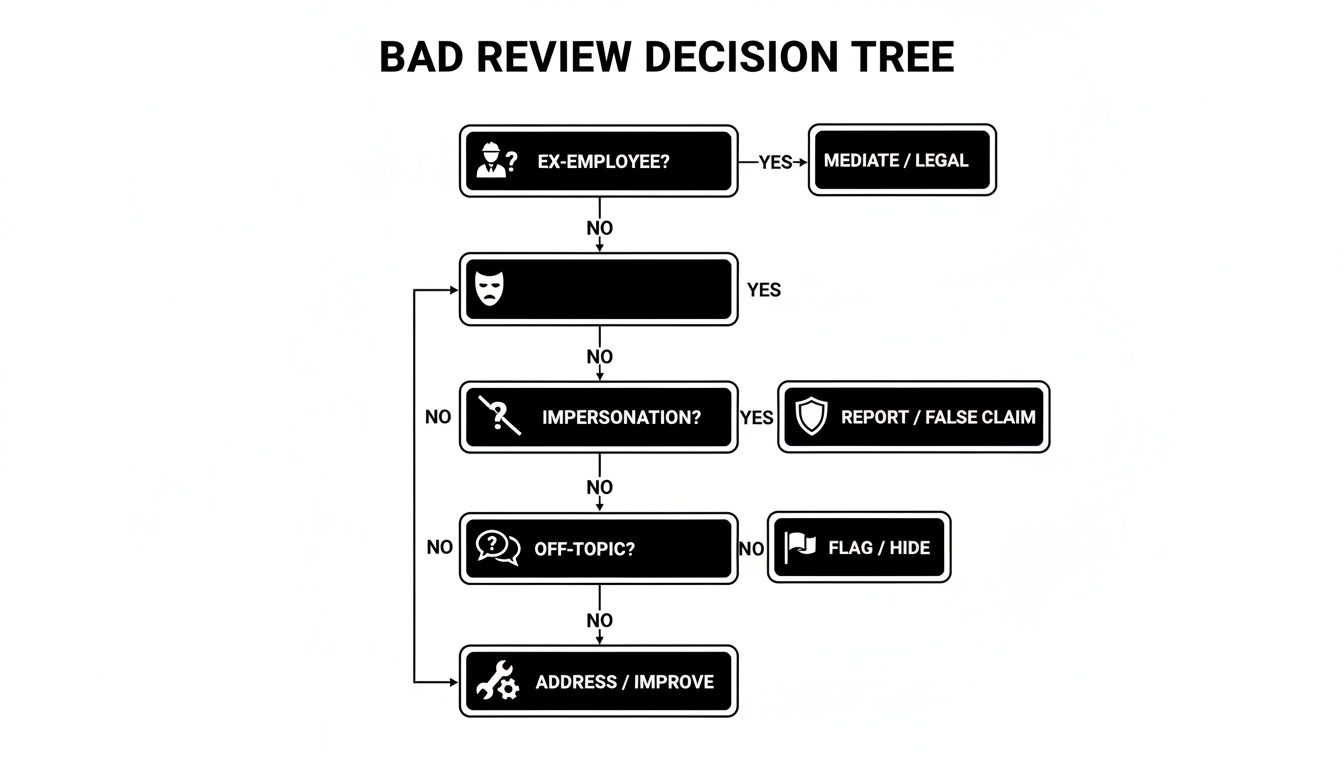
Nailing down the specific violation before you report is the best way to strengthen your case with Google from the get-go.
How to Write a Report That Actually Works
When you flag that review, Google presents you with a simple form. The most important part is choosing the correct violation type. Don't just click one that feels right. Match it directly to the policy. If it's a former employee, that’s a Conflict of Interest. If it's a political tirade, that’s Off-topic.
Your choice here is everything. I've seen countless reports get rejected simply because they were categorized incorrectly. You need to make it incredibly easy for Google's team to see the clear link between your claim and their rules.
Sometimes, the form gives you a small text box for extra details. If you see it, use it—but be smart about it. Keep your explanation short, factual, and to the point.
- What not to do: "This person is a liar and they were a nightmare customer! They're just mad and trying to ruin my business."
- What to do: "This review violates the Conflict of Interest policy. The reviewer is a former employee terminated on [Date]. We have employment records to confirm this."
See the difference? The second example is calm, professional, and points directly to a policy violation. That’s exactly what a moderator needs to make a fast decision. For a much deeper dive into building a compelling case, our guide on how to https://levelfield.io/blog/report-fake-google-reviews breaks it all down.
So, What Happens After You Hit 'Submit'?
Once your report is sent, you play the waiting game. You should get an automated email from Google saying they've received it. From there, expect to wait anywhere from three to seven business days for an initial decision.
You can keep an eye on things using Google's Review Management Tool. It’s a dashboard that shows you every review you've reported and its status—"Decision pending," "Report reviewed - no policy violation found," or the one you're hoping for, "Escalated."
Now, brace yourself for a potential rejection. It is incredibly common for the first report to be denied, especially by an automated filter. This is normal. It is not the end of the road. If you know you have a solid case, persistence is key. The next move is to appeal and bring more evidence to the table, which we'll get into next. If you find your business tangled in more complex compliance issues, understanding how to handle recovering from broader Google penalties can provide some useful parallels for navigating their system.
What to Do When Your First Attempt Fails
It's frustrating, but it's incredibly common: you flag a clearly bogus review, and a day or two later, Google sends back a generic "does not violate our policies" message. Don't let it discourage you.
That first rejection is almost always from an automated system. It’s designed to catch the low-hanging fruit, not to understand the nuances of a disgruntled ex-employee or a competitor's coordinated attack. Now is when the real work begins. Your first flag was the opening volley; an appeal is where you bring in the heavy artillery.
An initial rejection doesn't mean you're wrong. It just means you need to build a case that a human reviewer can't ignore.
Building Your Evidence File for a Human Reviewer
When you escalate your case, you’re no longer just pointing at a review. You're submitting a tidy, compelling file of proof that backs up every word of your claim. The goal is simple: make it so easy for the human on the other end to see the violation that removing the review is the only logical next step.
Start gathering your evidence right away. Think like a detective.
- Screenshots are non-negotiable. Get clean shots of the review itself, the reviewer's profile (especially if it looks fake or they've left a trail of other suspicious reviews), and anything else that supports your story.
- Check your records. If you can't find the reviewer in your system, that’s a powerful piece of evidence. A simple statement like, "We have searched our CRM and payment system for the past 12 months and have no record of a customer named 'John Doe'" is often enough.
- Mention internal documents. If it’s a disgruntled ex-employee, you don’t need to upload their HR file. Just stating, "This individual was a former employee whose employment was terminated on [Date], and we can provide documentation if required" adds significant weight to your claim.
- Create a timeline. This is crucial for coordinated attacks. A simple list showing a flood of 5 one-star reviews from brand-new accounts all appearing within 24 hours paints a very clear picture of spam for a human reviewer.
The trick is to shift your argument from, "This isn't fair!" to "This review violates Google's [specific policy] and here is the evidence proving it." You’re handing the reviewer the justification they need to take action.
The Official Escalation Path
Once your evidence is organized, it's time to head back to the Google Business Profile Review Management Tool. This is the same place you checked the status of your initial flag. Find the review in question and look for the option to appeal the decision.
This is your shot to speak directly to a person. Be concise, professional, and firm in the appeal form.
For instance, instead of just saying "This is a fake review," make it specific and actionable:
"We are appealing the decision on this review as it is a clear violation of the Conflict of Interest policy. The reviewer, Jane Smith, is a former employee terminated on October 15, 2024. We have no record of her using our services as a customer, and her review was posted one day after her termination date."
This approach is fact-based and ties directly into Google’s own rules. And it’s more important than ever to be precise. Review deletion rates have surged over 600% recently, mostly thanks to Google's own AI getting more aggressive. While that’s great for catching spam, it also means your legitimate appeal needs to be crystal clear to get through the system. You can learn more about how Google is changing its moderation in this in-depth analysis.
When to Consider a Legal Takedown Request
Sometimes, a review goes beyond just being negative and crosses a serious line. In these rare but damaging cases, you have a much more powerful tool at your disposal: a legal removal request. This isn't for someone who just had a bad experience; this is for content that is legally actionable, like defamation.
Defamation is a false statement, presented as fact, that causes tangible harm to your reputation. If a review contains a provably false claim—like "the owner is a thief who stole my wallet" or "they're operating without a business license" (when you clearly have one)—it might be defamatory.
Going this route is a serious step, and here's how it works:
- Talk to a Lawyer First. Don't even think about winging this one. You need to consult with an attorney who has experience with internet law and defamation. They'll tell you if you have a real case.
- Submit a Formal Complaint. With your lawyer's guidance, you'll submit a formal legal takedown notice directly to Google. This isn't a simple web form; it’s a legal document citing the specific laws the review violates.
- Get a Court Order if Possible. The ultimate trump card is a court order declaring the review's content to be unlawful. Submitting a court order to Google practically guarantees the review will be removed.
This path is obviously more involved and will cost you legal fees. But for those incredibly harmful reviews that are actively costing you business and damaging your name, it's often the only way to get them taken down for good.
The Overlooked Power of a Public Response

While you’re building your case to get a review taken down, never leave it just sitting there unanswered. To a potential customer scrolling through your profile, a negative review with no reply looks a lot like an admission of guilt.
Responding publicly is your fastest and most direct line of defense. It's an immediate move that lets you control the narrative and minimize the damage. A calm, professional reply shows everyone—especially future customers—that you're on top of things, engaged, and care about your reputation. This holds true for all negative feedback, even the reviews you’re certain are completely fake.
Crafting a Strategic Reply
Your public response is really for two different audiences: the reviewer (and the public) and Google's moderators. If the complaint seems legitimate, your goal is empathy and taking the conversation offline to find a solution. But if you suspect the review is fake, your goal is to gently poke holes in its credibility without getting into a messy public fight.
A carefully written reply can actually strengthen your removal request.
When you're dealing with what you believe is a fake review, a response like this can be incredibly effective: "Thank you for your feedback. We've thoroughly checked our records but can't find any client or appointment that matches your name or the details you've described."
This approach does a few things at once. It sidesteps an aggressive back-and-forth, shows other readers that the review might not be genuine, and gives a Google moderator crucial context when they eventually look at your removal flag.
The Impact of Engagement
There's also evidence to suggest that engaging with reviews influences how Google's own systems handle them. Recent data from major review purges showed that reviews with a response from the business owner seemed less likely to be deleted. This hints that Google sees active profile management as a positive signal.
For a deep dive into proven response tactics—from handling genuinely upset customers to debunking false claims—check out our complete guide on how to respond to negative Google reviews.
Ultimately, your public reply is more than just good customer service. It's a critical tool in your arsenal for removing bad reviews from Google and protecting your brand's integrity.
When to Bring in Professional Help
Trying to remove a bad Google review yourself is always a smart first move. But let's be realistic—sometimes, the DIY approach just won't cut it. Knowing when to call in an expert isn't about admitting defeat; it's a strategic decision to protect your brand when the stakes get high.
So, when does the situation demand a professional? There are a few tell-tale signs that it’s time to hand over the reins. If you're suddenly hit with a coordinated attack—a flood of one-star reviews from brand-new or empty profiles—you're likely dealing with a spam campaign, not just a few disgruntled customers. This requires a much more sophisticated response.
The same goes for reviews containing defamatory statements that are actively hurting your business. Navigating Google's legal removal process is notoriously complex. An expert partner brings a deep understanding of platform policies and often has established channels of communication, turning a frustrating, uphill battle into a managed process.
Recognizing the Tipping Point
The decision to hire help often boils down to two things: bandwidth and expertise. You're an expert at running your business, but documenting evidence, filing appeals, and endlessly following up with Google support can feel like a second job. The process is slow, and getting an automated rejection can feel like you've hit a brick wall.
Think of these scenarios as your cue to get help:
- A High Volume of Fake Reviews: One fake review is an annoyance. A dozen in a week is a reputation crisis that demands a swift, organized counter-attack.
- Complex Legal Claims: If a review veers into defamation, libel, or discloses private information, a professional service can work alongside legal counsel to build a formal, compelling takedown request.
- Lack of Time or Resources: Your time is far more valuable running your business. Offloading the meticulous and often repetitive work of review management is a smart investment in your own efficiency.
When the fight to remove bad reviews from Google starts costing you more in time and stress than it would to hire an expert, you've reached the tipping point. An experienced service like LevelField doesn't just flag reviews; they build a comprehensive case designed for human review, dramatically increasing the odds of success.
For a broader perspective on protecting your digital footprint, especially when you're weighing the pros and cons of expert help, these actionable online reputation management tips are a great resource. Ultimately, bringing in a professional gives you the focus and leverage needed to resolve serious reputation threats and get back to what you do best.
Answering Your Top Questions About Google Review Removal
Once you've got the basics down for flagging and escalating bad reviews, the "what if" questions start to pop up. These are the tricky, real-world scenarios that can make or break your strategy. Let's walk through the questions I hear most often from business owners trying to clean up their Google presence.
How Long Does Google Take to Remove a Review?
This is the big one, and unfortunately, the answer is: it depends. After you flag a review for the first time, you'll usually get an initial decision back within 3 to 7 business days. Think of this as the first automated pass.
If that doesn't work and you have to escalate your case with more evidence, you need to be patient. We've seen it take several weeks for a real person at Google to get to a case, especially if it's complex. Don't give up if you don't hear back right away—persistence is key here.
Can I Sue Someone Over a Bad Google Review?
Technically, yes, you can sue for defamation. But I'll be blunt: it's a brutal, expensive, and incredibly slow process. To even have a chance of winning, you have to prove all three of these things in court:
- The statement was presented as a fact, not just an angry opinion.
- You can prove the statement is completely false.
- The review caused direct and measurable financial damage to your business.
Talk to an attorney, of course, but for almost every situation, you're far better off exhausting Google's own reporting and legal takedown options first. It's faster and a whole lot cheaper.
A lawsuit should always be your absolute last resort. Keep it in your back pocket for only the most damaging and blatantly false attacks, not for a standard one-star rant.
Will Deleting My Google Business Profile Wipe Out the Bad Reviews?
This is a question that comes from a place of pure frustration, but it's a terrible idea. Deleting your Google Business Profile is like burning down your house to get rid of a spider. You’ll lose all your good reviews, your ranking on Google Maps, and all the SEO value you've built.
Even worse, it might not even work. The negative reviews can linger and sometimes even re-attach themselves if you create a new profile down the road. It’s always better to face the problem head-on instead of nuking your online reputation.
What Do I Do if a Negative Review Is Actually True?
This is the tough pill to swallow. If a customer had a genuinely bad experience and their review, while negative, doesn't break any of Google's rules, it’s not coming down.
Your only move here is your public response. This is your chance to turn a negative into a positive. Respond with empathy and professionalism. Acknowledge their issue, apologize for where you fell short, and offer to make things right offline. A thoughtful, human response shows other potential customers that you listen and you care—and that can be even more powerful than the original bad review.