


When you're trying to get a link removed from Google search, the very first thing you need to figure out is whether the content is still live on the website. This one detail changes everything.
If the original page is already gone, you're in luck—your job is much simpler. You just need to nudge Google to update its index using the Remove Outdated Content tool. But if the content is still up, your first and most important target is the website owner.
Your Game Plan for Removing Unwanted Links
Discovering a negative or private link associated with your name is stressful, but don't panic. A clear, methodical approach will get you through it. Your entire strategy hinges on that one simple question: is the content still live on the source website?
Getting this right is crucial.
Persuading a webmaster to take down the source content is always the most permanent and effective solution. Once the page itself is deleted, it's only a matter of time before it naturally disappears from Google's search results for good.
In contrast, Google's tools are designed for specific scenarios. They either offer a temporary fix or only work after the original content has been removed.
Assess Your Starting Point
Before you send a single email or fill out a form, take a moment to assess the situation. This simple flowchart breaks down the two main paths you can take, depending on whether the content you want gone is still online or has already been taken down.
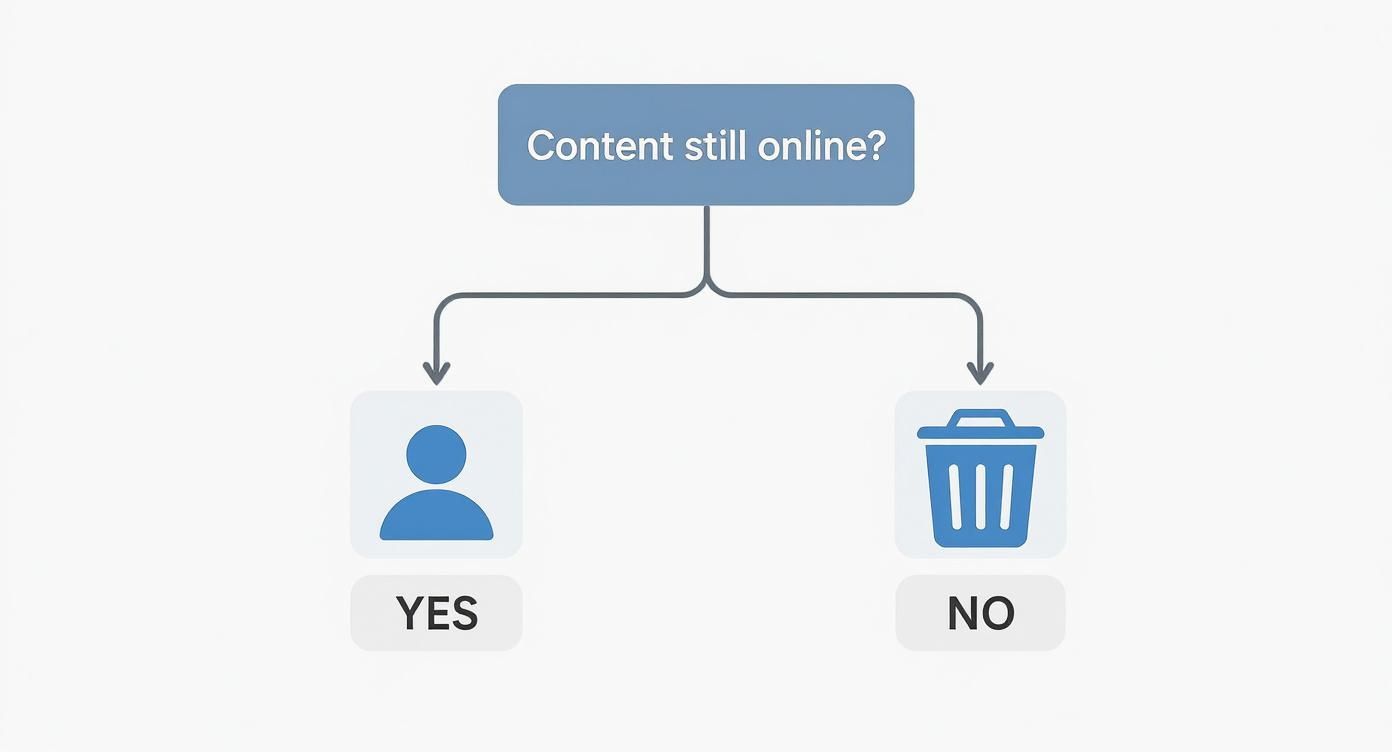
As you can see, if the content is gone, your only task is to let Google know its index is out of date. If it's still live, you'll need to work with the site owner or use Google's specific policies to make your case.
Don't feel like you're fighting this battle alone. Google handles a massive number of removal requests every day, for everything from personal data breaches to legal issues like the EU's "Right to be Forgotten." In fact, these systems have led to the delisting of over 90 million URLs globally as of early 2025. You can dig into the numbers yourself in Google's Transparency Report, which shows just how often these removal processes succeed when used correctly.
Choosing Your Link Removal Strategy
Use this table to quickly identify the best removal method based on your specific situation.
| Scenario | Best First Action | Google Tool to Use | Expected Outcome |
|---|---|---|---|
| The webpage is deleted, but still in search results. | Do nothing with the site; the work is done. | Remove Outdated Content tool | The search result is removed or updated on Google. |
| The content is still live on the website. | Contact the website owner and request removal. | None at this stage. | The source content is deleted permanently. |
| The content is live and harmful (doxxing, explicit). | File a request directly with Google. | Google's legal removal form | The specific URL is de-indexed from search results. |
| The content is live but the webmaster is unresponsive. | Explore Google's specific policy violations. | Varies based on the violation (e.g., privacy, copyright). | The URL is de-indexed if it meets Google's criteria. |
This table should help you cut through the confusion and focus your energy on the strategy most likely to work for you. The key is matching your situation to the right tool and a realistic outcome.
Understand Google's Policies
It's important to know that Google won't just remove anything you don't like. They have very specific policies that define what they will remove from search results, even if the content stays live on the host website. These rules are in place to protect people from genuine, significant harm.
Here are the main types of content that might qualify for direct removal by Google:
- Explicit or intimate personal images that were shared without your consent.
- Doxxing, which is the act of publishing private contact information like your home address, email, or phone number.
- Involuntary fake pornography created to harass or damage someone's reputation.
- Certain private financial, medical, or official government ID numbers.
Google offers a pretty clear breakdown of its personal information removal policies. The takeaway is that Google steps in for high-stakes situations involving personal safety and privacy—not just for content that's unflattering or that you simply disagree with.
Using Google's Own Removal Tools Effectively

Google gives you two very different, and very powerful, tools for managing search results. A lot of people get them confused, which leads to denied requests and a whole lot of wasted time. One tool is for content that’s already gone, and the other is an emergency brake for content you control.
Getting this right from the start is half the battle. Think of it like this: you wouldn't use a hammer to turn a screw. Pick the wrong Google tool, and you’re just setting yourself up for frustration. Let's dig into when and how to use each one.
The Outdated Content Tool: For Pages That Are Already Gone
This is your go-to when a website owner has already removed a page, but a ghost of it still haunts Google's search results. Google doesn't update its index in real-time; it can take weeks for its crawlers to realize a page is no longer there. The Remove Outdated Content tool is how you give Google a nudge to speed things up.
The key here is that the page must truly be gone (showing a 404 or 410 error) or the problematic information has been definitively removed from the live page. You aren’t asking Google to make a judgment call on the content, you’re simply pointing out that its records are out of date.
Here’s how it works:
- Head over to the Remove Outdated Content page.
- Pop in the URL that's showing the old information.
- Google takes a look and confirms if the page has been removed or significantly changed.
- If it verifies the change, the link is usually pulled from the search results within a day or two.
I’ve seen people get stuck when the content on the page has changed, but the old title or description (the snippet) is still showing in search. The tool anticipates this. It will ask you for a word that is no longer on the live page but still appears in Google's cached version. This is your proof that the page has been updated.
The Search Console Removals Tool: For Urgent "Oops" Moments
Now for the other side of the coin. The Removals tool inside Google Search Console is a completely different beast. This is an emergency measure for website owners to temporarily hide a URL from search results. And the keyword is temporarily.
This tool is made for those "oh no" moments. Imagine you accidentally publish a blog post on your own website that contains sensitive customer data or internal pricing. You need that page gone from search right now while you sort out the mess.
The interface is simple—you just submit a new request. You can request temporary removals, clear a cached URL to force an update, and even track your outdated content requests all in one place.
Using this tool blocks the URL from search for about six months. That gives you plenty of time to go in and permanently delete the content or fix the page. But don't forget that last part. If you don't take permanent action, the page will pop right back into the search results after the temporary block expires. It's a powerful Band-Aid, not a permanent solution.
Comparing the Two Google Removal Tools
Knowing the difference between these two tools is critical if you want to successfully remove links from Google search. Here’s a simple breakdown of how they stack up.
| Feature | Remove Outdated Content Tool | Search Console Removals Tool |
|---|---|---|
| Who Can Use It? | Anyone | Only verified site owners in GSC |
| Purpose | To update Google's index after a page is deleted or changed | To temporarily hide a live page from search results |
| Duration | Permanent (once updated) | Temporary (approx. 6 months) |
| Typical Scenario | An old news article about you was deleted but still shows up in search. | You accidentally publish a page with private data on your own website. |
These aren't niche tools; they handle a massive volume of requests. Between the official tools and legal requests, Google processes over 30 million removal requests annually worldwide. Success rates tend to hover between 40-50%, heavily depending on the request type and local laws. You can learn more about what it takes to remove negative links from Google at mediaremoval.com. This just goes to show how important it is to get your request right the first time. Choosing the correct tool from the start dramatically boosts your odds of getting that unwanted link removed quickly.
Removing Content You Don't Control

So, you've tried reaching out to the site owner, and you’ve been met with radio silence. Or worse, a flat-out "no." It’s frustrating, but this is where the game changes. You stop asking nicely and start leveraging the rules Google and the law have put in place. It's a tougher road, for sure, but it’s definitely not a dead end.
When the content is out of your hands, you’re no longer just requesting a takedown; you’re building a solid case. Your focus has to shift from persuasion to proving that the content violates a specific Google policy or a law. The outcome here really hinges on two things: the type of content you're dealing with and how well you document everything.
When Google Will Intervene Directly
Google has its own set of rules about content it will remove from its search results, even if the website owner won't take it down. These policies aren't for things that are merely embarrassing or unflattering—they’re designed to protect people from real, significant harm.
You've got a good shot at getting Google to step in if the content falls into one of these buckets:
- Doxxing and Personal Identifiers: Publishing your private contact info (home address, phone number) or sensitive government ID numbers without your permission.
- Non-Consensual Explicit Imagery: Any intimate photos or videos of you that have been shared without your consent.
- Harmful AI-Generated Content: This is a big one now—it includes fake or manipulated explicit media that uses your likeness.
- Financial Information: Exposed credit card or bank account numbers that open the door to fraud.
If the link you want gone contains any of this stuff, you have a very strong case for a direct removal request to Google. They tend to prioritize these issues because they pose an immediate threat to a person's safety and privacy.
Building a Bulletproof Case for Removal
To get a link removed under one of these policies, you have to hand Google clear, undeniable proof. Think of their review team as moderators, not detectives. They act on the evidence you provide, and a weak, vague claim will get denied almost instantly.
Your evidence file needs to be airtight. Start by collecting every piece of information you can.
- Get Your Screenshots: Take clean, unedited screenshots of the webpage. The two most important things to capture are the full URL in the browser's address bar and the harmful content itself.
- List Every URL: Create a precise list of every single URL where the problem content shows up. This includes the direct link to the page and the URLs of any Google search results that feature it.
- Explain the Harm: You need to be able to state exactly why the content is harmful and which specific policy it breaks. Don't just say, "This is private information." Instead, say, "This page publicly lists my personal home address without my consent, which is a violation of the doxxing policy."
Your goal is to make the reviewer's job as simple as possible. Present a clean, organized case that leaves no doubt. A well-prepared request that directly ties your evidence to a specific policy violation is far more likely to get approved the first time around.
Tapping Into Legal Avenues for Removal
What if the content is damaging but doesn't quite fit into one of Google's specific privacy policies? Your next move is to explore legal options. This path is more involved and often requires professional help, but it carries a lot of weight.
There are two main legal routes that can compel Google to act.
The DMCA Takedown Notice
The Digital Millennium Copyright Act (DMCA) is your best friend if someone has stolen something you created. If another site has ripped off your blog posts, photographs, or videos without permission, you can file a DMCA takedown notice directly with Google.
You'll need to point to the infringing URL and provide a link to your original work to prove you're the owner. Google takes copyright violations very seriously and usually acts fast to de-index the stolen content once they've confirmed your claim.
Court Orders for Defamation
For content that's truly defamatory or libelous, a court order is the ultimate weapon. If you've successfully sued a publisher for defamation and a judge has ordered the content removed, you can submit that order to Google. In my experience, Google almost always complies with a valid court order.
This is obviously the most expensive and time-consuming route, but for severe reputational attacks—like a flood of fake reviews or completely false accusations—it's often the only path to a permanent fix. For example, malicious content on business listings presents its own set of hurdles; learning how to remove a Google My Business profile can shed light on these platform-specific challenges.
When you don’t control the source, your power lies in meticulous documentation and a smart approach. By carefully building your case and using the right channels, you can get those damaging links out of Google's search results and take back control of your story.
How to Document and Escalate Your Case
Let’s be honest: sometimes, getting a link removed isn't a simple, one-shot deal. You can follow all the right steps and still hit a wall. Maybe the website owner is ignoring you, or Google denies your first request. When that happens, your best friend is a solid paper trail. Meticulous documentation is what turns a series of hopeful emails into a structured case you can actually win.
Think of yourself as an investigator building a case file. Every action, every email, every screenshot is another piece of evidence. This isn't just about being tidy—it's about creating a clear record that proves you’ve done your due diligence. When you have to escalate your issue, this file will show anyone reviewing it that you've followed the proper channels and your claim is legitimate.
Building Your Evidence Timeline
The first thing you need is a detailed timeline of events. This chronological log is the backbone of your entire case, telling a clear story of what happened and when. Don't even think about relying on your memory for this. Document everything as it happens.
Your timeline should track these key moments:
- Initial Discovery: Note the exact date you first found the unwanted content.
- First Contact: Record the date and time you sent your initial removal request to the site owner.
- All Follow-Ups: Log every single follow-up email or contact form submission.
- Google Submissions: Keep a record of when you submitted requests through Google Search Console or the Remove Outdated Content tool.
- Responses Received: Document any replies you get, whether they’re helpful or not.
This timeline becomes incredibly powerful if a request gets denied. Instead of a vague complaint, you can go back to Google’s team with a clear, concise summary like, "I contacted the webmaster on May 1st and followed up on May 8th with no response. I then submitted an outdated content request on May 15th." This instantly shows you’ve been both proactive and patient.
Meticulous record-keeping is your leverage. When you can present a clear, documented history of your removal attempts, your request gains credibility and shows reviewers you have exhausted all other options before escalating the issue.
The Essential Evidence Checklist
A strong case file needs more than just a timeline; you need concrete proof to back up your claims. It's a huge pain to scramble for this stuff later, so get in the habit of collecting it as you go.
Here’s a quick guide to building a robust collection of evidence for any removal request. The table below outlines what to gather, why it matters, and how to get it.
Evidence Checklist for Removal Requests
| Evidence Type | Why It's Important | How to Collect It |
|---|---|---|
| Full-Page Screenshots | Provides undeniable proof of the content's existence at a specific point in time. | Use a browser extension or your computer’s built-in tools to capture the entire visible page, making sure the URL is visible. |
| URL of the Live Page | This is the direct link to the content you want removed. | Copy and paste the exact URL from your browser's address bar. Always double-check it for accuracy. |
| URL of Google's Cached Version | Shows what Google's index "remembers" about the page, which is vital for outdated content requests. | Search for the URL on Google, click the three dots next to the result, and select "Cached." |
| Communication Records | Creates a paper trail of your attempts to resolve the issue directly with the source. | Save copies of all sent emails, screenshots of submitted contact forms, and any replies you receive. |
Taking a systematic approach like this is more critical than ever. In mid-2025, Google disabled the &num=100 URL parameter, which completely changed how professionals monitor search results. The shift to infinite scrolling killed the ability for tools to easily scrape 100 results at once, making manual documentation an essential skill for anyone trying to clean up their search presence. You can get more details on how this Google update impacted SEO and data collection at getpassionfruit.com.
Knowing When to Escalate
So, what do you do when your perfectly documented efforts still go nowhere? If your requests are being ignored or repeatedly denied, it’s time to think about escalating. Where you go from here really depends on how serious the situation is.
If the content is defamatory, harassing, or flat-out illegal, you should probably talk to a lawyer who specializes in internet law. For other stubborn cases, an online reputation management service can be a powerful ally. These experts live and breathe platform policies and have battle-tested processes for escalating tough cases. They can save you a world of time and stress.
And that well-organized case file you built? That’ll be the very first thing they ask for, giving them a massive head start on getting you results.
Building a Positive Online Reputation
Playing whack-a-mole with negative search results is exhausting and, frankly, it's a losing game. The most effective, lasting strategy isn't just about deleting the bad stuff; it's about drowning it in a sea of good. This is where you shift from a defensive crouch to a proactive stance with online reputation management (ORM).
The entire goal is to build such a powerful, positive digital footprint that one or two negative links become completely irrelevant—a tiny drop in a very large ocean.
This isn’t just theory. We’re talking about creating and promoting positive content that you have complete control over. When you build up a portfolio of positive, high-authority web pages, you can systematically shove those unwanted results down the search rankings until they fall off the first page and into total obscurity. This technique is often called reverse SEO, and it's incredibly powerful.
Taking Control of Your Narrative
First things first: you need to own your own name online. When someone Googles you, the top results absolutely must be platforms you manage. These are your digital HQs, the places where you define the story.
Your first move should be to create and flesh out profiles on websites Google already loves. These high-authority domains give you a leg up, as profiles on them tend to rank well right out of the gate.
Get started with these must-haves:
- Your LinkedIn Profile: For any professional, a well-optimized LinkedIn profile is non-negotiable. It’s often one of the first things to rank for your name. Go all in on your headline, summary, and work experience.
- Professional Social Media: Pick the platforms that make sense for your field—like X (formerly Twitter), Instagram, or a Facebook business page—and keep them active. A consistent brand and message across all of them is crucial.
- Your Own Website or Blog: Nothing beats the power of owning your own domain, like
YourName.com. This is the one place online where you control 100% of the narrative, from the content to the design.
A personal blog, for instance, is a fantastic tool. Every article you publish that showcases your expertise is another digital asset that can rank in Google, pushing negative content down while building you up as an authority.
Expanding Your Influence With Positive Content
Once you’ve locked down your core online properties, it’s time to expand your reach. Now the objective is to get your name or brand mentioned in a positive light on other reputable websites. This builds a network of good vibes that tells Google you’re the real deal.
Guest posting is one of the most direct ways to do this. When you write an article for a respected blog or online magazine in your niche, you’re not just getting a link back to your site. You’re associating your name with an established, trusted source. The ripple effect on your search presence can be huge.
Think about trying these content strategies:
- Write for industry publications: Get a byline in a trade journal or a popular blog your peers actually read.
- Jump on interviews or podcasts: Being a guest on a podcast creates a ranking page with show notes and shareable audio content.
- Engage in online communities: Smart, helpful participation on places like Reddit or niche industry forums can build positive associations around your name. Just make sure you’re adding real value.
The big idea behind reverse SEO is simple: dilution. Stop trying to erase one negative link and instead focus on creating ten positive ones to bury it. It's a much more resilient strategy that protects you from future headaches.
Building a Long-Term Digital Firewall
Let's be clear: this isn't a quick fix. It's a long-term investment in your digital identity. Every piece of positive content you put out there is another brick in a digital firewall protecting your reputation. The more positive, high-quality pages you have ranking for your name, the harder it is for anything negative to break through.
The importance of online reputation management can’t be stressed enough. A strong digital presence is both a shield and a megaphone. It makes sure that when people look you up, they find the credible, professional image you’ve worked so hard to build.
Picture this: the first page of Google for your name is filled with your LinkedIn profile, your personal blog, a few guest articles you wrote, and your professional social media. A negative link lurking on page two or three is basically invisible. Almost no one ever clicks past page one. That’s how you stop fighting fires and start building a fortress.
Common Questions About Link Removals

Trying to get links removed from Google can feel like you're navigating a maze. It’s totally normal to have questions. Let’s clear up a few of the most common ones I hear from people facing this challenge.
How Long Does It Take for Google to Remove a Link?
This is the million-dollar question, and the honest answer is: it depends entirely on how you're asking. There's no one-size-fits-all timeline.
If you’re just trying to clear out a dead link using the Remove Outdated Content tool, you’re in luck. That process is usually pretty quick—often just a few days. You're simply telling Google its index is stale, and the automated systems are good at catching up.
On the other hand, if you're filing a legal request for something serious like defamation or a copyright violation, buckle in. These require a real person at Google to review everything, so it can take weeks or even months. And that temporary block in Google Search Console? It’s nearly instant, but don't forget it's just a band-aid that only lasts for about six months.
Will Removing a Link From Google Delete It From the Internet?
This is a huge point of confusion, so let's be crystal clear: no, it will not. Removing something from Google's search results only makes it invisible on Google. The actual page still lives on its original website.
Anyone who has the direct URL can still get to it. It might also show up on other search engines like Bing or DuckDuckGo. The only way to truly erase the content is to get it taken down from the source website itself. That's why your first move should always be to contact the site owner, assuming the page is still live.
Think of Google as a library's card catalog, not the library itself. Asking Google to remove a link is like asking the librarian to throw out a catalog card. The book is still on the shelf—it's just harder for people to find.
What if My Removal Request to Google Is Denied?
Getting that "denied" email feels like hitting a brick wall, but it's rarely the end of the road. The first thing you need to do is read their explanation carefully.
More often than not, a denial comes down to a lack of solid proof. For instance, you can't just claim something is defamatory without backing it up. If your request gets bounced, you might need to gather stronger evidence—like a court order—and resubmit your case.
Now, if the content simply doesn't break any of Google's rules, your options narrow. At that point, you either have to double down on getting the site owner to cooperate or shift your focus to a proactive reputation management strategy to bury the negative result.
Can I Pay Someone to Remove Links for Me?
Absolutely. This is the core business of online reputation management (ORM) services. Professionals like the team at LevelField handle this entire headache for you, from negotiating with uncooperative webmasters to navigating Google’s tangled legal forms.
But a word of caution: run from any service that guarantees a removal. Nobody can force a website owner or Google to do anything. A legitimate ORM expert will use proven strategies that work with existing policies to build the strongest case possible. They bring the expertise and persistence that can dramatically improve your chances of success when you need to remove links in Google search.