


When you’re in the driver's seat of a Google Business Profile, your first instinct might be to just hit a "delete" button and be done with it. But it's not quite that simple. Google gives you two main options right from your dashboard: marking the business as permanently closed or removing the profile.
These two choices sound similar, but they do completely different things. One tells the world you've shut your doors, while the other just removes your access, leaving the listing to float around online. Understanding this distinction is the first and most critical step.
Step 1: Handling a Business Profile You Already Own
If you have login access to the Google Business Profile you want to get rid of, you're in the best possible position. The solution is likely just a few clicks away, but you need to make the right clicks.
This is where so many people go wrong. They see "Remove Profile" and assume it scrubs the listing from Google Search and Maps. It absolutely does not. All it does is revoke your ability to manage it, which often creates a bigger mess. Let’s break down the right way to do this.
Mark as Permanently Closed vs. Remove Profile: What's the Difference?
Think of it this way: are you closing the business for good, or are you just handing over the keys to someone else? Your answer determines which button you should press.
- Mark as Permanently Closed: This is your go-to option if the business is actually, truly closed. It keeps the profile online but slaps a big "Permanently Closed" label on it for everyone to see. This is the responsible way to signal to customers that you're no longer in operation.
- Remove Business Profile: This option is only for when you personally no longer need to manage the profile. The listing stays live. It just becomes an "unclaimed" profile that you can't edit anymore.
The bottom line is that removing a profile you own is almost never the right move for shutting a business down. You're essentially abandoning it, leaving it vulnerable to being hijacked or cluttered with bad information from public "suggestions." You lose all control.
Real-World Examples
Let's put this into practice.
Imagine a beloved neighborhood coffee shop is closing its doors for good. The owner should log into their GBP dashboard and choose Mark as Permanently Closed. This keeps all their great reviews and photos visible as a nice legacy, but more importantly, it stops coffee lovers from showing up to a locked door.
Now, picture a digital marketing agency that managed a plumber's GBP. The contract ends. The agency's next move is to Remove Profile from their account and ensure ownership is properly transferred to the plumber. The business is still running, so the agency is just stepping away from its management role.
For businesses with a more complex structure, like a franchise with multiple storefronts, managing these profiles requires a bit more finesse. If you're in that boat, you might find this a comprehensive guide to local SEO for multiple locations incredibly helpful.
Comparing Google Business Profile Removal Options
To make it crystal clear, here’s a quick-glance table breaking down the two main choices for a profile you control.
A quick look at the main methods for handling a business profile you own or manage.
| Method | What It Actually Does | When to Use It | What the Public Sees |
|---|---|---|---|
| Mark as Closed | Updates the listing status to "Permanently Closed." You retain ownership. | Your business has shut down permanently. | A red "Permanently closed" label on your listing in Search and Maps. |
| Remove Profile | Revokes your management access to the profile. The listing stays live. | You no longer manage the business (e.g., you sold it, or you're an agency ending a contract). | The business profile appears as normal but becomes "unclaimed." |
Getting this first step right saves a ton of frustration. When you choose the correct option from the start, you avoid the headache of trying to regain control of a profile you accidentally abandoned.
Of course, some situations are more complicated than this. If you're dealing with duplicate listings, fake profiles, or other issues you can’t fix, you may need a more advanced approach. You can learn more about how we handle these tough cases with LevelField's Google Business Profile removal services.
Tackling Incorrect Listings You Don't Own
It’s one thing to manage a business profile you control, but what do you do when you stumble across a listing that’s just plain wrong—and you don't have the keys? You might find a duplicate of your own business, a profile for a company that never existed at your address, or even outright spam. It’s a common and frustrating problem, but you aren’t powerless.
When you can't just log in and mark a profile as closed, your best tool is Google's public-facing reporting system. This isn't just about clicking a button; it's about building a solid case that Google's automated systems and human reviewers can quickly understand and verify. Honestly, knowing which options to choose and what proof to provide makes all the difference.
This decision path shows the basic routes you can take, depending on whether you own the listing or not.
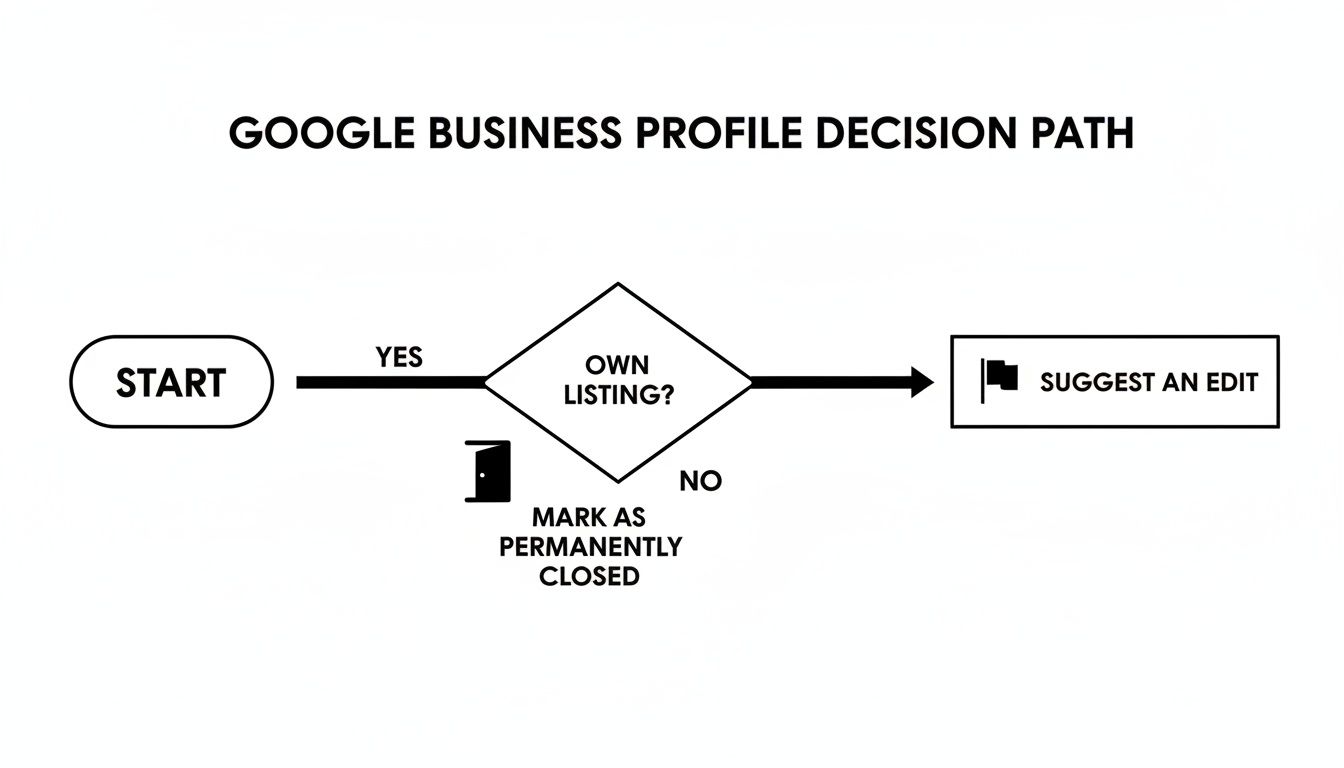
As you can see, when you don't own the profile, your main course of action is to report the problem directly through Google Maps, which kicks off an investigation.
Using The "Suggest an Edit" Feature Effectively
The "Suggest an edit" link you see on every Google Business Profile is your starting point. When you click it, you’ll see two main choices: "Change name or other details" and "Close or remove." For our purposes, "Close or remove" is the one you'll be using most of the time.
Inside that option, you’ll find a list of reasons. Choosing the right one is absolutely crucial for getting a fast and accurate response from Google.
- Permanently closed: Use this if you have hard proof the business shut down, like a news article or an update on its official website.
- Doesn't exist here: This is the perfect choice for when a listing points to your address, but the business isn't there and never was.
- Duplicate of another place: Select this when you find multiple listings for the same business. Google will then ask you to point out the correct, primary profile.
- Spam, fake, or offensive: This is your go-to for fraudulent listings, such as those with keyword-stuffed business names or profiles created purely to mislead customers.
Don't just report it and walk away. Your first edit suggestion might get rejected. Persistence is key, but persistence armed with proof is far more effective. Each time you submit an edit, you're building a record.
Gathering Proof That Gets Results
Simply telling Google a listing is wrong isn't enough. You need to hand them evidence that makes your claim undeniable. The stronger your proof, the higher the chance of a quick removal.
When dealing with listings you don't own, or even things like fake reviews that misrepresent your business, you have to be proactive. For more on that, check out this excellent guide on how to remove fake Google reviews.
Here’s the kind of evidence that I’ve seen work time and time again:
- Photographic Proof: Take a clear, geotagged photo of the storefront showing it's vacant or that a different business now occupies the space. A picture of the building directory that doesn't list the business is also incredibly powerful.
- Official Documentation: A link to your state's official business registry showing the fraudulent company isn't registered at that address is very compelling evidence.
- Online Presence: If the fake business has a website, check if its address matches the Google listing. If it doesn't, you can use that inconsistency as proof in your report.
The effort to clean up these incorrect listings is well worth it. Research shows that removing spam listings is a significant local search ranking factor. In fact, some businesses in major markets that successfully cleaned up their online presence saw a 25% average uplift in authentic review growth afterward. It just shows how much customers value accurate information. Your goal is to make it as easy as possible for Google to say "yes" to your removal request.
When to Escalate Your Request to Google Support

Sometimes, the automated tools just don't get the job done. You've tried suggesting edits, you've submitted photos, and you've waited patiently, but that stubborn, incorrect listing is still live. This is when you know it's time to get a real person involved. Escalating your case to Google Business Profile (GBP) Support is the next logical move.
Knowing how and when to do this makes all the difference. Contacting support without having your ducks in a row is like showing up to an exam unprepared—you're probably not going to get the outcome you want. The goal here is to present a crystal-clear, evidence-backed case that a support agent can look at and act on immediately.
How to Get Through to a Human
The main path to a support agent is through the Google Business Profile Help Center. It can feel a bit like a maze designed to keep you from talking to someone, but it's a necessary process that routes your issue to the right team.
When you start the form, be specific. Use phrases like "remove fraudulent listing" or "incorrect business at my home address." The system will try to push help articles on you first. If you've already been down that road, just click through until you reach the actual contact options—usually email.
My Two Cents: Your first message sets the tone. Be polite, direct, and professional. The support agent on the other end is a person dealing with hundreds of these requests a day. Make their job easier, and you’ll find they’re much more likely to resolve your issue quickly.
Build Your Case File First
Before you even think about filling out that form, get all of your evidence together. A well-prepared case file is your single most powerful weapon. Think of yourself as a detective building an airtight case—you want to make the conclusion (removing the profile) completely unavoidable for the support agent.
Here's a quick checklist of what you'll need:
- The GBP Profile Link: The direct URL to the Google Maps listing in question.
- Previous Case IDs: If you’ve used "Suggest an edit" before, dig up those confirmation emails. Reference any Case ID numbers you were given.
- Photo Evidence: Clear photos are non-negotiable. If a business doesn't exist, snap a picture of the empty storefront or the new, correct business at that location. For a fake listing using your home address, a clear photo of your house number is crucial.
- Official Documents: This is the heavy artillery. Links to government business registries, utility bills (with personal info blacked out), or property deeds can prove you own an address and that the other business isn't legally registered there.
Putting this work in upfront dramatically increases your chances of getting this sorted out in one shot, saving you from a frustrating, weeks-long email chain.
For Serious Violations, Use the Redressal Form
When you're dealing with more than just a simple error—especially when competitors are playing dirty—Google has a more specific tool: the Business Redressal Complaint Form. This form is built specifically for reporting fraudulent activity and misleading information on Google Maps.
This is the right tool to use when you see things like:
- A competitor using a P.O. box or fake address to rank in a city they don't actually operate in.
- A business stuffing its name with keywords (e.g., "Prime Plumbing NYC Best 24/7 Emergency Repair").
- Someone spamming Google Maps with multiple fake listings to crowd out legitimate businesses.
When you fill out this form, be precise. Don't just write, "This listing is fake." Explain why it violates Google's guidelines, and if you can, cite the specific policy. For instance: "This business is violating policy by using a virtual office address and claiming it as a physical storefront, which is not permitted for service-area businesses."
The more you can frame your complaint around Google's own rules, the better. This form signals that you're reporting a serious policy violation, not just a simple mistake, which usually triggers a much more thorough investigation.
When a simple fix won't cut it, you sometimes have to bring out the big guns. If you're dealing with something serious—like another profile impersonating your business, stealing your trademark, or spreading defamatory lies—the standard support channels just aren't equipped to handle it.
This is where you move into Google's official legal takedown process. Be warned: this is a completely different ballgame. It's a formal, evidence-heavy path reserved for situations where a genuine legal line has been crossed.
What Qualifies for a Legal Takedown?
Google has a structured system for these requests, but your complaint has to fit into one of their specific legal buckets. You can't just tell them something feels "unfair." Your claim needs a solid legal foundation.
The most common grounds for a takedown include:
- Trademark Infringement: This is when another business listing uses your registered trademark in a way that’s bound to confuse customers. You’ll need to have your trademark registration details handy.
- Copyright Violation: If someone has lifted your photos, text, or other creative work for their listing without permission, you can file a claim under the Digital Millennium Copyright Act (DMCA).
- Defamation: This applies to content with false statements of fact that actively harm your business's reputation. Honestly, this is one of the toughest claims to win without an actual court order.
- Impersonation: This covers profiles that are flat-out pretending to be your business or an authorized agent, usually with malicious intent.
For any of these, you absolutely must come prepared with detailed evidence. Vague claims are dead on arrival.
The Burden of Proof is on You
Think of it this way: Google is a platform, not a courtroom. To get them to take action on a legal complaint, you need to present a case that’s practically airtight. The level of proof they require is leagues beyond what you'd submit for a simple map edit.
For instance, a trademark claim isn't just about showing a similar name. You need to provide your official trademark registration number and clearly explain how the other listing is creating confusion in the marketplace.
For defamation claims, your chances of success skyrocket if you can provide a court order that explicitly calls out the content as defamatory. For a deeper dive into this, our guide on defamation removal strategies walks through the entire complex process.
You'll start the process using Google’s legal troubleshooter form, which is designed to get you to the right place.
This first step is crucial because it ensures your complaint is routed to the team that actually handles Google Business Profiles and Maps, not a disconnected department like YouTube or Search.
Knowing When to Call a Lawyer
While you can file these requests yourself, there are times when getting a legal professional involved is the smartest move you can make. If the infringement is costing you real money, you're up against a persistent bad actor, or Google has already rejected your initial requests, it’s probably time to get help.
An attorney can help you secure that all-important court order, draft a more powerful takedown notice, and speak to Google's legal team in their own language. This is especially true for tricky defamation cases where local laws can make or break your claim. The upfront investment in legal fees often pales in comparison to the cost of prolonged damage to your brand.
A legal takedown is a serious move. It demands precision, patience, and undeniable proof. This isn't a quick fix; it’s the formal process you use to protect your legal rights when all other options have been exhausted.
The good news? Google seems to be getting more aggressive in policing its own platform. A recent analysis found that 2.19% of all reviews were removed from a sample of 5,000 German business locations. This stricter enforcement also applies to manipulated listings, which are increasingly being suspended outright. This tells us that while the bar for a legal takedown is high, well-documented claims that prove a clear policy violation are being taken more seriously than ever. You can read more about how Google is handling AI-driven and legal takedowns on GMBapi.com.
What to Do When a Listing Just Won't Go Away

Here’s a hard truth you might face when trying to get a business listing off Google: sometimes, you just can't. Google's commitment to providing a historical record of businesses means a complete takedown isn't always possible, especially for established locations. When you've hit that wall and the listing is still live, it’s time to pivot.
Your new game plan is to shift from removal to suppression. Instead of trying to erase the listing, you’ll focus on making it irrelevant. The idea is to push it so far down in search results that it becomes practically invisible, all while building up a stronger, more accurate online presence for your current business.
Your First Move: Mark the Listing as Closed
Before you get into more advanced tactics, your first and most important step is to make sure the unwanted listing is correctly marked as "Permanently Closed." This one action is your best initial defense.
It sends a clear signal to Google’s algorithm and to any potential customers that this information is old news. This status change will almost immediately cause the listing to show up less often in searches, especially for general queries, and it stops people from driving to the wrong address. While it doesn't make the listing vanish, its power to harm your brand is cut dramatically.
Build a Digital Moat Around the Old Listing
The heart of any good suppression strategy is to create and promote other online profiles and pages so they outrank the old, unwanted one. You’re essentially building a stronger, more authoritative online footprint that Google’s algorithm can't help but favor. This is classic online reputation management—your goal is to dominate the first page of search results for your brand name.
Here's where you can start building that moat:
- Make Your Official Website the Authority: Your website needs to be the undeniable #1 result for your brand. That means making sure it’s fully optimized for search engines with your correct, current business name, address, and phone number.
- Create Strong Social Media Profiles: Claim and actively manage profiles on major platforms like LinkedIn, Facebook, X (formerly Twitter), and Instagram. These profiles often rank very high for brand searches and will help shove the old listing further down the page.
- Get Listed in Other Key Directories: Don't stop at Google. Create accurate listings on other trusted directories like Yelp, Bing Places, and any sites specific to your industry. Consistency across all these platforms sends powerful trust signals to Google.
The goal is simple: When someone searches for your business, you want them to see a first page filled with assets you control. The old, closed Google listing should be pushed to page two or three, where very few people ever look.
Why Proximity Is Your Secret Weapon
Recent updates to how Google measures listing performance really highlight why controlling your digital footprint is so critical. A major change to Search Console started filtering out bot traffic, which led many businesses to see their impression numbers drop by 50% or more. This change underscores the importance of attracting real human searchers, who are heavily influenced by proximity.
Believe it or not, research shows that the 'proximity of address to the search point' is a more powerful ranking factor than even 'spam listing removal.' What does this mean for you? It means making sure your new and correct map marker is perfectly placed is a powerful offensive strategy. I’ve seen clients achieve a 40% recovery in human impressions just by correcting a misplaced map pin. This makes your new, accurate listing far more visible than the old, closed one. You can learn more about how these ranking factors impact your Google Business Profile visibility at goodfellastech.com.
When you can't remove a stubborn business listing, the best approach is to make it obsolete. By marking it closed and then building a powerful network of accurate, optimized online properties, you take back control of your brand’s story and ensure customers find the right information, every single time.
Common Questions We Get About Google Listings
When you're trying to get a business listing removed from Google, a lot of questions pop up. It's a confusing process, and the rules aren't always clear. Here are some straightforward answers to the questions we hear most often.
Can I Really Delete My Business from Google for Good?
Honestly, probably not. When you go through the process of "removing" a profile you manage, or even when you successfully report one as closed, Google doesn't actually hit a delete button. Instead, it slaps a big "Permanently Closed" banner on it.
Why do they do this? It's all about creating a reliable public record. This prevents a confused customer from wondering what happened to their favorite spot and, just as importantly, stops someone else from creating a new, fake listing for your old business down the road.
True, permanent deletion is incredibly rare. It's usually only an option for listings that were bogus to begin with—think spam, a totally fraudulent operation, or a profile created for a private home that never should have been public. For any real business that has simply shut its doors, the "closed" status is the end of the line.
Expert Tip: Stop thinking about "deletion" and start thinking about "accuracy." Getting your old listing marked as "Permanently Closed" is the correct and final state. It tells the world what happened and protects your old brand's identity from being hijacked.
How Long Is This Going to Take?
That's the million-dollar question, and the answer completely depends on your situation and the path you take.
- You own the profile: This is the fast lane. Marking your own business as "Permanently Closed" is almost instant. You should see the update on Google Search and Maps within a few hours at most.
- You suggest an edit: If you're reporting a listing you don't control, you're in for a bit of a wait. The review can take anywhere from a few days to a couple of weeks. Google’s system often waits for other signals or user reports to confirm the change, so it's not a quick fix.
- You file a support ticket: When you escalate the issue directly to Google's support team, you'll usually hear back within 24-48 hours. But getting the problem solved can easily take another week or more, especially if they need you to provide proof.
- You file a legal request: Settle in, because this is the slowest route by far. Legal takedowns have to go through a formal review process, which can take several weeks or even a few months to resolve.
Patience is key here, particularly when the listing is out of your direct control.
What Happens to My Old Reviews If the Business Is Closed?
They stick around. When a business profile is marked as permanently closed, all the reviews and photos stay right where they are. Google sees them as part of the historical record of that business.
If you closed up shop with a 5-star reputation, this is great news—it’s a testament to your hard work. But if you were hoping to finally escape some nasty reviews, you're out of luck. They will remain attached to that closed profile. This is a big reason why, for many, the better long-term strategy isn't removal but suppression. By focusing on building a powerful online presence for whatever you're doing now, you can effectively bury the old, irrelevant listing and its reviews.